

In iOS 16, Apple has brought some notable improvements to the Photos app, one of which is the ability to copy edits you make to an image and then paste them to other pictures. Keep reading to learn how it's done.

If you have multiple photos that you want to edit in the same way, or if you've made changes to one photo that you want to replicate in another photo, you can use the new copy and paste edits tools in iOS 16.
To use the new option in the Photos app, first open an image, then tap Edit and make the adjustments to it that you want. When you're finished, tap Done, and then tap on the ellipsis (three dots) icon in the upper right corner of the interface.
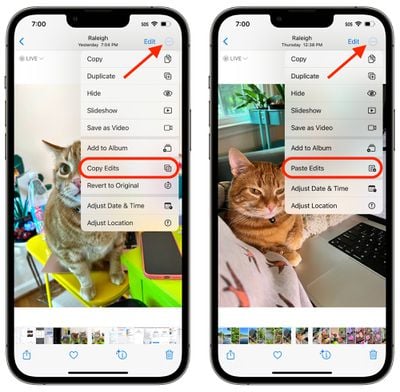
From there, tap Copy Edits in the dropdown menu to copy everything that you did to the image to the clipboard. Then open up another photo, tap on the ellipsis (three dot) icon again, and then tap Paste Edits to get the exact same adjustments.





















