

 macOS features powerful parental controls that, once enabled, allow you to monitor and restrict the time your children spend on your Mac, ensuring they enjoy a safe and secure experience.
You can set up custom parental controls for each child who will be using your Mac by adding separate user accounts. Alternatively you can set up a guest account for anyone to use, but with parental controls enabled.
The below steps show you how to add a new named account to macOS with parental controls. If you want to turn on parental controls for an existing user account, check out our separate how-to article which guides you through the process.
How to Create a User Account With Parental Controls
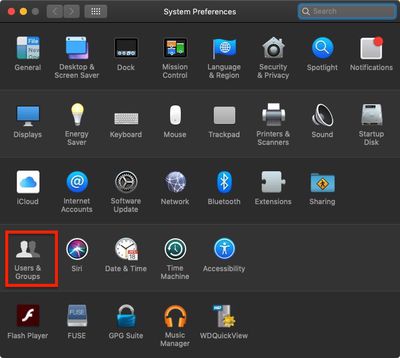
- Click the Apple () symbol in the top left corner of your Mac's screen and select System Preferences....

- Click Users & Groups.
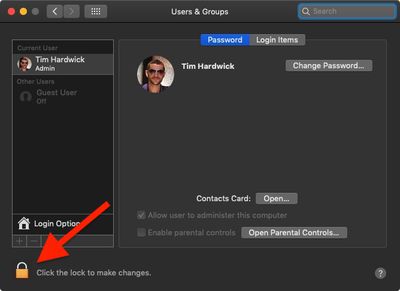
- Click the lock in the lower left corner of the window.
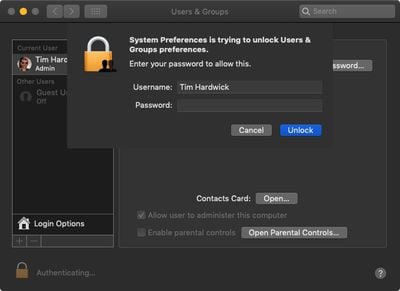
- Type in your admin password if prompted.
- Click Unlock.
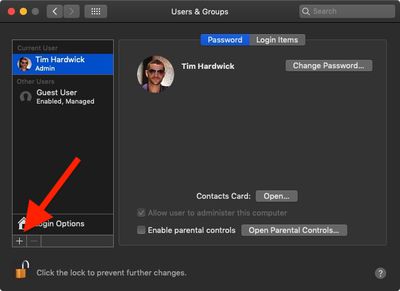
- Click the plus (+) at the bottom left of the account column to add a user account.
- In the New Account dropdown, select Managed with Parental Controls, then fill in the account fields, including a new verified password.
- Click Create User.
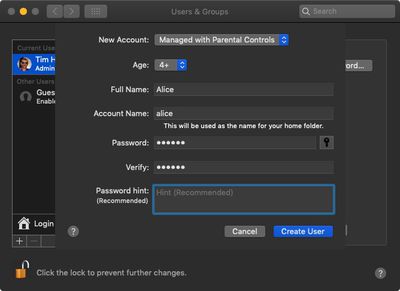
Note that if you select the new user account in the side column, the box next to Enable parental controls is checked.
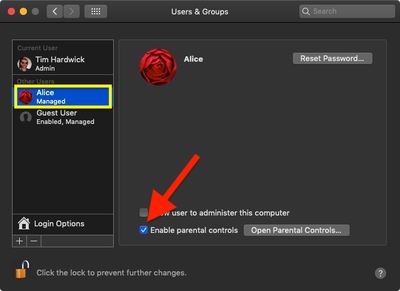
To disable parental controls for this account at any time, simply uncheck the box. For more details on managing the restrictions associated with parental controls, click here.





















