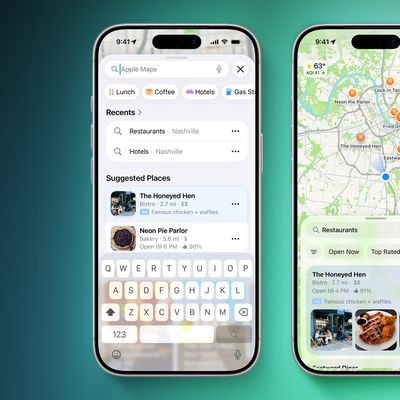
In iOS 13, Apple added a Collections feature to its Maps app on iPhone and iPad that lets you search for and aggregate lists of different locations, such as restaurants you're thinking of eating out at, sightseeing locations for when you're on vacation, or other places you want to visit.
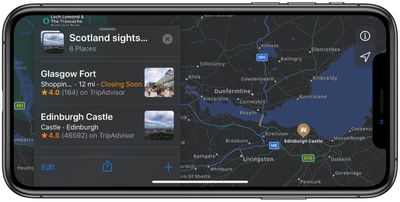
Collection lists can also be shared, so you can create lists of places for friends and family that will be visiting your local area, and then share the collection with them, for example. Keep reading to learn how to create your first Collection in Apple Maps.
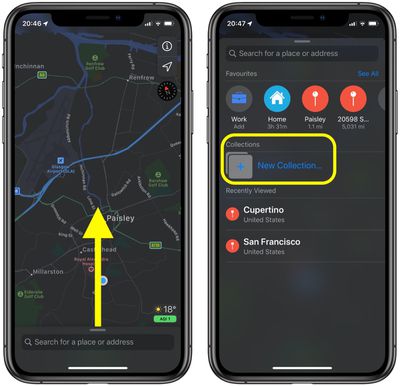
- Launch the Apple Maps app on your iPhone or iPad.
- With a swipe of your finger, expand the panel at the bottom of the screen using the small drag handle above the search field.
- Under Collections, tap New Collection....

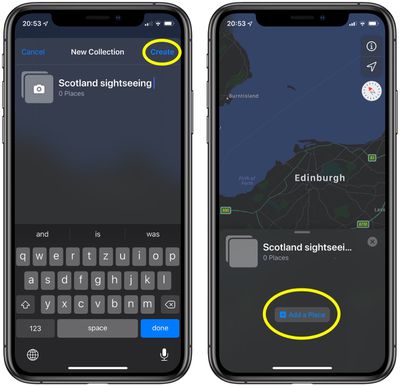
- Give your new collection a name, then tap Create.
- Tap the Add a Place button in the panel, located below your new collection.
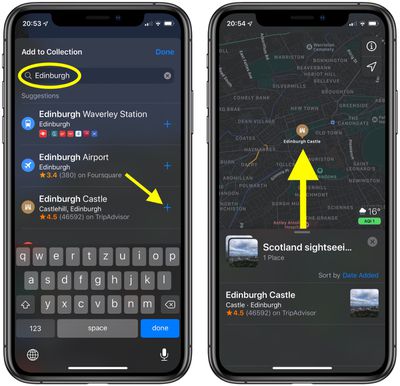
- Start typing the name of a place, landmark, or establishment that you might want to visit.
- Tap the plus icon next to the place you're looking for in the search results to add it to your collection. To search and add more locations in this screen, simply delete your search term and start typing the new place name.
- Tap Done if you're finished adding places for now.
- You should see the place or places listed in your new collection and their location on the map. To add more locations to a collection at any time, simply select your named list (found under the Collections section), drag the panel up over the map, and then tap the plus (+) button at the bottom-right corner of the screen.
When you've finished adding locations to your new collection, you can share it with friends – just tap the Share icon (the square with an arrow pointing out) at the bottom of the collection panel and choose a method of delivery from the Share Sheet.