

When you're doing a workout through Apple Fitness+, there are some minor customizations you can make to the metrics that are displayed on the screen.
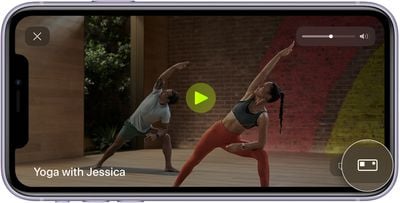
With a connected Apple Watch, you will see the workout time, heart rate, total calories burned, and active calories burned, along with your Apple Watch rings in the corner. Most of this is not customizable, but you can select whether to show how much time has elapsed in a workout or how much time is remaining.
- Start a workout on iPhone, iPad, or Apple TV.
- Tap on the screen if you're using an iPhone or iPad, or on the Apple TV remote's touch surface if you're using an Apple TV. You can also use the Remote Control Center app on Apple TV.
- Tap or select the Metrics Editor button that looks like a rectangle with a smaller square in the upper left corner.

- Choose "Show Time Elapsed," "Show Time Remaining," or "Off."
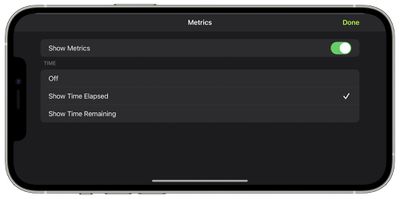
In some workouts, you'll also see a Burn Bar that lets you compare your effort to others who have done the same workout. It is available for High Intensity Interval Training, Treadmill, Cycling, and Rowing workouts, and can also be turned off through this interface if desired.
For more on Fitness+, make sure to check out our full Fitness+ guide.





















