In iOS 15, Apple's Focus feature lets you set up Focus modes that when enabled help reduce distractions and allow you to turn your attention to a particular thing.
iOS 15 comes with a handful of pre-set Focus modes, like Sleep, Personal, and Work, and you can also create your own custom configurations to filter notifications based on what you're doing. But how do you delete a Focus you no longer find useful?
Deleting a Focus is easy. Here's how.
- Launch the Settings app on your iPhone or iPad.
- Tap Focus.
- Select the Focus you want to delete.
- Scroll to the bottom and tap Delete Focus.
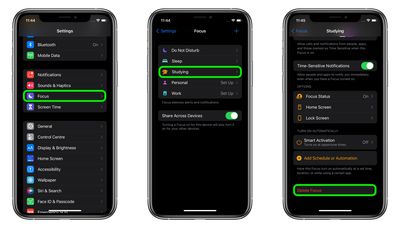
Once you've deleted a Focus, it will no longer appear in Settings nor in the Control Center when you tap the Focus button.
Tag: Focus Mode
Related Forum: iOS 15