

In iOS 26, Apple introduces conversation backgrounds to its Messages app for the first time. Custom backgrounds can help users better organize their conversations at a glance, and they also serve to add a personal touch to important chats, but they can feel like an imposition for other users.
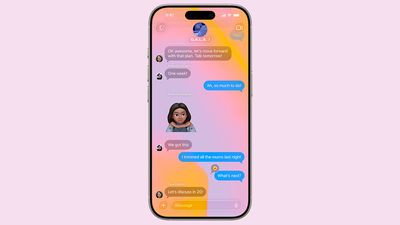
The ability to apply custom backgrounds to Messages conversations in iOS 26 will be welcomed by many users – especially anyone coming from WhatsApp, which has offered custom chat wallpapers for some time. The only problem with Messages is that when a background is changed by someone, everyone in the conversation also sees it.
It's undeniably a neat feature if you're the person who chose the custom background, but if the picture or pattern has been set by somebody else, you might find that it makes the conversation harder to follow.
How to Turn Off Conversation Backgrounds
Thankfully, disabling the new chat backgrounds for Messages is straightforward.
- Open Settings on your iPhone.
- Tap Apps.
- Select Messages.
- Toggle off the switch next to Conversation Backgrounds.
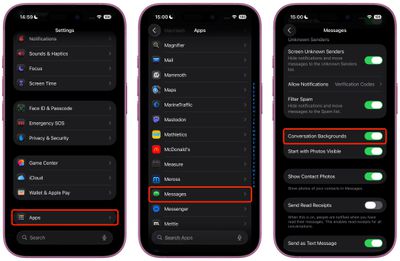
That's all there is to it. Your Messages app will now display conversations against the familiar clean background found in previous iOS versions, ignoring any custom backgrounds that may have been chosen.
Re-Enable Messages Conversation Backgrounds
To re-enable the feature, simply return to Settings ➝ Apps ➝ Messages and toggle the Conversation Backgrounds switch back on. Your chats will immediately return to displaying the contextual background themes, regardless of whether you chose them or someone else did.

















