If you've installed an iOS beta either through Apple's developer program or the public beta testing website, you may find yourself wanting to downgrade if you've run into issues. iOS beta software can be notoriously buggy, especially during the first few betas of a major update.

Apps often don't work, devices crash, battery life is poor, and entire features can be rendered non-functional. In some cases, these problems are a big enough deal that users will want to downgrade back to the more stable release version of iOS.

It's possible to restore your iPhone or iPad to the release version of iOS, but you're going to need an archived iTunes backup to restore your iPhone or iPad to its pre-beta state, so hopefully you have one on hand (this is the first step in any beta installation).

If not, downgrading will require wiping your device, so you'll need to start from scratch with apps, accounts, and preferences. Here are the steps to downgrade:
restoreandupdateios

  1. Turn off Find My iPhone in the iCloud section of the Settings app.
  2. Turn off the iPhone or the iPad.
  3. Hold down the Home button while plugging the device into a PC or Mac running iTunes.
  4. Continue to hold down the Home button until the iTunes logo pops up on the device display. This is called recovery mode.
  5. If you don't see the iTunes logo, entering recovery mode did not work. Repeat steps 2 to 4.
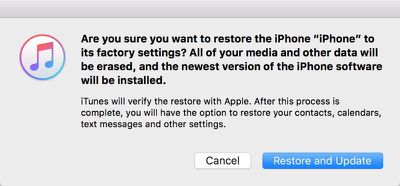
  6. When recovery mode is successful, an iTunes popup will show up on your Mac or PC. Click on "Restore." A warning will pop up letting you know the device will be erased.
  7. Click on "Restore and Update" to bring up the iPhone Software Update menu, which will display details about the current publicly available version of iOS. Click "Next" and then "Agree" to agree to the terms and conditions and start the restoration process.
  8. iTunes will download the current version of iOS and the restore will begin.

Restoring this way results in a clean installation of the current release version of iOS. All apps and data will be erased, which is why you want an archived iTunes backup to restore all of your information. It will take a several minutes for the recovery process to complete, but once it's done, the next step is to restore from a backup.
restorefrombackup

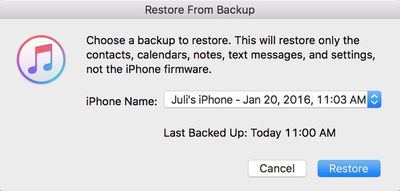
  1. Choose "Restore Backup" in iTunes.
  2. Select the archived backup.
  3. Click on "Restore" to confirm that you want to begin the backup restoration process.

When the install is complete, your iOS device will be restored to the condition that it was in prior to the beta. If you do not have an archived backup to work with, your device will need to be set up from scratch.

This how to is part of our iOS beta installation series. To see the rest of the steps involved with upgrading to a beta, make sure to check out our how tos on creating an archived iTunes backup and the steps to download the beta.


Top Rated Comments

Quu Avatar
128 months ago
If you don't want to restore like this (I didn't). Just wait a little while until a normal release comes out, update to that and remove the certificates on your iOS device that force it to seek out the betas from the update system. And of course remove your iOS device from the beta.

I just had to wait a couple weeks while on a Beta to get back on Stable and didn't need to faff around with restorations. Also last time I tried to restore my phone from backup it failed. The backup was not corrupted but an app installed on my Phone got backed up and it was for whatever reason unable to be restored to my iPhone and that stopped the entire restoration from being able to complete.

I had to get a 3rd party app that could open and modify the backup to fix the issue.
Score: 3 Votes (Like | Disagree)
psycho93 Avatar
128 months ago
So is the new 9.3 build garbage or what?
Have read a lot of reports re messed up notifications on Apple Watch after upgrading to iOS 9.3 Public Beta 4.

I'm running iOS Public Beta 9.3 on iPhone 5s with my Apple Watch and no problems
Score: 2 Votes (Like | Disagree)
scott523 Avatar
128 months ago
Someone on Reddit gave a hint that there's a much easier way of restoring from a beta without wiping the phone / clean install.
I'll update if I find it.
You are correct and it's pretty similar to Juli Clover's post.

Just complete steps 1 through 5. Now for step 6, instead of clicking "Restore", just click the "Update" button and continue the process of downgrading to the latest non-beta version, no backup or significant data loss required (see newer post).

If you don't want to take my word for it, check out this link ('http://www.imore.com/how-downgrade-ios-91-beta-back-ios-9') along with the user comments at the bottom of the page.
Score: 1 Votes (Like | Disagree)
jayducharme Avatar
128 months ago
Although I liked the thought that I was helping Apple by debugging the Betas, I stopped participating because I experienced a lot of serious issues with a previous version. My iPhone and my Mac are too important to me to have a lot of down time. I'm glad there's a way to back up from a Beta, but it's not worth the trouble for me any more.
Score: 1 Votes (Like | Disagree)
jclo Avatar
128 months ago
You are correct and it's pretty similar to Juli Clover's post.

Just complete steps 1 through 5. Now for step 6, instead of clicking "Restore", just click the "Update" button and continue the process of downgrading to the latest non-beta version, no backup or data loss required.

If you don't want to take my word for it, check out this link ('http://www.imore.com/how-downgrade-ios-91-beta-back-ios-9') along with the user comments at the bottom of the page.
I tried this method on two different devices and both times the installation was corrupt for me. On one it didn't end up downgrading me from iOS 9.3 and on another, it broke it so bad that while all my apps are installed, they're not visible. It was weird. That's why I didn't end up recommending "update" over "restore." So use with caution!
Score: 1 Votes (Like | Disagree)

Popular Stories

Apple Wallet ID Illinois

Apple Plans to Expand iPhone Driver's Licenses to These 7 U.S. States

Wednesday December 24, 2025 8:40 am PST by
In select U.S. states, residents can add their driver's license or state ID to the Apple Wallet app on the iPhone and Apple Watch, and then use it to display proof of identity or age at select airports and businesses, and in select apps. The feature is currently available in 13 U.S. states and Puerto Rico, and it is expected to launch in at least seven more in the future. To set up the...
iPhone Top Left Hole Punch Face ID Feature Purple

iPhone 18 Pro Launching Next Year With These 12 New Features

Tuesday December 23, 2025 8:36 am PST by
While the iPhone 18 Pro and iPhone 18 Pro Max are not expected to launch for another nine months, there are already plenty of rumors about the devices. Below, we have recapped 12 features rumored for the iPhone 18 Pro models. The same overall design is expected, with 6.3-inch and 6.9-inch display sizes, and a "plateau" housing three rear cameras Under-screen Face ID Front camera in...
maxresdefault

Where's the New Apple TV?

Monday December 22, 2025 11:30 am PST by
Apple hasn't updated the Apple TV 4K since 2022, and 2025 was supposed to be the year that we got a refresh. There were rumors suggesting Apple would release the new Apple TV before the end of 2025, but it looks like that's not going to happen now. Subscribe to the MacRumors YouTube channel for more videos. Bloomberg's Mark Gurman said several times across 2024 and 2025 that Apple would...
airpods color prototypes

Apple Tested AirPods in Bright Colors

Saturday December 27, 2025 6:06 am PST by
Apple reportedly tested a version of the first-generation AirPods with bright, iPhone 5c-like colored charging cases. The images, shared by the Apple leaker and prototype collector known as "Kosutami," claim to show first-generation AirPods prototypes with pink and yellow exterior casings. The interior of the charging case and the earbuds themselves remain white. They seem close to some...
iOS 26

iOS 26.2 Adds These 8 New Features to Your iPhone

Monday December 22, 2025 8:47 am PST by
Earlier this month, Apple released iOS 26.2, following more than a month of beta testing. It is a big update, with many new features and changes for iPhones. iOS 26.2 adds a Liquid Glass slider for the Lock Screen's clock, offline lyrics in Apple Music, and more. Below, we have highlighted a total of eight new features. Liquid Glass Slider on Lock Screen A new slider in the Lock...
maxresdefault

10 Mac Apps Worth Trying in 2026

Wednesday December 24, 2025 9:27 am PST by
2026 is almost upon us, and a new year is a good time to try out some new apps. We've rounded up 10 excellent Mac apps that are worth checking out. Subscribe to the MacRumors YouTube channel for more videos. Alt-Tab (Free) - Alt-Tab brings a Windows-style alt + tab thumbnail preview option to the Mac. You can see a full window preview of open apps and app windows. One Thing (Free) -...
top stories 2025 12 27

Top Stories: iPhone Fold Mockup, Where's the New Apple TV?, and More

Saturday December 27, 2025 6:00 am PST by
Merry Christmas and Happy Holidays from MacRumors! News in the Apple world has unsurprisingly been relatively slow over the past week, but Apple's upcoming foldable iPhone managed to make its way back into the news, while we also shared updates on current and future Apple TV news. iOS 26.3 will be bringing some new features, particularly for users in the EU, so we'll look for additional...