

In iOS and macOS, Apple includes a Family Sharing feature that allows multiple users to easily share content and interact with each other. Most notably, Family Sharing allows up to six family users to share purchases made from the iTunes, iBooks, or App Store.
The feature also lets you add family members to an Apple Music Family subscription, contribute to a unified photo album or calendar, share locations, use Find My iPhone to find a lost device, and set parental controls for children.
With Family Sharing, users have immediate access to each other's music, movies, TV shows, books, and apps, as content can be downloaded with a single tap.
Before You Start
A user needs to have a valid iCloud account in order to use Family Sharing, with OS X Yosemite or later required for Mac access. Prior to turning on Family Sharing, ensure that you are ready to designate yourself or another user to be the Family Organizer in the Family Sharing group. The Family Organizer will be responsible for all iTunes, iBooks, and App Store purchases made by the Family users in the group.
Also, ensure that the Family Organizer has a valid payment method linked to their iTunes account. In the desktop iTunes application on the Mac, this can be done by going to Menu Bar -> Store -> View Account. On an iOS device, this can be done by going to App Store -> Scroll to Apple ID on bottom of "Featured" tab -> Tap on Apple ID -> View Apple ID -> Payment Information. Only the Family Organizer needs to have a valid payment method attached to their iTunes account.
Steps to Enable Family Sharing
1. Go to Settings -> iCloud -> Set Up Family Sharing to begin setup as the Family Organizer.
2. Tap on Get Started. Ensure that the email listed on the Share Purchases screen is correct.
3. Ensure that the information listed on the "Payment Method" is correct. If it is not, change the payment method by going to App Store -> Featured tab -> Apple ID -> View Apple ID -> Payment Information.
4. Choose to share your location with your family users by tapping "Share Your Location" or decline the option by tapping "Not Now".
You have now enabled Family Sharing for the Family Organizer. To begin adding users to the Family Sharing group, follow the steps below.
Steps to Add Family Members
1. To add a Family Member, tap on "Add Family Member" in the main menu.
2. From the Add Family Member screen, you can send an invitation to another user's iCloud account to join a group. Alternatively, you can ask another user to enter the Family Organizer's iCloud password to join a group.
3. If you have chosen to send an invitation, the invited user will see a push notification on their iOS device asking them to join a Family Sharing group. Once a user accepts the invite, they will be prompted to share their purchases and location. The user will also appear in the Family Sharing main menu.
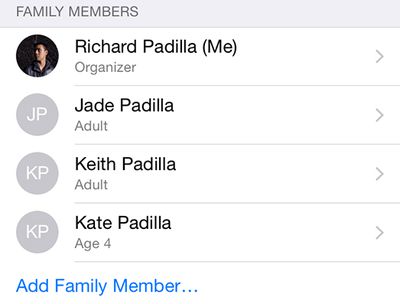
4. By default, users invited to Family Sharing will be recognized as adults and will not need permission to purchase content. However, the Family Organizer can also create an Apple ID for a child by tapping the highlighted option at the bottom of the Family Sharing menu.
5. Creating an Apple ID for a child will ask the Family Organizer to input a birthday and accept a Parent Privacy Disclosure. The Family Organizer will also be required to input the security code for the primary card being used.
6. Next, the Family Organizer will be able to enter a name and create an email address, password and security questions as seen in a typical iCloud setup process.
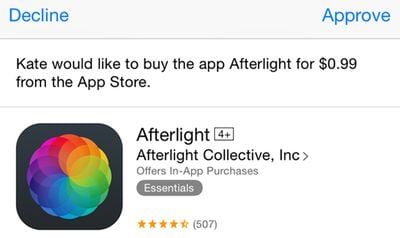
7. Afterward, the Family Organizer will be able to turn on Ask to Buy. Ask to Buy allows a child user to send a purchase request for an app, song or book to the Family Organizer, who can then approve or deny the request. The Family Organizer can also choose whether to share the location of the child's device. Once setup is completed, the child user will appear in the Family Sharing menu.
Sharing Purchased Content
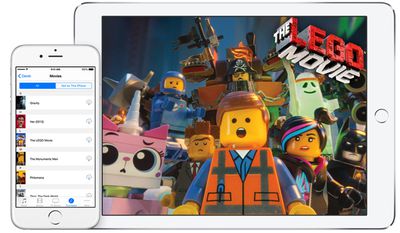
Family members can access each other's apps, books, songs, movies, and TV shows and download content to their own devices. To download a family member's shared content, users can head to the Purchased tab in the iTunes Store app, the iBooks app, or the App Store app. From there, users can select a family member and view a list of purchased content that is available for download. To hide a purchase, go into the Purchased tab, swipe the content you want to hide to the left, and select "Hide".
Apple notes that there are certain types of content that cannot be downloaded by other users in a Family Sharing group. Non-shareable content includes songs added to iTunes Match from outside of the iTunes Store, in-app purchases, items that are no longer available on the iTunes Store, and apps that are marked as non-shareable in their App Store descriptions.
Family Calendars and Photo Albums
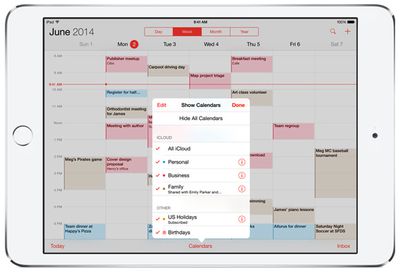
In addition to allowing purchased content to be shared, Family Sharing allows multiple users to contribute to a single calendar or photo album. To add to the calendar, family members can go to the Calendar app and select "Family Calendar" in the list of options before creating an event. The Family Organizer can also view and edit the calendar permissions of each family member by selecting "Calendars" and tapping the "I" symbol next to the Family Calendar.
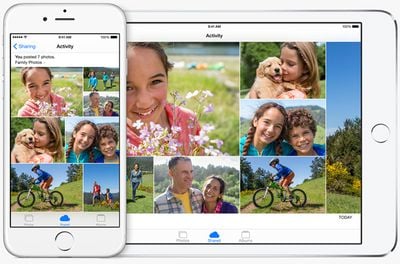
To enable shared photo album functionality, all family members must have iCloud Photo Sharing turned on in Settings -> iCloud -> Photos -> iCloud Photo Sharing. Once that setting is enabled, the Family photo album can be viewed in Photos -> Shared -> Sharing -> Family. A user can add photos to the shared album by tapping the + sign in the upper right corner, and all family members receive a push notification when a new image is added.
Sharing Locations and Find My iPhone
Users in a Family Sharing group can also keep track of each other's locations through the Find My Friends or Messages app. The Find My Friends app will display the location of all family members on a map and give details on their current city and distance.
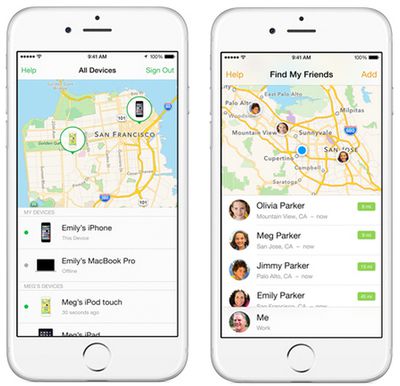
Similarly, if a family member's Mac, iPhone, iPad, or iPod touch is lost and needs to be tracked down, other users in the group can see the whereabouts of each device in the Find My iPhone app. Once a device is selected, users can choose to play a loud sound on the device, enable Lost Mode to lock the device, or choose to erase the entire device.
Things to Be Aware of
While the ability for a Family Sharing group to track down a lost device with the Find My iPhone app is useful, there are a few issues to be aware of. For example, any user in the Family Sharing group, including child users, can choose to lock a device with their own passcode or erase a device entirely without needing permission from other users. Any user can also choose to play a loud sound on a selected device which cannot be automatically silenced even with the "Do Not Disturb" feature turned on.
Though all three options are useful in the event of a device becoming lost, each could also be turned on accidentally, resulting in lost data or unexpected disturbances. Because of these potential oversights, it is recommended that you ensure that each member of your Family Sharing group uses the Find My iPhone app responsibly.
Another factor worth considering is that all Family Sharing members must use a single credit card or debit card for all App Store purchases, which is controlled by the Family Organizer. If App Store credit is applied to the account of a Family Sharing member, the credit will be used before the Family Organizer is billed for a purchase.
It's also worth noting that in order to secure an Apple ID for a child, the parent or Family Organizer must have a credit card on file in order to verify that the person creating the child's Apple ID is an adult. Apple will not accept a debit card.
Troubleshooting
Since its debut with iOS 8, a number of users have had issues with Family Sharing and shared app purchases. Most problems have centered around a message stating "Redownload Unavailable with This Apple ID" when trying to download apps or other content. Members on Apple's Support Communities and CNET's Jason Cipriani have reported that logging out and back into iCloud has fixed the problem.
Other users have also found out that the designated Family Organizer needs to have the same Apple ID logged into iCloud and the App Store for purchases to be shared. Also, keep in mind that not all apps support Family Sharing, and specify whether they do in their App Store description. If users are unable to download shared purchases, it is also important to ensure that the payment method on the Family Organizer's account is up to date by going to App Store -> Featured tab -> Apple ID -> View Apple ID -> Payment Information.






















Top Rated Comments
How does stored app credit work for an adult that was added to a sharing plan?
Apple, think more in depth with these things! Great idea, but seriously, needs work.
Another issue is the apple ID and the date of birth. I like many created kids accounts before Apple had kids accounts. Now those accounts are locked in as adults because of the date of birth in the Apple ID.
Apple supports solution was to delete the Apple ID and start over. In doing so I would lose the very nice @me.com email that both of my kids have.
Apple really needs to get a grip on the management functions of these IDs. We need and period to be able to merge and update IDs. I have an iTunes, which is not the same as the iCloud, but sure would be nice to merge all those into one.
Back when they released iCloud those of us who had a custom name for an appleID couldn't set it up with the ID and instead had to use whatever email address we had on that account. This created a strange issue where i have all my purchases on the named account and iCloud access on a sort of new account that uses the email address to sign in. In the case of services like find my friends the form does not accept signing in with a non email address account and also asks that said email be verified, which is impossible because that email is already verified for the account with a username.
Now, because the new account that uses he email exists, i cannot change the account that has the username back to using the email address. This means no access to family sharing unless i abandon all my old app/music/video purchases and move entirely to the second account that can't even verify its email address so find my friends or any other service they decide in the future to require an email address to as userID still wouldn't work.
Apple still does not offer merging of accounts and won't even delete the iCloud account that uses the unverified email address so i could reset the username account back to sign on with the email.
This issue has been a pain in the butt the past few years and has stopped me going for some iCloud storage upgrades incase it causes trouble. Also, FaceTime/iMessage happens to be linked to the username account (because thats where the email is verified) and not the one i use for iCloud. meaning setting up a new device requires manually signing out and back in with the other details for those services.
Apple NEED to set up a system for merging accounts as they move forward with more cloud services.
Just about everyone with a 4 yr old and an iPhone/iPad.
You're right, but I suspect this is by design. Apple's use of the term "Family" means "immediate family members that live in the same house." So generally 2 adults and their offspring.