

Apple has initiated a new worldwide service program offering free repairs of MacBook and MacBook models equipped with low-profile, butterfly mechanism keyboards, after the company determined that "a small percentage" of the keyboards may develop one or more of the following issues:
- Letters or characters repeat unexpectedly
- Letters or characters do not appear
- Key(s) feel "sticky" or do not respond in a consistent manner
Apple or Apple Authorized Service Providers will service eligible MacBook and MacBook Pro keyboards free of charge. Apple says the process may involve the replacement of one or more keys or the whole keyboard.
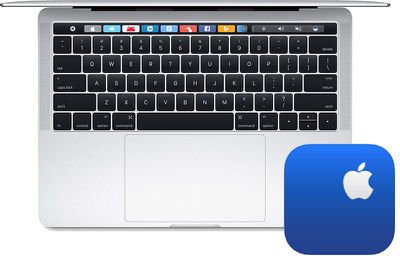
The following MacBook and MacBook Pro models are eligible for the program:
- MacBook (Retina, 12-inch, Early 2015)
- MacBook (Retina, 12-inch, Early 2016)
- MacBook (Retina, 12-inch, 2017)
- MacBook Pro (13-inch, 2016, Two Thunderbolt 3 Ports)
- MacBook Pro (13-inch, 2016, Four Thunderbolt 3 Ports)
- MacBook Pro (15-inch, 2016)
- MacBook Pro (13-inch, 2017, Two Thunderbolt 3 Ports)
- MacBook Pro (13-inch, 2017, Four Thunderbolt 3 Ports)
- MacBook Pro (15-inch, 2017)
All other MacBook, MacBook Air, and MacBook Pro models are not equipped with butterfly mechanism keyboards, and thus are ineligible.
To identify your MacBook or MacBook Pro model to see if it is eligible for this program, click on the Apple logo in the top-left corner of the screen and select About This Mac. A window should open, and in the Overview tab, the model should be listed, such as MacBook Pro (15-inch, 2016).
Apple or an Apple Authorized Service Provider will examine the MacBook or MacBook Pro prior to any service to verify that it is eligible for this program. If the notebook has any damage which impairs the service, that issue will need to be repaired first, and in some cases, there may be repair fees.
Step-by-step instructions ahead…
MacRumors obtained an internal service document from Apple that outlines exactly which pre-existing damage is eligible for this program:
Eligible physical damage includes:
• keyboard damage due to attempted keycap repair
• physical top case damage unrelated to the keyboardIneligible physical damage includes:
• liquid damage
• physical keyboard damage unrelated to keycap repair
Apple's service program is valid for four years after an eligible MacBook or MacBook Pro was originally purchased, meaning all of the models listed above remain eligible until at least April 10, 2019, four years after the original 12-inch MacBook, the first model with a butterfly keyboard, was released.
An eligible MacBook or MacBook Pro purchased today, meanwhile, would be eligible for coverage under this program until June 2022.
How to Initiate a Free Repair
Remember to back up your Mac prior to sending it in for service.
There are three ways to take advantage of Apple's service program: book an appointment with an Apple Store or Apple Authorized Service Provider, or mail in the notebook to Apple's repair center.
Apple Store or Apple Authorized Service Provider via Web
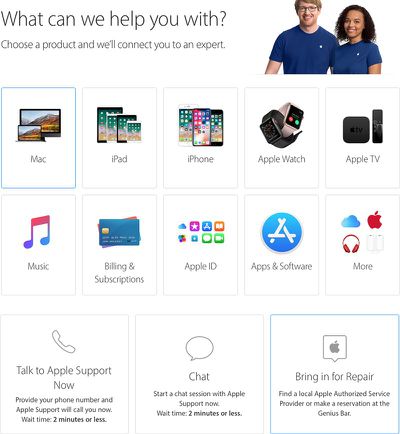
These steps are web-based, so they work across Mac, iPhone, iPad, and other devices.
- Navigate to the Get Support page on Apple's website.
- Select "Mac."
- Select "Mac notebooks."
- Select "Hardware Issues."
- Select "Keyboard not working as expected."
- Select "Bring in for Repair."
- Sign in with your Apple ID.
- Specify your location.
- Sort by "Availability" or "Distance."
- Select an Apple Store or Apple Authorized Service Provider.
- Select an available day and time slot for the appointment.
- Arrive at the Apple Store or Apple Authorized Service Provider when your appointment is scheduled. Bring your affected MacBook or MacBook Pro and government-issued photo ID.
Apple Store or Apple Authorized Service Provider via Apple Support App
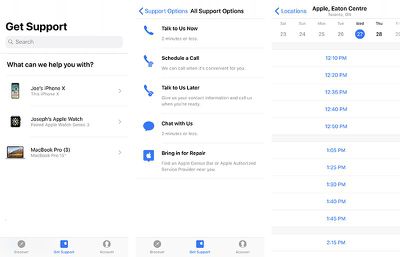
These steps are based on the Apple Support app for iPhone and iPad.
- Open the Apple Support app.
- If necessary, tap on the "Account" tab and sign in with your Apple ID.
- Tap on the "Get Support" tab.
- Tap on your affected MacBook or MacBook Pro.
- Tap on "Hardware Issues."
- Tap on "Keyboard not working as expected."
- Tap on "See all" to the right of "Get More Help."
- Tap on "Bring in for Repair."
- Select an Apple Store or Apple Authorized Service Provider.
- Select an available day and time slot for the appointment.
- Arrive at the Apple Store or Apple Authorized Service Provider when your appointment is scheduled. Bring your affected MacBook or MacBook Pro and government-issued photo ID.
Mail-in to Apple Repair Center
- Navigate to the Get Support page on Apple's website.
- Select "Mac."
- Select "Mac notebooks."
- Select "Hardware Issues."
- Select "Keyboard not working as expected."
- Select "Talk to Apple Support Now" or "Chat" to speak with an Apple support representative by phone or online chat.
- Inform the representative that you would like to mail in your affected MacBook or MacBook Pro to Apple's repair center.
- Follow further instructions as advised.
Apple's internal document for this program advises that mail-in service will take five to seven business days to be completed, but Apple's public-facing page about the program notes that service turn-around time may vary depending upon the type of service and availability of replacement parts.
How to Initiate a Refund
Apple's website notes that customers who believe their MacBook or MacBook Pro was affected by this issue, and who paid to have their keyboard repaired prior to this program, can contact the company about a refund.
- Navigate to the Get Support page on Apple's website.
- Select "Mac."
- Select "Mac notebooks."
- Select "Hardware Issues."
- Select "Keyboard not working as expected."
- Select "Talk to Apple Support Now" or "Chat" to speak with an Apple support representative by phone or online chat.
- Inform the representative that you would like a refund.
- Follow further instructions as advised.
MacRumors first highlighted customer complaints about the 2016 MacBook Pro keyboard over a year ago, including non-functional keys, strange high-pitched sounds on some keys, and keys with a non-uniform feel. The issues are believed to result from small amounts of dust or debris accumulating under keys.
Apple has been hit with at least three class action lawsuits over the keyboards in the United States, after the company charged some customers with out-of-warranty fees as high as $700 to replace the keyboard on affected MacBook Pro models, as the process requires replacing the entire top case assembly.
Until now, Apple had not publicly acknowledged the keyboard issues, and only offered cleaning instructions to affected customers.
More Details on Apple.com: Keyboard Service Program for MacBook and MacBook Pro























Top Rated Comments