Normally your iPhone will stop listening for the "Hey Siri" command when you place your device face down on a surface or the screen is otherwise covered. In these circumstances "Hey Siri" is automatically disabled until the situation changes.

If you find this automated behavior inconvenient for your purposes, you'll be happy to learn that in iOS 13.4, Apple has added an option to always listen for "Hey Siri" regardless of your phone's placement.
Simply follow the steps below to change this setting so that Siri is always ready to respond to your query or command:
- Launch the Settings app on your iPhone or iPad.
- Tap Accessibility.

- Scroll down and tap Siri.
- Toggle the switch next to Always Listen for "Hey Siri" to the green ON position.
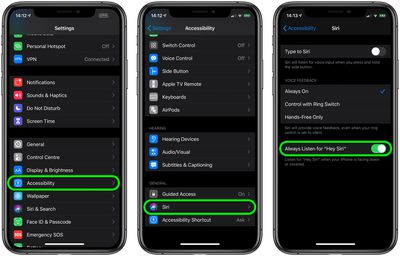
Siri will now listen for your voice even if your device is placed face down or it's in your pocket, for example.
Here's another neat accessibility tip: In iOS 13.4 and later, you can ask Siri to take you back to your device's Home screen. Simply say "Hey Siri, go to the Home screen" to exit your current app and go Home. It's a great vocal command to keep in mind if you have difficulty using your iPhone's Home button or swiping up from the bottom of the screen.