Apple's HomePod speaker can recognize the voices of up to six people and tailor the music selection to an individual user's taste profile, respond to their own Personal Requests, and access their information to help them with everyday tasks.
homepodmultiuser
Before you can make use of ‌HomePod‌'s multi-user voice support, you have to set up the feature, and there are a few steps involved. This article explains what they are and also offers a few troubleshooting tips if you're experiencing issues.

Check That Your Software is Up-to-Date

The first thing you need to do is ensure that the ‌HomePod‌ and the iPhones or iPads of the people who intend to use it are updated to iOS 16.3 or later or iPadOS 16.3 or later. You can check what software your iOS devices are running by opening the Settings app and selecting General -> Software Update.

To check the software version of your ‌HomePod‌, launch the Home app on your iOS device, tap the home icon in the upper left corner of the display, then scroll down to Software Update. You can pull down from the top of the iPhone or iPad screen to check for an update if you need to.

Turn on Share My Location in Find My

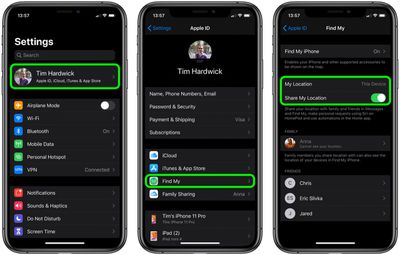
Share My Location must be set to This Device on the ‌iPhone‌ or ‌iPad‌ of every user who wishes to be recognized by ‌HomePod‌, including yours.

  1. Launch the Settings app on the ‌iPhone‌ or ‌iPad‌.
  2. Tap your name in the banner at the top of the screen.
  3. Tap Find My.
    settings

  4. Tap the toggle next to Share My Location to turn it to the green ON position.
  5. Next, set My Location to This Device.

Add People to Your Home Network

Whoever wants to be recognized by your ‌HomePod‌ must be part of your Home network. Here's how to add them.

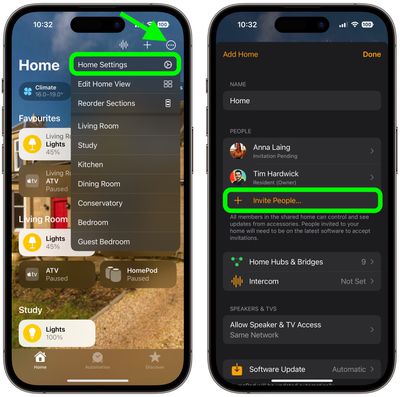
  1. Launch the Home app on your ‌iPhone‌ or ‌iPad‌.
  2. Tap the ellipsis button (three encircled dots) in the top-right corner of the screen.
  3. Tap Home Settings in the dropdown menu.
  4. Under People, tap Invite....
    home

  5. Enter the person's Apple ID that they use with iCloud.
  6. Tap Send Invite.

Additional Settings to Check/Enable

You'll also need to check the following settings on your ‌HomePod‌ and iOS device to ensure everything works.

  • Make sure Listen for "Hey, Siri" and Personal Requests are enabled on your ‌HomePod‌: In the Home app, long press on your ‌HomePod‌, tap the cog in the bottom-right corner of the screen, then toggle the requisite switches. On the same screen, check also that the Language is set to English. (Siri on ‌HomePod‌ multi-user only supports English at this time.)
  • Make sure Listen for "Hey, Siri" is enabled on the iOS device of every user who wishes to be recognized by ‌HomePod‌, including your own device. The associated toggle can be found in Settings -> Siri & Search. On the same screen, check also that the device is set to the same Language as your ‌HomePod‌.
  • Likewise, location services must be enabled on the device of every user who wishes to be recognized by ‌HomePod‌: Go to Settings -> Privacy -> Location Services, and make sure the Location Services toggle is green.

Testing HomePod Multi-user and Fixing Issues

When someone that you've set up to be recognized by your ‌HomePod‌ first asks it a personal request, ‌Siri‌ will ask who it is. If the user states their name, ‌Siri‌ should be able to recognize them after that.

Apple does say ‌HomePod‌ can have trouble distinguishing some voices, like those of young children, but rest assured whenever ‌HomePod‌ isn't sure, it will ask who's speaking.

If ‌Siri‌ doesn't recognize you after multi-user setup, try these steps. After each step, see if ‌Siri‌ recognizes you.

  1. In the Home app, tap the home icon, then tap Home Settings. Choose your home, then turn off Recognize My Voice, then turn it on again. Wait a few minutes before trying ‌Siri‌ again.
  2. Restart the iOS device that you use with "Hey ‌Siri‌."
  3. Restart your ‌HomePod‌: Open the Home app on your iOS device, tap and hold ‌HomePod‌, then tap the cog wheel in the bottom-right corner of the screen. Scroll down and select Reset HomePod, then tap Restart HomePod to confirm.

  4. On your iOS device, go to Settings -> Siri & Search, then turn off Listen for "Hey Siri", then turn it on again, and follow the onscreen instructions to teach ‌Siri‌ your voice.

To test out out the voice recognition further, you can get users to try asking different questions that relate specifically to them, like what their upcoming calendar events are. If everything works, ‌Siri‌ will reply with their respective name and the answer to their query.

The neat thing about ‌HomePod‌ multi-user support is that it doesn't apply to queries and commands that aren't person-specific – so you can ask what time it is or what the weather is like, just as you would do so normally.

Similarly, anyone can ask ‌HomePod‌ to play music, and it will play from the primary user's account without affecting that person's taste profile.


Related Roundups: HomePod, HomePod mini

Popular Stories

Apple Wallet ID Illinois

Apple Plans to Expand iPhone Driver's Licenses to These 7 U.S. States

Wednesday December 24, 2025 8:40 am PST by
In select U.S. states, residents can add their driver's license or state ID to the Apple Wallet app on the iPhone and Apple Watch, and then use it to display proof of identity or age at select airports and businesses, and in select apps. The feature is currently available in 13 U.S. states and Puerto Rico, and it is expected to launch in at least seven more in the future. To set up the...
iPhone Top Left Hole Punch Face ID Feature Purple

iPhone 18 Pro Launching Next Year With These 12 New Features

Tuesday December 23, 2025 8:36 am PST by
While the iPhone 18 Pro and iPhone 18 Pro Max are not expected to launch for another nine months, there are already plenty of rumors about the devices. Below, we have recapped 12 features rumored for the iPhone 18 Pro models. The same overall design is expected, with 6.3-inch and 6.9-inch display sizes, and a "plateau" housing three rear cameras Under-screen Face ID Front camera in...
iOS 26

iOS 26.2 Adds These 8 New Features to Your iPhone

Monday December 22, 2025 8:47 am PST by
Earlier this month, Apple released iOS 26.2, following more than a month of beta testing. It is a big update, with many new features and changes for iPhones. iOS 26.2 adds a Liquid Glass slider for the Lock Screen's clock, offline lyrics in Apple Music, and more. Below, we have highlighted a total of eight new features. Liquid Glass Slider on Lock Screen A new slider in the Lock...
maxresdefault

Where's the New Apple TV?

Monday December 22, 2025 11:30 am PST by
Apple hasn't updated the Apple TV 4K since 2022, and 2025 was supposed to be the year that we got a refresh. There were rumors suggesting Apple would release the new Apple TV before the end of 2025, but it looks like that's not going to happen now. Subscribe to the MacRumors YouTube channel for more videos. Bloomberg's Mark Gurman said several times across 2024 and 2025 that Apple would...
maxresdefault

10 Mac Apps Worth Trying in 2026

Wednesday December 24, 2025 9:27 am PST by
2026 is almost upon us, and a new year is a good time to try out some new apps. We've rounded up 10 excellent Mac apps that are worth checking out. Subscribe to the MacRumors YouTube channel for more videos. Alt-Tab (Free) - Alt-Tab brings a Windows-style alt + tab thumbnail preview option to the Mac. You can see a full window preview of open apps and app windows. One Thing (Free) -...
Foldable iPhone 2023 Feature Iridescent Search

Samsung Developing 'Wide Fold' With iPhone Fold-Like Design Ahead of Apple's 2026 Launch

Tuesday December 23, 2025 11:55 am PST by
Samsung is working on a new foldable smartphone that's wider and shorter than the models that it's released before, according to Korean news site ETNews. The "Wide Fold" will compete with Apple's iPhone Fold that's set to launch in September 2026. Samsung's existing Galaxy Z Fold7 display is 6.5 inches when closed, and 8 inches when open, with a 21:9 aspect ratio when folded and a 20:18...
iOS 26

iOS 26.3 Brings AirPods-Like Pairing to Third-Party Devices in EU Under DMA

Monday December 22, 2025 3:20 pm PST by
The European Commission today praised the interoperability changes that Apple is introducing in iOS 26.3, once again crediting the Digital Markets Act (DMA) with bringing "new opportunities" to European users and developers. The Digital Markets Act requires Apple to provide third-party accessories with the same capabilities and access to device features that Apple's own products get. In iOS...
iphone fold 3d print

Have a 3D Printer? You Can Make Your Own iPhone Fold Dummy

Tuesday December 23, 2025 1:31 pm PST by
Apple is working on a foldable iPhone that's set to come out in September 2026, and rumors suggest that it will have a display that's around 5.4 inches when closed and 7.6 inches when open. Exact measurements vary based on rumors, but one 3D designer has created a mockup based on what we've heard so far. On MakerWorld, a user named Subsy has uploaded a 1:1 iPhone Fold replica (via Macworld), ...
iPhone Fold Vertical Feature

Why Apple's Foldable iPhone May Be Smaller Than Expected

Tuesday December 23, 2025 5:21 am PST by
Apple's first foldable iPhone, rumored for release next year, may turn out to be smaller than most people imagine, if a recent report is anything to go by. According to The Information, the outer display on the book-style device will measure just 5.3 inches – that's smaller than the 5.4-inch screen on the ‌iPhone‌ mini, a line Apple discontinued in 2022 due to poor sales. The report has led ...