Apple has made the first macOS Tahoe developer beta available for testing before its official release in the fall, but don't be fooled into thinking only developers can download it. Keep reading to learn whether you should install it on your Mac, and if so, how to go about it.
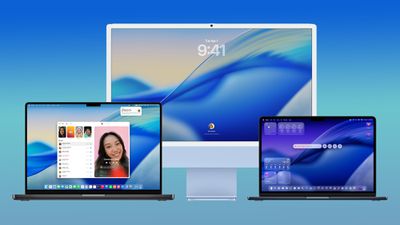
macos tahoe design
Getting access to the macOS Tahoe developer beta is simple, and can be done by registering your Apple Account with the Apple Developer program. The extra steps you need to complete to install the software on your Mac are provided towards the end of this article, but before you jump ahead, here are a few things worth considering.

Should I Install the macOS Tahoe Developer Beta?

With macOS Tahoe, Apple introduces a major redesign for the platform with the all-new Liquid Glass interface, along with a host of new features. These include the Phone app on Mac, powerful new Spotlight actions, further Apple Intelligence integration, a dedicated Games app, and customizable backgrounds in Messages. Live Activities from iPhone also make their way to your Mac's menu bar, which now has a fully customizable Control Center. With so many additions and a striking visual update, it's no surprise that macOS Tahoe is generating a lot of interest among Mac users.

But before you commit, bear in mind that Apple does not recommend installing macOS developer beta updates on your main Mac. Remember, this is beta software, which means there are almost certainly bugs and issues that can prevent software from working properly or cause other problems with the system. Indeed, one of the reasons that Apple releases the beta to developers early is so that they can feed back problems and help Apple debug them. If you have a spare Mac hanging around, by all means use that, but we would be the first to advise holding off until at least July, when the macOS Tahoe public beta is expected to drop.

Is My Mac Supported?

macOS Tahoe is compatible with the following Mac models, according to Apple:

  • MacBook Air with Apple silicon (2020 and later)
  • MacBook Pro with Apple silicon (2020 and later)
  • MacBook Pro (16‑inch, 2019)
  • MacBook Pro (13‑inch, 2020, Four Thunderbolt 3 ports)
  • iMac (2020 and later)
  • Mac mini (2020 and later)
  • Mac Studio (2022 and later)
  • Mac Pro (2019 and later)

macOS Tahoe officially drops support for the following Macs (earlier models than those shown are also not supported):

  • MacBook Air (Retina, 13-inch, 2020)
  • MacBook Pro (13-inch, 2018, Four Thunderbolt 3 ports)
  • MacBook Pro (15-inch, 2018)
  • MacBook Pro (13-inch, 2019, Four Thunderbolt 3 ports)
  • MacBook Pro (15-inch, 2019)
  • MacBook Pro (13-inch, 2019, Two Thunderbolt 3 ports)
  • MacBook Pro (13-inch, 2020, Two Thunderbolt 3 ports)
  • iMac (Retina 5K, 27-inch, 2019)
  • iMac (Retina 4K, 21.5-inch, 2019)
  • iMac Pro (2017)
  • Mac mini (2018)

Don't Forget to Back Up Your Mac

Be sure to back up your Mac using Time Machine before installing the software using the method, otherwise you won't be able to revert back to the previous version of macOS if things go wrong.

How to Install macOS Tahoe Developer Beta

  1. If you haven't already, register your Apple Account with the Apple Developer Program (it's free) over at developer.apple.com.
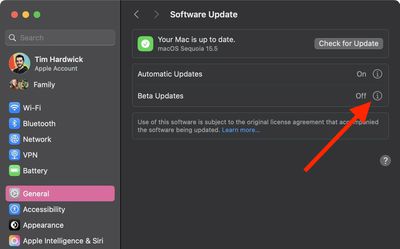
  2. Open System Settings on your Mac and select General ➝ Software Update.
  3. Look for "Beta Updates" and click the info (i) symbol next to it.
    settings

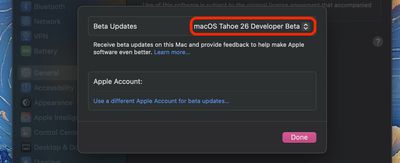
  4. Choose macOS Tahoe 26 Developer Beta from the dropdown list.
    settings

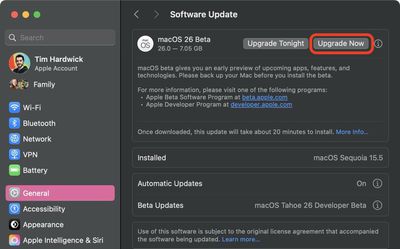
  5. Click Upgrade Now to begin the update process to macOS 26.
    2install macos 26 beta

That's all you need to do. The installation process will complete just like a standard macOS update, so sit back and let the installation finish, after which your Mac will boot directly into the macOS Tahoe beta.


Top Rated Comments

MacLawyer Avatar
27 weeks ago
If you're not a developer of if you're not installing on a secondary Mac, DON'T DO THIS.
Score: 10 Votes (Like | Disagree)
Artemiz Avatar
27 weeks ago
MR should stop making articles about installing betas especially the initial ones of a major iOS revision.

Every year there’s a whole bunch of ppl reading just one article and suddenly becoming an expert. And when it doesn’t pan out great, they’re scrambling to restore which is both a pain and not a stroll in the park.
Score: 7 Votes (Like | Disagree)
turbineseaplane Avatar
27 weeks ago
Step One:

Reconsider any desire to install the beta.
Score: 6 Votes (Like | Disagree)
wonderings Avatar
27 weeks ago
I do it as a VM. I have Parallels and install the beta there. Not something I want for my main OS till it is finished, but want to do tests on things.
Score: 5 Votes (Like | Disagree)
wonderings Avatar
27 weeks ago

This solution causes that there are two systems, nothing to boot, but I avoid Parallels - it's time to say goodbye to this program.
That exactly the point of Parallels, running multiple OS's without removing your main OS. I have Windows 11 installed for the few things I need Windows for. I have Taho installed to test software on, all one my main work computer, no need for a bunch of different computers.
Score: 3 Votes (Like | Disagree)
turbineseaplane Avatar
27 weeks ago

MR should stop making articles about installing betas especially the initial ones of a major iOS revision.

Every year there’s a whole bunch of ppl reading just one article and suddenly becoming an expert. And when it doesn’t pan out great, they’re scrambling to restore which is both a pain and not a stroll in the park.
I agree 100%

Folks that should be installing betas don't need MR guides to do it.

These guides just plant bad ideas in the heads of folks who should be waiting until the releases in the Fall.
Score: 3 Votes (Like | Disagree)

Popular Stories

Apple Wallet ID Illinois

Apple Plans to Expand iPhone Driver's Licenses to These 7 U.S. States

Wednesday December 24, 2025 8:40 am PST by
In select U.S. states, residents can add their driver's license or state ID to the Apple Wallet app on the iPhone and Apple Watch, and then use it to display proof of identity or age at select airports and businesses, and in select apps. The feature is currently available in 13 U.S. states and Puerto Rico, and it is expected to launch in at least seven more in the future. To set up the...
iPhone Top Left Hole Punch Face ID Feature Purple

iPhone 18 Pro Launching Next Year With These 12 New Features

Tuesday December 23, 2025 8:36 am PST by
While the iPhone 18 Pro and iPhone 18 Pro Max are not expected to launch for another nine months, there are already plenty of rumors about the devices. Below, we have recapped 12 features rumored for the iPhone 18 Pro models. The same overall design is expected, with 6.3-inch and 6.9-inch display sizes, and a "plateau" housing three rear cameras Under-screen Face ID Front camera in...
iOS 26

iOS 26.2 Adds These 8 New Features to Your iPhone

Monday December 22, 2025 8:47 am PST by
Earlier this month, Apple released iOS 26.2, following more than a month of beta testing. It is a big update, with many new features and changes for iPhones. iOS 26.2 adds a Liquid Glass slider for the Lock Screen's clock, offline lyrics in Apple Music, and more. Below, we have highlighted a total of eight new features. Liquid Glass Slider on Lock Screen A new slider in the Lock...
maxresdefault

Where's the New Apple TV?

Monday December 22, 2025 11:30 am PST by
Apple hasn't updated the Apple TV 4K since 2022, and 2025 was supposed to be the year that we got a refresh. There were rumors suggesting Apple would release the new Apple TV before the end of 2025, but it looks like that's not going to happen now. Subscribe to the MacRumors YouTube channel for more videos. Bloomberg's Mark Gurman said several times across 2024 and 2025 that Apple would...
maxresdefault

10 Mac Apps Worth Trying in 2026

Wednesday December 24, 2025 9:27 am PST by
2026 is almost upon us, and a new year is a good time to try out some new apps. We've rounded up 10 excellent Mac apps that are worth checking out. Subscribe to the MacRumors YouTube channel for more videos. Alt-Tab (Free) - Alt-Tab brings a Windows-style alt + tab thumbnail preview option to the Mac. You can see a full window preview of open apps and app windows. One Thing (Free) -...
Foldable iPhone 2023 Feature Iridescent Search

Samsung Developing 'Wide Fold' With iPhone Fold-Like Design Ahead of Apple's 2026 Launch

Tuesday December 23, 2025 11:55 am PST by
Samsung is working on a new foldable smartphone that's wider and shorter than the models that it's released before, according to Korean news site ETNews. The "Wide Fold" will compete with Apple's iPhone Fold that's set to launch in September 2026. Samsung's existing Galaxy Z Fold7 display is 6.5 inches when closed, and 8 inches when open, with a 21:9 aspect ratio when folded and a 20:18...
iOS 26

iOS 26.3 Brings AirPods-Like Pairing to Third-Party Devices in EU Under DMA

Monday December 22, 2025 3:20 pm PST by
The European Commission today praised the interoperability changes that Apple is introducing in iOS 26.3, once again crediting the Digital Markets Act (DMA) with bringing "new opportunities" to European users and developers. The Digital Markets Act requires Apple to provide third-party accessories with the same capabilities and access to device features that Apple's own products get. In iOS...
iphone fold 3d print

Have a 3D Printer? You Can Make Your Own iPhone Fold Dummy

Tuesday December 23, 2025 1:31 pm PST by
Apple is working on a foldable iPhone that's set to come out in September 2026, and rumors suggest that it will have a display that's around 5.4 inches when closed and 7.6 inches when open. Exact measurements vary based on rumors, but one 3D designer has created a mockup based on what we've heard so far. On MakerWorld, a user named Subsy has uploaded a 1:1 iPhone Fold replica (via Macworld), ...
iPhone Fold Vertical Feature

Why Apple's Foldable iPhone May Be Smaller Than Expected

Tuesday December 23, 2025 5:21 am PST by
Apple's first foldable iPhone, rumored for release next year, may turn out to be smaller than most people imagine, if a recent report is anything to go by. According to The Information, the outer display on the book-style device will measure just 5.3 inches – that's smaller than the 5.4-inch screen on the ‌iPhone‌ mini, a line Apple discontinued in 2022 due to poor sales. The report has led ...