

In iOS 10, the simple Messages app you're familiar with has transformed from a bare bones texting platform into a fun, interactive communication service that takes advantage of games, apps, drawings, stickers, message effects, and more.

Following in the footsteps of apps like Facebook and Line, Apple is delving into stickers in a big way, giving iOS users new ways of expressing themselves. Like the real thing, Stickers in iOS can be stuck onto messages or images, or sent by themselves, and they can be resized, rotated, and stuck to other stickers for fun layering effects.


Installing Sticker Packs

Sticker packs can be installed as standalone applications through the iMessage App Store or they can be downloaded as add-ons to full iOS apps, but either way, getting them onto your device uses these steps.
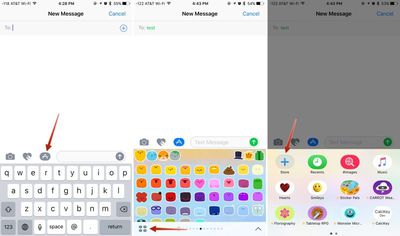
openingmessagesappstore

  1. Open an existing conversation thread in Messages or start a new conversation.
  2. Tap on the App Store icon next to the conversation box and then tap on the four dots to open your app drawer, which houses all installed apps.
  3. Tap the "+" icon to access the iMessage App Store.
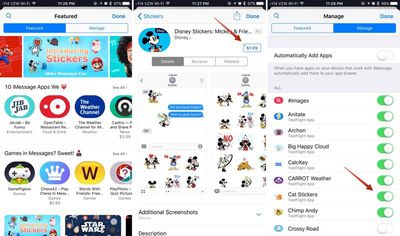
  4. In the "Featured" section, tap "Get" or and then "Install" to download a sticker pack, or tap on the purchase price to buy an pack that costs money. Passwords and Touch ID authentication are required, just as in the standard App Store.
  5. Tap on the "Manage" tab to install sticker packs (or other apps) that are available as iOS add-ons. Installation is done by setting the toggle to on (green), while removing an a sticker pack is done by turning the toggle off.

    messagesappstorestickers

  6. OPTIONAL: In the "Manage" tab, toggle on "Automatically Add Apps" to let all iOS apps that have an iMessage component install in Messages automatically.
  7. Click "Done." The newly installed sticker pack is now available in your app drawer. Access it by opening the app drawer (four dots icon) or swiping left or right through your installed apps.
Sticker Basics

Stickers are displayed in place of the iOS keyboard, just like emoji. Sending a sticker to someone is as simple as tapping it, which puts it in the message field. From there, tap the up arrow to send a sticker. It's simple, and essentially the same process as sending a standard text message or an emoji.
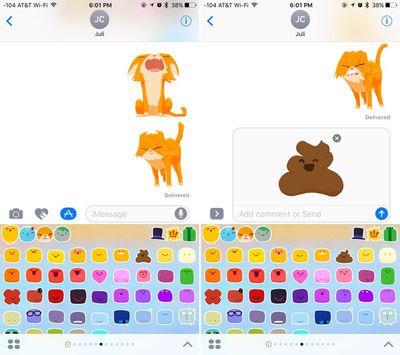
sendingstickers

Layering, Resizing, and Rotating Stickers

The neat thing about stickers is that they can be layered over incoming text messages, photos, GIFs, or other stickers, so you can use them to react to content your friends send you.
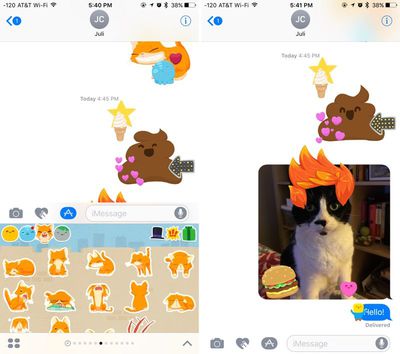
layeredstickers
Stickers must be placed on an incoming chat bubble of some sort and can't be placed randomly in the messages field, and stickers can only be added to other stickers after the first sticker has been sent, so it's not possible to layer multiple stickers together when composing a message.

To layer:

  1. Navigate to the sticker pack you want to use.
  2. Select a sticker. Instead of tapping it, place a finger on the sticker and drag it up to the messages window.
  3. Drag the sticker to where you want to place it on a message bubble, photo, or existing sticker.

You can put as many stickers as you like on a photo or an existing sticker, so you and your friends can take turns embellishing photos and creating sticker collages. Stickers from different sticker packs can be mixed together in one field — just swipe between packs to change stickers.

Stickers can be resized or rotated before they're placed, a feature that's especially useful when you want to accent a photo. To make stickers bigger or smaller, as you drag them up to the messages field to place them somewhere, add another finger to the screen and use pinch gesture to expand or contract them.
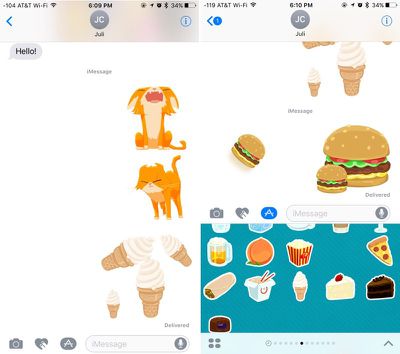
rotatedandresizedstickers
Rotating stickers is done in the same way. As you hold a sticker above the screen before placing it, use two fingers to twist it around, changing its orientation. Make sure not to let go when rotating or resizing, as removing your finger releases the sticker and it can no longer be edited.

Managing and Deleting Stickers

There are several gestures that can be used to manage your stickers. A single tap will display a sticker full screen, as will a 3D Touch press on the iPhone 6s and later.
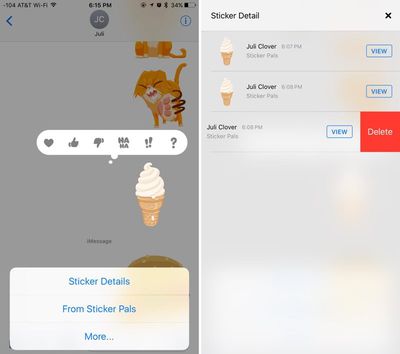
deletingstickers
Use a long press on a sticker to bring up your message reaction menu and a set of management options. This menu displays where a sticker is from so you can download the sticker pack from the iMessage App Store if it's not already installed, and it has tools for deleting layered stickers. To delete:

  1. Long press on a layered sticker or a sticker that's been placed on an incoming message or photo.
  2. Choose the "Sticker Detail" option. All stickers that have been placed on a particular photo, message, or initial sticker will be displayed.
  3. On the sticker you want to delete, swipe to the left and choose then tap the "Delete" button.
  4. The sticker is removed from your device and from the device of the person you were communicating with and you're now free to add additional stickers.

Sticker Compatibility

Stickers are only going to display appropriately on devices running iOS 10 and macOS Sierra, so sending stickers to friends who are using Android devices or older versions of iOS won't work quite the same. On these devices, stickers are simply displayed as an image or GIF might be displayed and all layering is ignored.

Sticker packs can be created using Xcode with no coding experience required, so not only are developers going to be coming out with sticker packs, but artists can make them too. Expect to see hundreds of available sticker packs in the near future in addition to the built-in Hearts, Smileys, Hands, and Classic Mac stickers made available by Apple.


Related Forum: iOS 10

Top Rated Comments

ArtOfWarfare Avatar
121 months ago
How do I remove all this garbage?

I'm fine with receiving it, but I want to send text messages and pictures and nothing else. How do I remove the apps button, the drawing button, and the voice button?

I don't think I'm at all alone in this. My wife, who uses Snapchat, doesn't want all this crap in her messaging app. If someone using snapchat doesn't want it, I can't imagine who does.

I feel like Apple risks losing a lot of people who will shift over to Skype or WeChat or something, just so they can have a simpler messaging experience.
Score: 7 Votes (Like | Disagree)
Traverse Avatar
121 months ago
Is there a way to hide this stuff? I think it's laughable that the text bar is only like 0.4" now
Score: 6 Votes (Like | Disagree)
Traverse Avatar
121 months ago
Already there are complaints complaints complaints :rolleyes:
Because not everyone likes it and there appears to be no easy way to hide it. It's too in your face.
Score: 3 Votes (Like | Disagree)
10littlebirds Avatar
121 months ago
iOS 9.3.5 (still installable - for a short time)

Does the text bar stay that short after you start typing?
No, the text bar expands as soon as you start typing. It's just a matter of getting used to seeing something different when you enter into a new text. You can also swipe left at the edge of the bar to hide camera/art/sticker options if it is distracting. I believe you have to do that with each new text though. Hope that helps.
Score: 2 Votes (Like | Disagree)
appledefenceforce Avatar
121 months ago
Already there are complaints complaints complaints :rolleyes:
Score: 2 Votes (Like | Disagree)
jonnysods Avatar
121 months ago
Is there a way to hide this stuff? I think it's laughable that the text bar is only like 0.4" now
I want to know too. Less is more for me, this change is kind of whacky and un-Apple like.
Score: 1 Votes (Like | Disagree)

Popular Stories

Apple Wallet ID Illinois

Apple Plans to Expand iPhone Driver's Licenses to These 7 U.S. States

Wednesday December 24, 2025 8:40 am PST by
In select U.S. states, residents can add their driver's license or state ID to the Apple Wallet app on the iPhone and Apple Watch, and then use it to display proof of identity or age at select airports and businesses, and in select apps. The feature is currently available in 13 U.S. states and Puerto Rico, and it is expected to launch in at least seven more in the future. To set up the...
iPhone Top Left Hole Punch Face ID Feature Purple

iPhone 18 Pro Launching Next Year With These 12 New Features

Tuesday December 23, 2025 8:36 am PST by
While the iPhone 18 Pro and iPhone 18 Pro Max are not expected to launch for another nine months, there are already plenty of rumors about the devices. Below, we have recapped 12 features rumored for the iPhone 18 Pro models. The same overall design is expected, with 6.3-inch and 6.9-inch display sizes, and a "plateau" housing three rear cameras Under-screen Face ID Front camera in...
iOS 26

iOS 26.2 Adds These 8 New Features to Your iPhone

Monday December 22, 2025 8:47 am PST by
Earlier this month, Apple released iOS 26.2, following more than a month of beta testing. It is a big update, with many new features and changes for iPhones. iOS 26.2 adds a Liquid Glass slider for the Lock Screen's clock, offline lyrics in Apple Music, and more. Below, we have highlighted a total of eight new features. Liquid Glass Slider on Lock Screen A new slider in the Lock...
maxresdefault

Where's the New Apple TV?

Monday December 22, 2025 11:30 am PST by
Apple hasn't updated the Apple TV 4K since 2022, and 2025 was supposed to be the year that we got a refresh. There were rumors suggesting Apple would release the new Apple TV before the end of 2025, but it looks like that's not going to happen now. Subscribe to the MacRumors YouTube channel for more videos. Bloomberg's Mark Gurman said several times across 2024 and 2025 that Apple would...
maxresdefault

10 Mac Apps Worth Trying in 2026

Wednesday December 24, 2025 9:27 am PST by
2026 is almost upon us, and a new year is a good time to try out some new apps. We've rounded up 10 excellent Mac apps that are worth checking out. Subscribe to the MacRumors YouTube channel for more videos. Alt-Tab (Free) - Alt-Tab brings a Windows-style alt + tab thumbnail preview option to the Mac. You can see a full window preview of open apps and app windows. One Thing (Free) -...
Foldable iPhone 2023 Feature Iridescent Search

Samsung Developing 'Wide Fold' With iPhone Fold-Like Design Ahead of Apple's 2026 Launch

Tuesday December 23, 2025 11:55 am PST by
Samsung is working on a new foldable smartphone that's wider and shorter than the models that it's released before, according to Korean news site ETNews. The "Wide Fold" will compete with Apple's iPhone Fold that's set to launch in September 2026. Samsung's existing Galaxy Z Fold7 display is 6.5 inches when closed, and 8 inches when open, with a 21:9 aspect ratio when folded and a 20:18...
iOS 26

iOS 26.3 Brings AirPods-Like Pairing to Third-Party Devices in EU Under DMA

Monday December 22, 2025 3:20 pm PST by
The European Commission today praised the interoperability changes that Apple is introducing in iOS 26.3, once again crediting the Digital Markets Act (DMA) with bringing "new opportunities" to European users and developers. The Digital Markets Act requires Apple to provide third-party accessories with the same capabilities and access to device features that Apple's own products get. In iOS...
iphone fold 3d print

Have a 3D Printer? You Can Make Your Own iPhone Fold Dummy

Tuesday December 23, 2025 1:31 pm PST by
Apple is working on a foldable iPhone that's set to come out in September 2026, and rumors suggest that it will have a display that's around 5.4 inches when closed and 7.6 inches when open. Exact measurements vary based on rumors, but one 3D designer has created a mockup based on what we've heard so far. On MakerWorld, a user named Subsy has uploaded a 1:1 iPhone Fold replica (via Macworld), ...
iPhone SE Cosmopolitan Clean

Apple Discontinued These 25 Products This Year

Wednesday December 24, 2025 7:24 am PST by
With the end of 2025 near, the time has come to look back at the devices and accessories that Apple discontinued throughout the year. Most of the products that were discontinued this year were simply replaced by a new model with an updated chip. However, the iPhone SE line was entirely discontinued when the iPhone 16e launched, and the iPhone Plus line is being phased out. Below, we have...
















