

With iOS 18, Apple overhauled the Home Screen, introducing design changes that allow for more customization and personalization. One of the changes is the freedom to arrange icons and widgets with space between them, opening up a variety of new layout options.
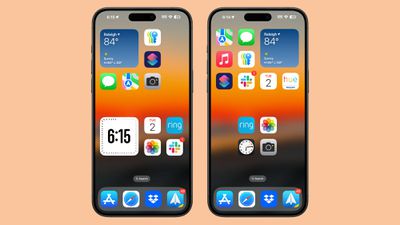
In iOS 17, new apps added to the Home Screen automatically occupy the next available spot, and there is no way to space out icons on the same page. But with iOS 18, you have more flexibility in arranging your Home Screen.
You can now choose the exact location for new apps, allowing for app icon-sized gaps between apps, entire empty rows, or entire empty columns. However, due to the invisible grid system, icons and widgets cannot be placed with uneven spacing, so this should be considered when arranging your Home Screen.
This design enables a variety of layouts: For example, you can place a single app in the center of a page, create a row of apps at the top and bottom, form a column of apps, and more. Apple's goal here is to let you organize apps and widgets around wallpapers and create more functional and visually appealing layouts.
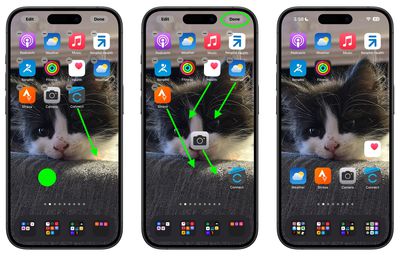
Here's how to place your icons where you want in iOS 18.
- Long press an empty space on the Home Screen to enter jiggle mode.
- Move your app icons into the desired positions within the invisible grid.
- Tap Done.
In iOS 18, you can also make your icons bigger by removing the app names from them. Click the link to learn how it's done. iOS 18 is currently in public beta and will see a general release in the fall.






















Top Rated Comments
We've been able to arrange apps into folders for some time now. Soon we'll be able to place apps and folders wherever we want on the home screen. If they still force the App Library page at the end of all that, it would actually be hilarious. Basically, "Arrange things however you want, but we're still gonna do it our way and force you to see it".