Apple's iOS 26 update brings an unexpected camera trick to AirPods 4 and AirPods Pro 2 – the ability to control iPhone photo and video capture using AirPods stem gestures. The new Camera Remote feature essentially turns your wireless earbuds into a handy hands-free photography tool. Keep reading to learn how it works.
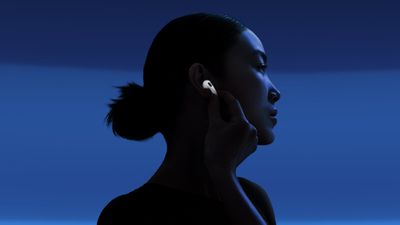
airpods 4 stem
New in iOS 26, Apple's Camera Remote feature for AirPods offers a neat solution in scenarios where standard phone photography might fall short. If you've ever used the Camera Remote app for Apple Watch, it offers similar benefits. When taking group photos, you can position your iPhone at the perfect angle, step into the frame, and trigger the shot with a simple press of your AirPods. It can also help capture steadier footage when shooting video, since you're not handling the camera and don't need to work with on-screen controls.

Getting the Beta Software

Before you can access the Camera Remote feature, you'll need to have the appropriate beta software on your devices. First, install iOS 26 beta or iPadOS 26 beta on your iPhone/iPad by following these instructions.

Once you have your device running the iOS 26/iPadOS 26 beta, you need to give Apple permission to install beta firmware on your AirPods.

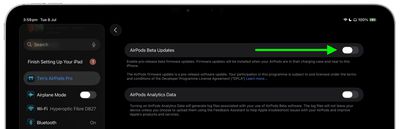
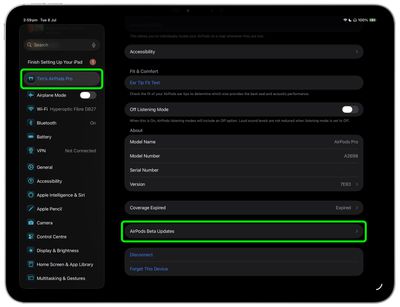
  1. Connect your AirPods to your iPhone or iPad, then open Settings ➝ [Your Name]'s AirPods.
  2. Scroll to the bottom of the menu and select AirPods Beta Updates.
    settings

  3. Toggle the switch next to AirPods Beta Updates to the green ON position.
    settings

After you've completed these steps, the firmware update will be installed automatically when your AirPods are in their charging case and near to your iPhone/iPad/Mac. This could take anywhere from a few seconds to several minutes, so be patient.

Enabling Camera Remote

After updating the firmware of your AirPods 4 or AirPods Pro 2, you can enable and configure the Camera Remote feature:

  1. Connect your AirPods to your iPhone, then open Settings.
  2. Tap your AirPods name under the Apple Account banner.
  3. Scroll down to "Camera Control", then tap Camera Remote.
  4. Choose your preferred gesture: Press Once or Press and Hold.
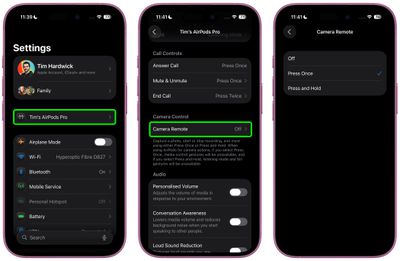
settings

The "Press Once" option responds to a single tap on your AirPods stem, while "Press and Hold" requires you to maintain pressure on the stem to activate the camera.

Using Camera Remote

Once enabled, the feature works seamlessly with the built-in Camera app. Wearing at least one paired AirPod, simply open the Camera app and select either Photo or Video mode, then frame your shot as you normally would. When you're ready to capture, use your chosen AirPods gesture to trigger the camera remotely.

camera ios 26 e1756384193773
When taking photos, your selected gesture triggers a 3-second countdown, after which the camera captures a burst of 10 photos. This gives you multiple shots to choose from, increasing your chances of getting the perfect image. When shooting video, the gesture starts and stops video recording, functioning much like a wireless record button.

The Camera Remote feature works at any distance within your AirPods' Bluetooth range, making it handy for wide-angle shots and creative photography where you need to be some distance away from your device.

And that's it. iOS 26 also brings additional AirPods features and improvements like auto-pause audio when asleep and improved call quality. A general release of iOS 26 is expected around mid-September.


Related Roundups: AirPods 4, AirPods Pro 3
Related Forum: AirPods

Top Rated Comments

mrmax86 Avatar
17 weeks ago
But then you're wearing AirPods in the picture...what am I missing here?
Score: 4 Votes (Like | Disagree)
jayducharme Avatar
17 weeks ago

But then you're wearing AirPods in the picture...what am I missing here?
You're wearing AirPods, and the photo will be of you with a hand on your ear. I don't see how this can be called "hands-free".
Score: 3 Votes (Like | Disagree)
Hank001 Avatar
17 weeks ago
You can already take a photo handsfree, without any special software. Simply tell Siri to turn the volume up. There was even an article about it on this very site ('https://www.macrumors.com/how-to/remotely-control-iphone-camera-no-apple-watch/'). Bit strange that the journalist, sorry, author of the article doesn't search the archives before writing and posting.
Score: 3 Votes (Like | Disagree)
Imperial926 Avatar
17 weeks ago

You're wearing AirPods, and the photo will be of you with a hand on your ear. I don't see how this can be called "hands-free".
Read the article - pressing the AirPods starts a countdown so you have time to move your hand away.
Score: 2 Votes (Like | Disagree)
BGPL Avatar
17 weeks ago
Why. Scrapin' the bottom of the idea barrel. Sure saves a lot of time not having to push the pesky volume button with my finger that's already next to it.
Score: 1 Votes (Like | Disagree)
freezelighter Avatar
17 weeks ago
In Q4 2025, I expect cameras to be controlled by thought, through neuralink or at least gestures.
Score: 1 Votes (Like | Disagree)

Popular Stories

Apple Wallet ID Illinois

Apple Plans to Expand iPhone Driver's Licenses to These 7 U.S. States

Wednesday December 24, 2025 8:40 am PST by
In select U.S. states, residents can add their driver's license or state ID to the Apple Wallet app on the iPhone and Apple Watch, and then use it to display proof of identity or age at select airports and businesses, and in select apps. The feature is currently available in 13 U.S. states and Puerto Rico, and it is expected to launch in at least seven more in the future. To set up the...
iPhone Top Left Hole Punch Face ID Feature Purple

iPhone 18 Pro Launching Next Year With These 12 New Features

Tuesday December 23, 2025 8:36 am PST by
While the iPhone 18 Pro and iPhone 18 Pro Max are not expected to launch for another nine months, there are already plenty of rumors about the devices. Below, we have recapped 12 features rumored for the iPhone 18 Pro models. The same overall design is expected, with 6.3-inch and 6.9-inch display sizes, and a "plateau" housing three rear cameras Under-screen Face ID Front camera in...
iOS 26

iOS 26.2 Adds These 8 New Features to Your iPhone

Monday December 22, 2025 8:47 am PST by
Earlier this month, Apple released iOS 26.2, following more than a month of beta testing. It is a big update, with many new features and changes for iPhones. iOS 26.2 adds a Liquid Glass slider for the Lock Screen's clock, offline lyrics in Apple Music, and more. Below, we have highlighted a total of eight new features. Liquid Glass Slider on Lock Screen A new slider in the Lock...
maxresdefault

Where's the New Apple TV?

Monday December 22, 2025 11:30 am PST by
Apple hasn't updated the Apple TV 4K since 2022, and 2025 was supposed to be the year that we got a refresh. There were rumors suggesting Apple would release the new Apple TV before the end of 2025, but it looks like that's not going to happen now. Subscribe to the MacRumors YouTube channel for more videos. Bloomberg's Mark Gurman said several times across 2024 and 2025 that Apple would...
maxresdefault

10 Mac Apps Worth Trying in 2026

Wednesday December 24, 2025 9:27 am PST by
2026 is almost upon us, and a new year is a good time to try out some new apps. We've rounded up 10 excellent Mac apps that are worth checking out. Subscribe to the MacRumors YouTube channel for more videos. Alt-Tab (Free) - Alt-Tab brings a Windows-style alt + tab thumbnail preview option to the Mac. You can see a full window preview of open apps and app windows. One Thing (Free) -...
Foldable iPhone 2023 Feature Iridescent Search

Samsung Developing 'Wide Fold' With iPhone Fold-Like Design Ahead of Apple's 2026 Launch

Tuesday December 23, 2025 11:55 am PST by
Samsung is working on a new foldable smartphone that's wider and shorter than the models that it's released before, according to Korean news site ETNews. The "Wide Fold" will compete with Apple's iPhone Fold that's set to launch in September 2026. Samsung's existing Galaxy Z Fold7 display is 6.5 inches when closed, and 8 inches when open, with a 21:9 aspect ratio when folded and a 20:18...
iOS 26

iOS 26.3 Brings AirPods-Like Pairing to Third-Party Devices in EU Under DMA

Monday December 22, 2025 3:20 pm PST by
The European Commission today praised the interoperability changes that Apple is introducing in iOS 26.3, once again crediting the Digital Markets Act (DMA) with bringing "new opportunities" to European users and developers. The Digital Markets Act requires Apple to provide third-party accessories with the same capabilities and access to device features that Apple's own products get. In iOS...
iphone fold 3d print

Have a 3D Printer? You Can Make Your Own iPhone Fold Dummy

Tuesday December 23, 2025 1:31 pm PST by
Apple is working on a foldable iPhone that's set to come out in September 2026, and rumors suggest that it will have a display that's around 5.4 inches when closed and 7.6 inches when open. Exact measurements vary based on rumors, but one 3D designer has created a mockup based on what we've heard so far. On MakerWorld, a user named Subsy has uploaded a 1:1 iPhone Fold replica (via Macworld), ...
iPhone SE Cosmopolitan Clean

Apple Discontinued These 25 Products This Year

Wednesday December 24, 2025 7:24 am PST by
With the end of 2025 near, the time has come to look back at the devices and accessories that Apple discontinued throughout the year. Most of the products that were discontinued this year were simply replaced by a new model with an updated chip. However, the iPhone SE line was entirely discontinued when the iPhone 16e launched, and the iPhone Plus line is being phased out. Below, we have...