

iOS 18 overhauls the Control Center by letting you reorder, resize, and remove buttons, access a controls gallery, and add multiple screens, moving away from the single-screen layout of recent years. In this article we are going to show you how you can create dedicated pages for various control types, such as connectivity, HomeKit devices, and Accessibility options.
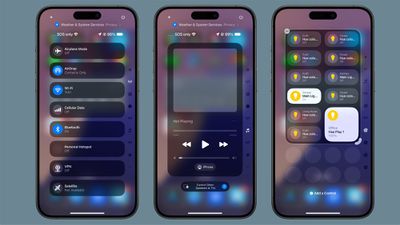
The new Control Center comes pre-configured with multiple default pages, which you can freely customize, add to, or remove. The system accommodates up to 15 separate screens, offering unprecedented flexibility when compared to previous versions of iOS.
Navigation between these pages is easy. You can swipe up and down through Control Center, tap small icons on the right side of the display, or hold and scrub through these icons for quick access. The following steps explain how to add additional pages to your Control Center.
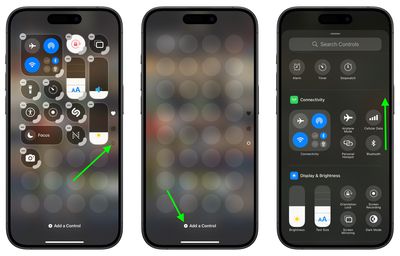
- Swipe down from the top-right corner of the screen to launch Control Center.
- Tap the circle icon at the bottom of the icon list, which indicates a new blank page.
- Tap Add a Control to open the Controls Gallery.
- Use the search field at the top, or browse the controls with a finger scroll to find the control that you want to include on the page, then tap it.

- Using the corner anchor, drag with your finger to expand the control if you wish.
- When finished, tap a space on the page to exit editing mode.
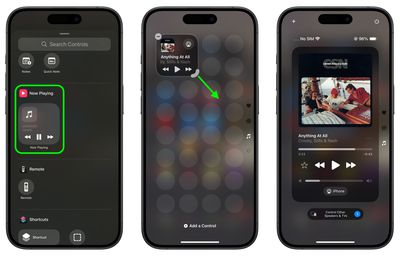
Control Center intelligently assigns icons to each page based on its content. When controls exceed the available space on a page, or if a resized control becomes too large, Control Center automatically creates a new page and relocates the excess controls. Bear in mind that the option to create a new page only appears when an existing page is approximately half full, ensuring adequate spacing between icons and maintaining a clean, organized layout.
iOS 18 and iPadOS 18 are currently in beta and expected to go on general release around mid-September.






















Top Rated Comments
And with ever-growing size of displays, it is getting more and more difficult to reach the top corner to access the Control Center.