

In iOS 26, Apple has added new call filtering options to FaceTime. You can still silence unknown callers, but you can now have missed calls and voicemails from unsaved numbers sorted into an Unknown Callers list that's hidden from view unless you select it.

Enable FaceTime Call Filtering
Call filtering for FaceTime is opt-in, so if you often get calls from unknown numbers, you can turn it on. The following steps show you how it's done.
- Open the Settings app on your iPhone or iPad.
- Scroll to the bottom and select Apps.
- Select FaceTime from the alphabetical list.
- In the "Call Filtering" section, toggle on Unknown Callers.
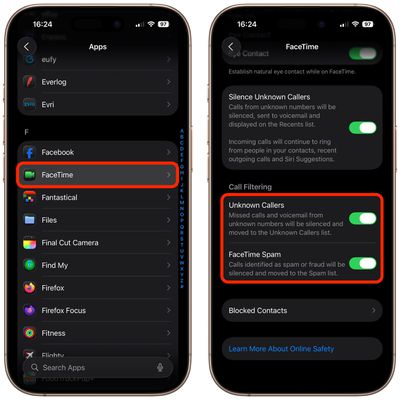
Note that you can toggle on FaceTime Spam in the same "Call Filtering" section of FaceTime's settings. Calls that are identified as spam will be silenced and automatically added to a new Spam list.
Access Unknown Callers List
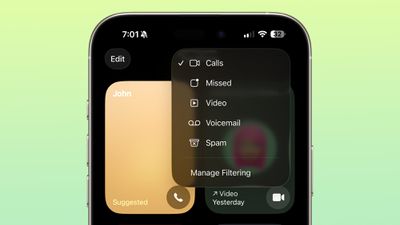
In the FaceTime app, you can get to the different filtered sections by tapping on the menu button in the upper right of the app. Sections include Calls, Missed, Video, Voicemail, Unknown Callers, and Spam. If you haven't had calls from unknown callers, this option won't appear in the menu.
In iOS 26, the Sensitive Content Warning and Communication Safety features are also available for FaceTime video calls. You can learn more about them in our dedicated how-to.

















