

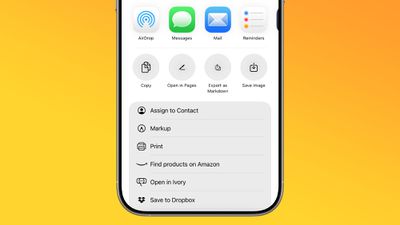
In iOS 26, currently in beta, Apple Notes has gained new Markdown support, letting you seamlessly import and export files in the popular plain-text formatting language. Whether you're a developer, writer, or content creator, this long-awaited feature should bridge the gap between your existing Markdown workflow and Apple's native note-taking app.
ios 26 notes app markdown
For those unfamiliar with Markdown, it's a simple way of writing that uses plain text symbols (like ** for bold or # for headings) to format documents without complicated menus. It's popular because the same text works both as easy-to-read notes and as polished, styled content when exported.

In Apple's Notes app, the new functionality works both ways: you can bring existing Markdown files into Notes while preserving formatting like headings, links, and lists, or export your Notes content as Markdown for use in other apps. The following steps show you how to do both.

Bear in mind that Notes doesn't display Markdown syntax while you're writing – it continues to show rich text formatting as usual. The Markdown conversion happens during the import and export process, so you'll see the plain text formatting only when viewing the file outside of Notes.

Import Markdown Files into Notes

  1. Locate your Markdown (.md) file on your iPhone (e.g., in Files or your writing app).
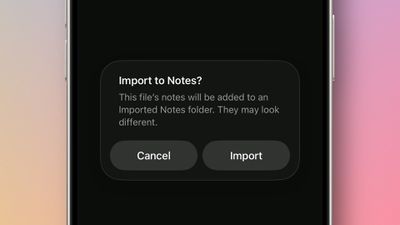
  2. Open the file, tap Share, then choose Notes.
  3. Tap Import at the prompt to save the file to an Imported Notes folder.
import markdown notes ios

If you're working in the Notes app on an iPad running iPadOS 26, you can also choose File ➝ Import to Notes… from the Notes menu bar (accessed with a swipe down from the top of the screen). Select your Markdown file from the files interface, then tap Import to confirm the import.

Once the note is imported, look for the Imported Notes folder where your note will be saved. Then you can verify that key formatting has been preserved in the note. When you import a Markdown file, Notes automatically converts the plain text formatting into rich text, preserving headings, links, bulleted lists, and text styling like bold and italics.

Export Notes in Markdown Format

  1. In Notes, open the note you want to export.
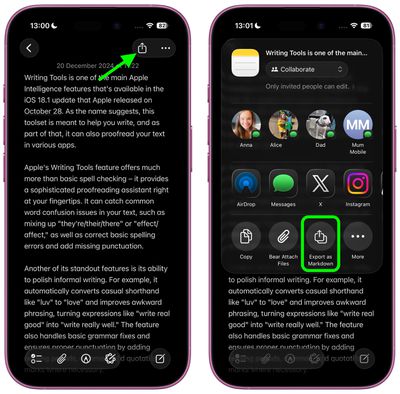
  2. Tap the Share icon in the top-right corner.
  3. Select Export as Markdown.
  4. Choose where to share or save the markdown file from the share sheet options.
settings

The exported file retains the note's structure and formatting as standard Markdown syntax, making it compatible with text editors, documentation tools, and publishing platforms that support the format.

Apple is expected to officially release iOS 26 in September.

Top Rated Comments

TheDailyApple Avatar
16 weeks ago

I'm glad they're doing this for interoperability, but on a practical level I only care to use Markdown when I can hide the cluttery _formatting_ *characters* as much as possible. Conceptually, I think Markdown is very elegant, but I don't want to have the "how the sausage is made" part in my face all the time. I use Ulysses a lot and it does let me dial down the color of the Markdown so it's not visible, but it still junks up the spacing and flow of text. I have used another app (forgetting the name) which optionally will entirely hide Markdown tags, and I think that's the best way to go IMO.
I highly recommend Obsidian. It completely hides the markdown formatting characters, and is generally one of the more elegant applications I've used. It's also free.
Score: 5 Votes (Like | Disagree)
ignatius345 Avatar
16 weeks ago

Can we finally bulk export notes?
Just tested this. In the Tahoe beta, you can multiple select notes and export to PDF or Markdown. The individual exported notes appear as separate files within a folder.
Score: 5 Votes (Like | Disagree)
MakeAppleAwesomeAgain Avatar
17 weeks ago
Quite funny that this is the year they added Markdown support but ditched John Gruber as interviewer ?
Score: 3 Votes (Like | Disagree)
novagamer Avatar
16 weeks ago

Here's what I get:


BTW, I'm finding running the beta in a virtual machine is a nice way to play around with it without subjecting my Mac to potential bugs. VirtualBuddy is very easy for this (and free).
Maybe my input didn’t have the spaces, thank you!! I will try this later. Much appreciated. :)

edit: works great. Huge time saver, this might be my favorite iOS26 feature.
Score: 1 Votes (Like | Disagree)
Korb3n_Dallas Avatar
17 weeks ago
What is nice for all the people who use discord is we can format messages in notes and then export it in markup for discord posts.
Score: 1 Votes (Like | Disagree)
ignatius345 Avatar
17 weeks ago
I'm glad they're doing this for interoperability, but on a practical level I only care to use Markdown when I can hide the cluttery _formatting_ *characters* as much as possible. Conceptually, I think Markdown is very elegant, but I don't want to have the "how the sausage is made" part in my face all the time. I use Ulysses a lot and it does let me dial down the color of the Markdown so it's not visible, but it still junks up the spacing and flow of text. I have used another app (forgetting the name) which optionally will entirely hide Markdown tags, and I think that's the best way to go IMO.
Score: 1 Votes (Like | Disagree)

Popular Stories

Apple Wallet ID Illinois

Apple Plans to Expand iPhone Driver's Licenses to These 7 U.S. States

Wednesday December 24, 2025 8:40 am PST by
In select U.S. states, residents can add their driver's license or state ID to the Apple Wallet app on the iPhone and Apple Watch, and then use it to display proof of identity or age at select airports and businesses, and in select apps. The feature is currently available in 13 U.S. states and Puerto Rico, and it is expected to launch in at least seven more in the future. To set up the...
iPhone Top Left Hole Punch Face ID Feature Purple

iPhone 18 Pro Launching Next Year With These 12 New Features

Tuesday December 23, 2025 8:36 am PST by
While the iPhone 18 Pro and iPhone 18 Pro Max are not expected to launch for another nine months, there are already plenty of rumors about the devices. Below, we have recapped 12 features rumored for the iPhone 18 Pro models. The same overall design is expected, with 6.3-inch and 6.9-inch display sizes, and a "plateau" housing three rear cameras Under-screen Face ID Front camera in...
maxresdefault

Where's the New Apple TV?

Monday December 22, 2025 11:30 am PST by
Apple hasn't updated the Apple TV 4K since 2022, and 2025 was supposed to be the year that we got a refresh. There were rumors suggesting Apple would release the new Apple TV before the end of 2025, but it looks like that's not going to happen now. Subscribe to the MacRumors YouTube channel for more videos. Bloomberg's Mark Gurman said several times across 2024 and 2025 that Apple would...
maxresdefault

10 Mac Apps Worth Trying in 2026

Wednesday December 24, 2025 9:27 am PST by
2026 is almost upon us, and a new year is a good time to try out some new apps. We've rounded up 10 excellent Mac apps that are worth checking out. Subscribe to the MacRumors YouTube channel for more videos. Alt-Tab (Free) - Alt-Tab brings a Windows-style alt + tab thumbnail preview option to the Mac. You can see a full window preview of open apps and app windows. One Thing (Free) -...
iOS 26

iOS 26.2 Adds These 8 New Features to Your iPhone

Monday December 22, 2025 8:47 am PST by
Earlier this month, Apple released iOS 26.2, following more than a month of beta testing. It is a big update, with many new features and changes for iPhones. iOS 26.2 adds a Liquid Glass slider for the Lock Screen's clock, offline lyrics in Apple Music, and more. Below, we have highlighted a total of eight new features. Liquid Glass Slider on Lock Screen A new slider in the Lock...
airpods color prototypes

Apple Tested AirPods in Bright Colors

Saturday December 27, 2025 6:06 am PST by
Apple reportedly tested a version of the first-generation AirPods with bright, iPhone 5c-like colored charging cases. The images, shared by the Apple leaker and prototype collector known as "Kosutami," claim to show first-generation AirPods prototypes with pink and yellow exterior casings. The interior of the charging case and the earbuds themselves remain white. They seem close to some...
iPhone Fold Vertical Feature

Why Apple's Foldable iPhone May Be Smaller Than Expected

Tuesday December 23, 2025 5:21 am PST by
Apple's first foldable iPhone, rumored for release next year, may turn out to be smaller than most people imagine, if a recent report is anything to go by. According to The Information, the outer display on the book-style device will measure just 5.3 inches – that's smaller than the 5.4-inch screen on the ‌iPhone‌ mini, a line Apple discontinued in 2022 due to poor sales. The report has led ...
Foldable iPhone 2023 Feature Iridescent Search

Samsung Developing 'Wide Fold' With iPhone Fold-Like Design Ahead of Apple's 2026 Launch

Tuesday December 23, 2025 11:55 am PST by
Samsung is working on a new foldable smartphone that's wider and shorter than the models that it's released before, according to Korean news site ETNews. The "Wide Fold" will compete with Apple's iPhone Fold that's set to launch in September 2026. Samsung's existing Galaxy Z Fold7 display is 6.5 inches when closed, and 8 inches when open, with a 21:9 aspect ratio when folded and a 20:18...
iPhone SE Cosmopolitan Clean

Apple Discontinued These 25 Products This Year

Wednesday December 24, 2025 7:24 am PST by
With the end of 2025 near, the time has come to look back at the devices and accessories that Apple discontinued throughout the year. Most of the products that were discontinued this year were simply replaced by a new model with an updated chip. However, the iPhone SE line was entirely discontinued when the iPhone 16e launched, and the iPhone Plus line is being phased out. Below, we have...

















