Mac OS X 10Apple's native Mail application in macOS lacks a specific option for enabling out-of-office replies, but there is another way you can set them up on a Mac, and that's with Rules. It's worth bearing in mind at the outset that your Mac needs to be powered on for this out-of-office method to work. That's because Apple Mail rules are only applied locally to incoming emails, and aren't active on the server side.

If you're looking for a longer term out-of-office solution, you'll want to check out Vacation mode in iCloud Mail, which we cover in the second part of this tutorial.

How to Create an Out-of-Office Reply Using Mail Rules

  1. Launch the Apple Mail app.

  2. From the menu bar, select Mail -> Preferences....

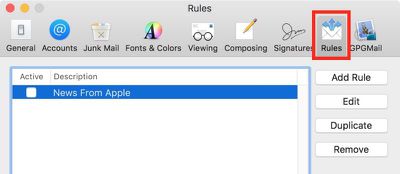
  3. Select the Rules tab.
    Rules Mail e1519290131337

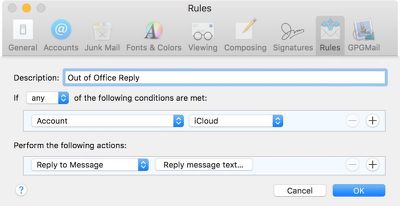
  4. In the Rules dialog box that appears, click the Add Rule button and give the rule an identifiable description, such as "Out of Office Reply".

  5. Leave the default "any" selection in "If any of the following conditions are met".

  6. For the initial condition, select Account from the first dropdown menu, and then choose the email account that you want your out-of-office rule to apply to from the condition's second dropdown menu.

  7. In the second condition under "Perform the following actions:", select Reply to Message from the dropdown menu.
    Add Rule Mail e1519290288872

  8. Now click Reply message text....

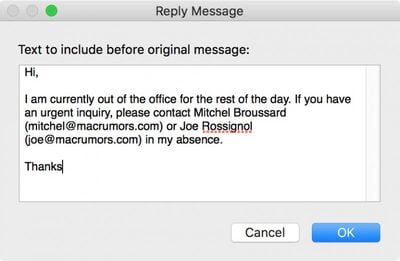
  9. In the input window that appears, type the text you want to appear in the automatic response email that will be sent when you're away.
    out of office rule text

  10. Click OK to close the input window when you're done.

  11. Click OK to close the Rules dialog box.

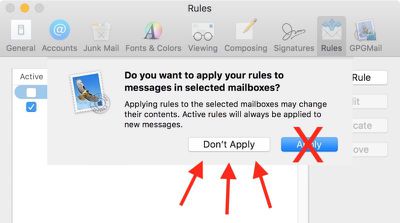
  12. WARNING! At this point, Apple Mail will ask if you want to apply the new rule to existing messages in your mailbox. Be very sure to respond to this question with a negative. In other words, click Do Not Apply, for the simple reason that clicking the alternative "Apply" option will cause Mail to send the automatic reply to all the messages currently sitting in your inbox, and you don't want that!Screen Shot 3 2 e1519290796563

  13. Your out-of-office reply rule is now active. Leave things as they are and keep your Mac on, and all incoming messages to that account will be responded to automatically. To make the out-of-office reply inactive upon your return, simply uncheck the box next to the said rule. The next time you're away, simply check the box again to reactivate it.
And that's it. It's worth noting that you can tweak the rule's conditions to suit your needs – so that the out-of-office reply is only sent out to specific people, or only in response to emails with certain subjects, for example.

How to Set Up Out-of-Office replies in iCloud Mail

Unlike Apple Mail in macOS, ‌iCloud‌ Mail has a dedicated out-of-office feature called Vacation mode that you can enable remotely from any web browser.

For obvious reasons, Vacation mode will only be useful to you if you have an ‌iCloud‌ email address. Other account holders looking for an out-of-office solution are better off using a third-party email client such as Mozilla Thunderbird. And with that caveat, here's how to get Vacation mode in ‌iCloud‌ Mail up and running.

  1. Open a browser and navigate to www.icloud.com.

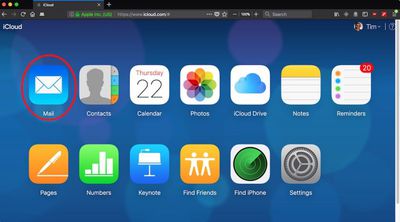
  2. Log in using your ‌iCloud‌ credentials and then click on the Mail icon.
    icloud mail

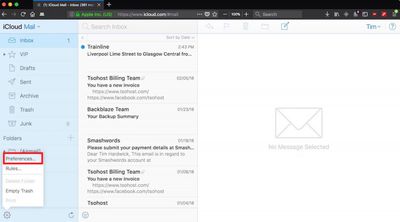
  3. When your Mail screen loads, click the cog icon in the lower left corner of the window and select Preferences... from the popup menu.
    Screen Shot 7

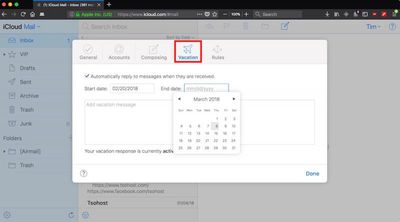
  4. Click the Vacation tab and check the box next to "Automatically reply to messages when they are received".
    Screen Shot 6

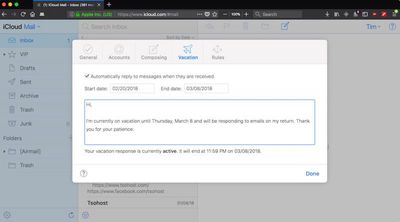
  5. Using the calendar dropdowns, click on a Start date and an End date between which you'd like your out-of-office replies to remain active.

  6. Lastly, enter the text of your automatic reply into the input box, and then click Done.Screen Shot 8
Tag: iCloud

Top Rated Comments

Mefisto Avatar
102 months ago
Who needs to do this in 2018?

Almost anywhere you go, you’ll have internet access and be able to read email.
And? If there's no reply, people expect (at least in my case) that I've read, and will reply to their email. An automated response tells them not to wait, and that I will get back to them at my convenience, or at a specific date. And I'll be damned if I'm reading, let alone replying to work emails while on vacation, for example. This feature get's around all that quite nicely.

I struggle to see what the current year has to do with it, but then again I'm getting a feeling I'm completely misunderstanding your post anyway so...

Any rules you set up in mail.app should absolutely be sent to the iCloud server and applied server side. Shows a huge and obvious gap in functionality.
100% agreed.
Score: 7 Votes (Like | Disagree)
Stella Avatar
102 months ago
Any rules you set up in mail.app should absolutely be sent to the iCloud server and applied server side. Shows a huge and obvious gap in functionality.
Score: 5 Votes (Like | Disagree)
Dthare Avatar
102 months ago
The first sentence if this article is wrong.

You say that the 10.13 apple mail client has no specific way to put on out of office but it does.

The option is in the mailbox porperties

Right click the mailbox on the left hand panel > Select Properties > Select the out of office tab.

This means you don’t have to set a rule that is relient on the machine and apple mail client being open.

The method i described sets a server side rule so it works all the time and is the correct way to do this
Score: 3 Votes (Like | Disagree)
TheralSadurns Avatar
102 months ago
Mac mail is horrible - I still want to know why I cant delete all emails via ipad or iphone, without doing some stupid trick. Talk about annoying and inefficient.
Sorry... but... lol.

Apple Mail on macOS and iOS are different applications, first of all. So saying the Mac app Sucks, because on your phone you cannot delete things... makes no sense. So whixh App are you talking about?! My fridge can also not mow my lawn.

Second... I guess you mean you have one email address... and receive your mails on iPhone, iPad, and your Mac. If you have an IMAP account or set it up as such on all devices then deleting an email on ONE will delete it on ALL devices. Always.
If you set it up as POP (and some let you use either IMAP or POP) then the different devices dont know of one another and actions like deletions are NOT synced.

BUT, and this is A BIG BUT:
This has ZERO absolutely ZERO to do with Apple Mail. ALL Email applications will work exactly the same way. Windows software included.


I am not saying that Mail is perfect (altho stuff like Mail Drop, and Automatik shrinking of images is awesome!!!). But what you complain about has nothing to do with Apple Mail!
Score: 2 Votes (Like | Disagree)
MacDawg Avatar
102 months ago
I want to know when Apple is going to fix the Zombie Email problem.
Deleted emails still keep coming back from the dead regardless of whether you mark them as spam or delete them.
This has turned into a years long running joke.
Have literally never had this happen to me, and honestly it is the first time I've heard of it
Could be a widespread problem, but not something I have ever encountered

Mac mail is horrible - I still want to know why I cant delete all emails via ipad or iphone, without doing some stupid trick. Talk about annoying and inefficient.
As mentioned above, this is iOS you are talking about and not Mac Mail
But maybe you could explain a little more... are you trying to do a mass delete, or are emails not deleting from other devices?
What exactly is the problem?
Score: 2 Votes (Like | Disagree)
timmyh Avatar
102 months ago
The first sentence if this article is wrong.

You say that the 10.13 apple mail client has no specific way to put on out of office but it does.

The option is in the mailbox porperties

Right click the mailbox on the left hand panel > Select Properties > Select the out of office tab.

This means you don’t have to set a rule that is relient on the machine and apple mail client being open.

The method i described sets a server side rule so it works all the time and is the correct way to do this
I believe this is only for Exchange-based corporate servers. Surprisingly, Apple Mail still doesn’t provide a native option for out of office.
Score: 2 Votes (Like | Disagree)

Popular Stories

Apple Wallet ID Illinois

Apple Plans to Expand iPhone Driver's Licenses to These 7 U.S. States

Wednesday December 24, 2025 8:40 am PST by
In select U.S. states, residents can add their driver's license or state ID to the Apple Wallet app on the iPhone and Apple Watch, and then use it to display proof of identity or age at select airports and businesses, and in select apps. The feature is currently available in 13 U.S. states and Puerto Rico, and it is expected to launch in at least seven more in the future. To set up the...
iPhone Top Left Hole Punch Face ID Feature Purple

iPhone 18 Pro Launching Next Year With These 12 New Features

Tuesday December 23, 2025 8:36 am PST by
While the iPhone 18 Pro and iPhone 18 Pro Max are not expected to launch for another nine months, there are already plenty of rumors about the devices. Below, we have recapped 12 features rumored for the iPhone 18 Pro models. The same overall design is expected, with 6.3-inch and 6.9-inch display sizes, and a "plateau" housing three rear cameras Under-screen Face ID Front camera in...
iOS 26

iOS 26.2 Adds These 8 New Features to Your iPhone

Monday December 22, 2025 8:47 am PST by
Earlier this month, Apple released iOS 26.2, following more than a month of beta testing. It is a big update, with many new features and changes for iPhones. iOS 26.2 adds a Liquid Glass slider for the Lock Screen's clock, offline lyrics in Apple Music, and more. Below, we have highlighted a total of eight new features. Liquid Glass Slider on Lock Screen A new slider in the Lock...
maxresdefault

Where's the New Apple TV?

Monday December 22, 2025 11:30 am PST by
Apple hasn't updated the Apple TV 4K since 2022, and 2025 was supposed to be the year that we got a refresh. There were rumors suggesting Apple would release the new Apple TV before the end of 2025, but it looks like that's not going to happen now. Subscribe to the MacRumors YouTube channel for more videos. Bloomberg's Mark Gurman said several times across 2024 and 2025 that Apple would...
maxresdefault

10 Mac Apps Worth Trying in 2026

Wednesday December 24, 2025 9:27 am PST by
2026 is almost upon us, and a new year is a good time to try out some new apps. We've rounded up 10 excellent Mac apps that are worth checking out. Subscribe to the MacRumors YouTube channel for more videos. Alt-Tab (Free) - Alt-Tab brings a Windows-style alt + tab thumbnail preview option to the Mac. You can see a full window preview of open apps and app windows. One Thing (Free) -...
Foldable iPhone 2023 Feature Iridescent Search

Samsung Developing 'Wide Fold' With iPhone Fold-Like Design Ahead of Apple's 2026 Launch

Tuesday December 23, 2025 11:55 am PST by
Samsung is working on a new foldable smartphone that's wider and shorter than the models that it's released before, according to Korean news site ETNews. The "Wide Fold" will compete with Apple's iPhone Fold that's set to launch in September 2026. Samsung's existing Galaxy Z Fold7 display is 6.5 inches when closed, and 8 inches when open, with a 21:9 aspect ratio when folded and a 20:18...
iOS 26

iOS 26.3 Brings AirPods-Like Pairing to Third-Party Devices in EU Under DMA

Monday December 22, 2025 3:20 pm PST by
The European Commission today praised the interoperability changes that Apple is introducing in iOS 26.3, once again crediting the Digital Markets Act (DMA) with bringing "new opportunities" to European users and developers. The Digital Markets Act requires Apple to provide third-party accessories with the same capabilities and access to device features that Apple's own products get. In iOS...
iphone fold 3d print

Have a 3D Printer? You Can Make Your Own iPhone Fold Dummy

Tuesday December 23, 2025 1:31 pm PST by
Apple is working on a foldable iPhone that's set to come out in September 2026, and rumors suggest that it will have a display that's around 5.4 inches when closed and 7.6 inches when open. Exact measurements vary based on rumors, but one 3D designer has created a mockup based on what we've heard so far. On MakerWorld, a user named Subsy has uploaded a 1:1 iPhone Fold replica (via Macworld), ...
iPhone SE Cosmopolitan Clean

Apple Discontinued These 25 Products This Year

Wednesday December 24, 2025 7:24 am PST by
With the end of 2025 near, the time has come to look back at the devices and accessories that Apple discontinued throughout the year. Most of the products that were discontinued this year were simply replaced by a new model with an updated chip. However, the iPhone SE line was entirely discontinued when the iPhone 16e launched, and the iPhone Plus line is being phased out. Below, we have...