

Starting in iOS 17, iPadOS 17, and macOS Sonoma, Safari can remove tracking parameters from URLs in order to prevent cross-website tracking. Keep reading to learn how it works and how to control the setting for both Private and non-Private Browsing modes.

Apple has updated Safari in its latest operating systems so that now it can remove tracking parameters in web addresses. When a tracking parameter is detected while browsing or copying a link, Safari strips the identifying components of the URL, while leaving the rest intact. The links still work as expected, but no longer have unique identifiers.
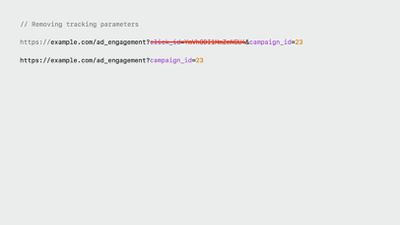
Example of a URL before and after the tracking parameters are removed
Apple calls this new feature Advanced Tracking and Fingerprinting Protection, and it also works for links shared in Apple's Messages and Mail apps. The following series of steps show you how to enable the feature for all browsing in Safari on iPhone, iPad, and macOS Sonoma. Turning it on will ensure that all URLs opened will strip the additional tracking information that's sometimes pasted on to the end of a URL.
How to Remove All URL Tracking in Safari on iPhone and iPad
- Launch the Settings app on your device.
- Scroll down and tap Safari.
- Scroll all the way down and tap Advanced.
- Under "Privacy," tap Advanced Tracking and Fingerprint Protection.
- Tap All Browsing.
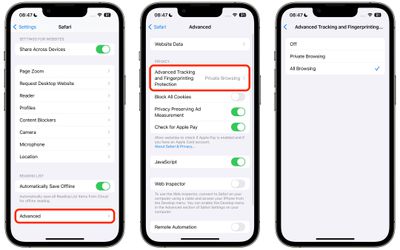
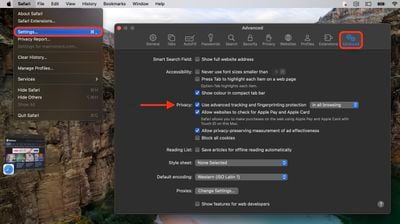
How to Remove All URL Tracking in Safari on Mac
- Launch Safari on your Mac.
- Select Safari -> Settings... in the menu bar.
- Click the Advanced tab.
- Make sure the box is checked next to Use advanced tracking and fingerprint protection, then choose in all browsing from the dropdown menu.
In iOS 17, Apple also added a secondary authentication requirement to access Private Browsing tabs. Click the link to learn how it works.
Tag: Safari





















