

In iOS 16, Apple has brought some welcome updates to its stock Messages app. One of these is the ability to report SMS/MMS messages as junk. Keep reading to learn how it works.
In iOS 16, Apple has added the ability to report SMS/MMS messages as junk in the Messages app. This represents an expansion of the built-in "Report Junk" feature in Messages that previously only let you report blue bubble iMessages.
Now you can use the same option to report an SMS/MMS message as junk, which will alert Apple and your network provider and delete the message in question.
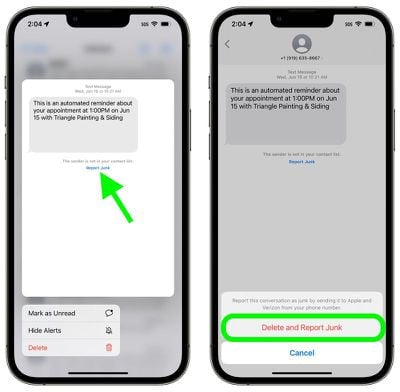
To report a message from an unknown sender as junk on an iPhone or iPad running iOS 16 or iPadOS 16, simply navigate to the message and tap the blue Report Junk option that appears below it. Then simply tap Delete and Report Junk in the pop-over to confirm.





















