iOS 26 gives you two distinct ways to add websites to your iPhone's Home screen – as web apps or traditional bookmarks. They might look similar at first glance, but choosing the right option can dramatically improve how you access your favorite sites.
Add to Home Screen dark scaled

Understanding the Difference

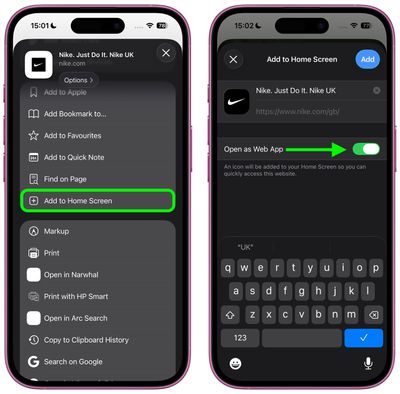
When you add a website to your Home screen using the "Add to Home Screen" option, iOS 26 allows the website to be opened as a web app. The update introduces a new feature for adding any website to the Home Screen as a web app, even if it doesn't support progressive web app (PWA) functionality.

Web apps run almost like native apps, with features like offline access, push notifications, and a streamlined interface without Safari's address bar. In contrast, traditional bookmarks simply open the website in Safari when tapped. This choice matters more than you might think. Web apps can provide a faster, more app-like experience, whereas bookmarks work better for informational sites you visit only occasionally.

Add a Web App or Bookmark to Home Screen

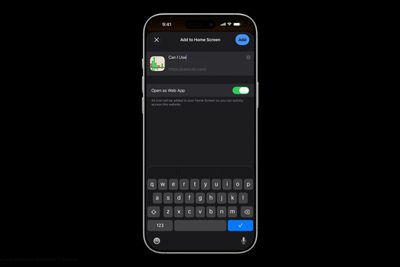
In iOS 26, Safari offers an Open as Web App toggle for all websites, even those that don't support have built-in web app support. If you want a bookmark, just switch the toggle off.

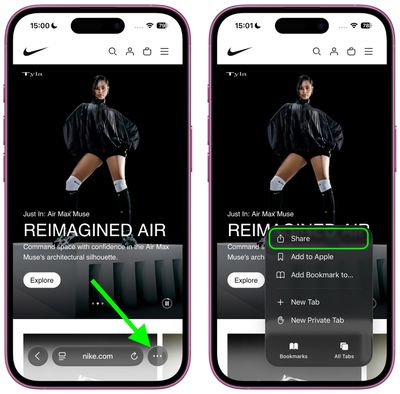
  1. Open Safari and navigate to the website you want to add.
  2. Tap the three dots to the right of Safari's address bar, then tap Share in the pop-up menu.
    safari

  3. Scroll down and tap Add to Home Screen.
  4. If the site supports web apps, you'll see the Open as Web App toggle in the dialog – switch it off if you want a bookmark instead.
  5. Customize the app name if desired, then tap Add.
    safari

Web apps appear on your Home screen with a dedicated icon, and tapping it will launch the site in its own window without Safari's browser interface. Bookmarks display with a generic website icon or the site's favicon, and tapping them opens the page in Safari.

Remove Bookmark or Web App From Home Screen

home screen
Both web apps and bookmarks can be deleted from the Home screen, much like any other app. To remove either kind, long-press the icon on your home screen, then tap Delete Bookmark (for some reason iOS doesn't differentiate the kind in this menu).

iOS 26 and iPadOS 26 are set for a general release in September 2025.

Top Rated Comments

iZac Avatar
21 weeks ago
I may be wrong, so please correct me if so - but I always believe the web version to be superior in one way; My assumption is that Safari allows less overt tracking and data collection of the user than an App Store counterpart.

My only evidence is that whenever I'm on the web version of a service, it keeps nagging me to download the App Store version for the 'best experience'
Score: 8 Votes (Like | Disagree)
flottenheimer Avatar
21 weeks ago
Locating this under 'Share' is an excellent example of how bad usability often is these days.
Score: 6 Votes (Like | Disagree)
Populus Avatar
21 weeks ago

I may be wrong, so please correct me if so - but I always believe the web version to be superior in one way; My assumption is that Safari allows less overt tracking and data collection of the user than an App Store counterpart.

My only evidence is that whenever I'm on the web version of a service, it keeps nagging me to download the App Store version for the 'best experience'
Exactly my thoughts. That’s why, for the past few years, more and more I opt for the web version of a service, especially if they offer a webapp.

If some day I install Discord, for instance, I will do so with the webapp instead of the App itself. I’m not sure how much data can the the App gather from my usage, but my guess is: more than just a sandboxed Safari tab.
Score: 4 Votes (Like | Disagree)
svish Avatar
21 weeks ago
Good to know about the change in iOS 26. Will be setting some pages as simple bookmarks.
Score: 3 Votes (Like | Disagree)
gdmedia Avatar
21 weeks ago
I wonder, if you choose the web option, will you be able to use Reader.

Right now, sometimes when you add a bookmark to your home screen, it will open as an app-like page, with no Safari address bar. This is something set up by the company that supplies the web page. Problem is, without the address bar, you cannot use Reader on that page. If you want to use Reader, you have to make a shortcut that opens that web page and put the shortcut on your home screen. When you open the page from your shortcut, it still includes the address bar and you can use reader.
Score: 2 Votes (Like | Disagree)
alayal Avatar
21 weeks ago
This is one of the best iOS 26 features, the only problems are that some web apps have horrible version of the icons and that safari on iOS don't support extensions for web apps.
Score: 2 Votes (Like | Disagree)

Popular Stories

Apple Wallet ID Illinois

Apple Plans to Expand iPhone Driver's Licenses to These 7 U.S. States

Wednesday December 24, 2025 8:40 am PST by
In select U.S. states, residents can add their driver's license or state ID to the Apple Wallet app on the iPhone and Apple Watch, and then use it to display proof of identity or age at select airports and businesses, and in select apps. The feature is currently available in 13 U.S. states and Puerto Rico, and it is expected to launch in at least seven more in the future. To set up the...
iPhone Top Left Hole Punch Face ID Feature Purple

iPhone 18 Pro Launching Next Year With These 12 New Features

Tuesday December 23, 2025 8:36 am PST by
While the iPhone 18 Pro and iPhone 18 Pro Max are not expected to launch for another nine months, there are already plenty of rumors about the devices. Below, we have recapped 12 features rumored for the iPhone 18 Pro models. The same overall design is expected, with 6.3-inch and 6.9-inch display sizes, and a "plateau" housing three rear cameras Under-screen Face ID Front camera in...
maxresdefault

Where's the New Apple TV?

Monday December 22, 2025 11:30 am PST by
Apple hasn't updated the Apple TV 4K since 2022, and 2025 was supposed to be the year that we got a refresh. There were rumors suggesting Apple would release the new Apple TV before the end of 2025, but it looks like that's not going to happen now. Subscribe to the MacRumors YouTube channel for more videos. Bloomberg's Mark Gurman said several times across 2024 and 2025 that Apple would...
maxresdefault

10 Mac Apps Worth Trying in 2026

Wednesday December 24, 2025 9:27 am PST by
2026 is almost upon us, and a new year is a good time to try out some new apps. We've rounded up 10 excellent Mac apps that are worth checking out. Subscribe to the MacRumors YouTube channel for more videos. Alt-Tab (Free) - Alt-Tab brings a Windows-style alt + tab thumbnail preview option to the Mac. You can see a full window preview of open apps and app windows. One Thing (Free) -...
iOS 26

iOS 26.2 Adds These 8 New Features to Your iPhone

Monday December 22, 2025 8:47 am PST by
Earlier this month, Apple released iOS 26.2, following more than a month of beta testing. It is a big update, with many new features and changes for iPhones. iOS 26.2 adds a Liquid Glass slider for the Lock Screen's clock, offline lyrics in Apple Music, and more. Below, we have highlighted a total of eight new features. Liquid Glass Slider on Lock Screen A new slider in the Lock...
airpods color prototypes

Apple Tested AirPods in Bright Colors

Saturday December 27, 2025 6:06 am PST by
Apple reportedly tested a version of the first-generation AirPods with bright, iPhone 5c-like colored charging cases. The images, shared by the Apple leaker and prototype collector known as "Kosutami," claim to show first-generation AirPods prototypes with pink and yellow exterior casings. The interior of the charging case and the earbuds themselves remain white. They seem close to some...
iPhone Fold Vertical Feature

Why Apple's Foldable iPhone May Be Smaller Than Expected

Tuesday December 23, 2025 5:21 am PST by
Apple's first foldable iPhone, rumored for release next year, may turn out to be smaller than most people imagine, if a recent report is anything to go by. According to The Information, the outer display on the book-style device will measure just 5.3 inches – that's smaller than the 5.4-inch screen on the ‌iPhone‌ mini, a line Apple discontinued in 2022 due to poor sales. The report has led ...
Foldable iPhone 2023 Feature Iridescent Search

Samsung Developing 'Wide Fold' With iPhone Fold-Like Design Ahead of Apple's 2026 Launch

Tuesday December 23, 2025 11:55 am PST by
Samsung is working on a new foldable smartphone that's wider and shorter than the models that it's released before, according to Korean news site ETNews. The "Wide Fold" will compete with Apple's iPhone Fold that's set to launch in September 2026. Samsung's existing Galaxy Z Fold7 display is 6.5 inches when closed, and 8 inches when open, with a 21:9 aspect ratio when folded and a 20:18...
iPhone SE Cosmopolitan Clean

Apple Discontinued These 25 Products This Year

Wednesday December 24, 2025 7:24 am PST by
With the end of 2025 near, the time has come to look back at the devices and accessories that Apple discontinued throughout the year. Most of the products that were discontinued this year were simply replaced by a new model with an updated chip. However, the iPhone SE line was entirely discontinued when the iPhone 16e launched, and the iPhone Plus line is being phased out. Below, we have...