In iOS 15, Apple has made some major improvements to Siri, and as a result the virtual assistant can now be used to control HomeKit devices at specific times.
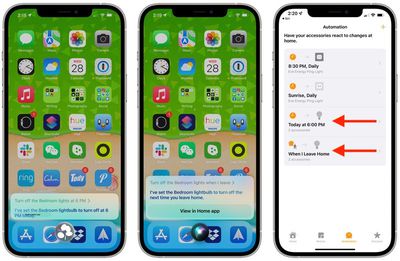
For example, if you want your blinds to open at seven o'clock the next morning, you could say, "Hey Siri, open the blinds at 7 a.m." Siri will also respond to geolocation commands, so you can say things like "Hey Siri, turn off the lights when I leave."
When you ask Siri to control a HomeKit product in this way, it creates an automation in the Home app under the "Automation" section. If you want to delete an Automation that Siri has created in the Home app, simply swipe leftwards across it and tap Delete.
HomeKit developers can also add Siri support to their products in iOS 15. However, note that using Siri commands with third-party devices requires that you own a HomePod to route the requests through.
With Siri integration, third-party HomeKit products can be controlled with Siri commands for doing things like setting reminders, controlling devices, broadcasting messages, and more.