

 Quite often when browsing the web in Safari, you'll see pop-ups asking you for permission for websites to use data about you, such as your location. There can be good reasons for this – if you're searching for local information such as the nearest grocery store or restaurant, then it makes sense for you to share your location data to get the most relevant results for your area.
On the other hand, you might visit a website that asks you for your location data for no obvious good reason, in which case it's understandable that you might be disinclined grant permission. Fortunately, there's a way to disable these location data requests altogether on both iOS devices and Macs. Keep reading to learn how it works.
How to Stop Safari Asking for Location Data in iOS
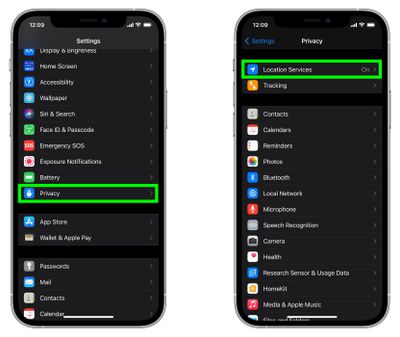
- Launch the Settings app on your iPhone or iPad.
- Scroll down and tap Privacy.
- Tap Location Services.

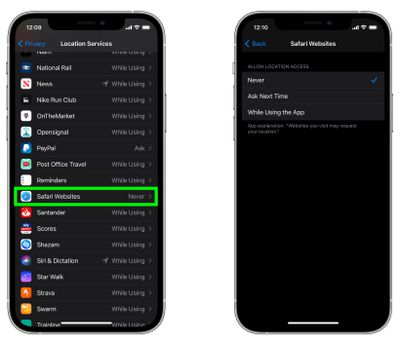
- Scroll down and tap Safari Websites.
- Tap Never.
How to Stop Safari Asking for Location Data in macOS
In Safari on Mac, the settings are a lot more fine-grained, and you can set up location request options for individual websites. Here's how to go about it.
- Launch Safari browser on your Mac.
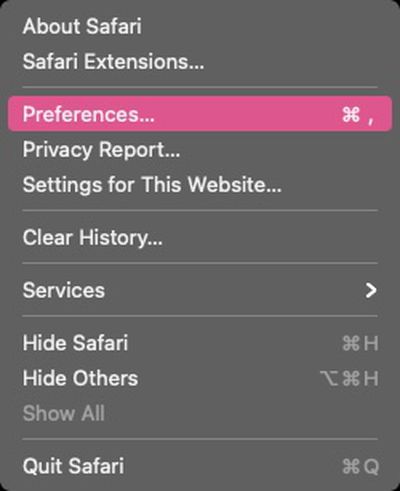
- Select Safari -> Preferences from the menu bar.
- Click the Websites tab.
- Click Location under "General" in the sidebar.
- Use the dropdown menus alongside the individual websites listed to change their location data access. You can set each one to Ask, Deny, or Allow.
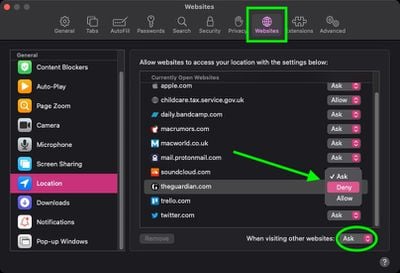
Note that you can select websites in the list and remove them, which will expose them to the global setting you choose in the When visiting other websites dropdown menu at the bottom of the window.





















