If you're looking to cut down on the amount of time you spend performing certain actions on your iPhone, there's usually a solution hidden in Apple's mobile operating system. Here are five quick iOS tips that once you start using will make you a lot more time-efficient in the long run.

This article assumes you're using an iPhone running iOS 11 or later, but some of these tips will work on iPad and earlier versions of Apple's mobile OS. Read on for more.

1. Search a Web Page

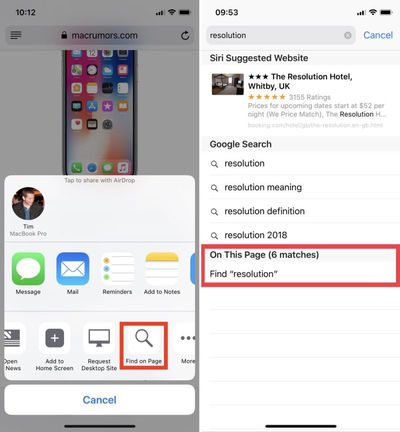
In Safari on iOS, there are two ways to search a web page for a specific word or phrase. One method is quicker than the other, although neither is necessarily immediately obvious.
search web page
The first way involves tapping the Share icon (the square with an arrow pointing out of it), sliding your finger left along the bottom column, and tapping the Find on Page button, indicated by a magnifying glass. Start typing what you're looking for, and your search results will be returned automatically.

The second, faster method is to type your search term straight into Safari's address bar and then tap the On This Page option at the bottom of the suggestion list, after which you'll be able to tap through each occurrence of the term on the current page.

2. Swipe to Delete in the Calculator
calculator delete to swipe
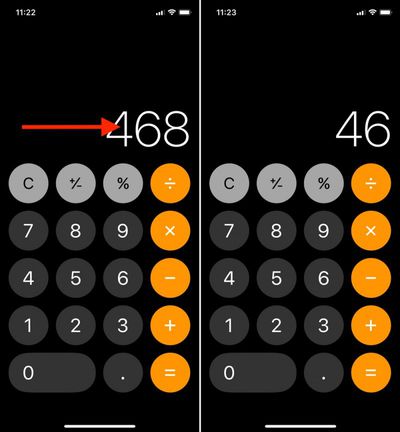
It's a common misconception that if you type the wrong number into the Calculator app, you have to start the whole sum all over again. Happily, that isn't the case: Simply swipe right or left with a finger across the number display to remove the last number you typed, and repeat the action if necessary to remove several numbers.

3. Access Deeper Control Center Options Sans 3D Touch
control center 1
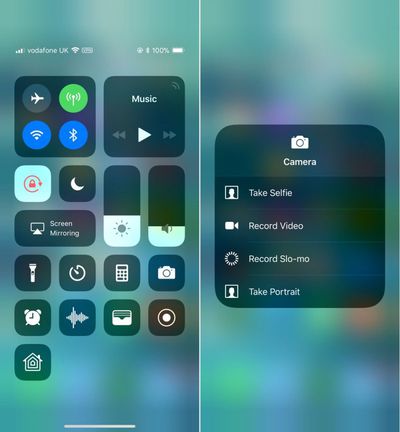
In iOS 11, the Control Center is designed to reveal deeper controls when the user hard-presses to activate 3D Touch – just try it on the camera button, for instance.

If you own an iPhone SE or an older iPhone that doesn't support 3D Touch gestures, it's still possible to access these more granular controls on any button that supports them by using a simple long press instead.

4. Quick-Switch Back From Numbers/Symbols to Letters

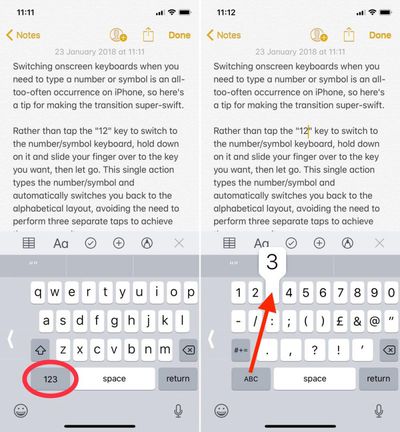
Switching onscreen keyboards when you need to type a number or symbol is an all-too-often occurrence on iPhone, so here's a tip for making the transition super-swift.
quick keyboard switch
Rather than tap the "123" key to switch to the number/symbol keyboard, hold down on it and slide your finger over to the key you want, then let go. This single action types the number/symbol and automatically switches you back to the alphabetical layout, avoiding the need to perform three separate taps to achieve the same result.

5. Clear All Notifications At Once
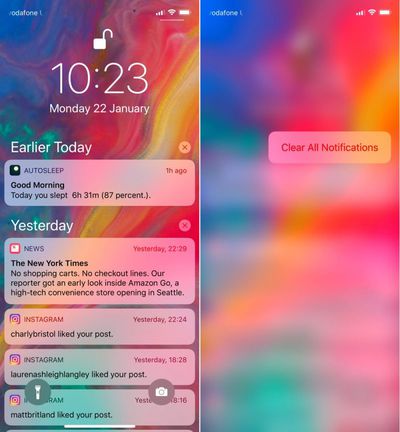
clear notifications 1
If you've got a bunch of notifications from earlier in the day or week that are clogging up your Notifications Screen, don't waste time clearing them one by one. Simply hard press on the first x icon you see on the right of the list. From there, you only need to select the Clear All Notifications 3D Touch option to make them instantly vanish.


Related Forum: iOS 11

Top Rated Comments

anyjungleinguy Avatar
103 months ago
Huh.

I knew you could search from the address bar for Find on Page but I had no idea there was a share sheet option. I’ve just moved the icon to the first spot and I actually think I prefer it over typing in the address bar then scrolling down. TIL.
Score: 6 Votes (Like | Disagree)
now i see it Avatar
103 months ago
I didn't know about the calculator trick. Thanks!
Score: 5 Votes (Like | Disagree)
macduke Avatar
103 months ago
I search within websites so frequently that I sometimes wish I could add it as a button that is always visible. It would be neat to be able to replace something I use infrequently such as the bookmarks button for search or another shortcut. That would be a cool feature in iOS 12.
Score: 3 Votes (Like | Disagree)
RodThePlod Avatar
103 months ago
I’ve just moved the icon to the first spot and I actually think I prefer it over typing in the address bar then scrolling down. TIL.
Whoa!! I didn’t even realise you could reposition the icons in the share sheet! I’ve just done it now (works in a similar way to rearranging apps on the home screen for those who didn’t know).

Thank YOU anyjungleinguy for the tip.

This thread is full of goodness :)
Score: 3 Votes (Like | Disagree)
djbuddha Avatar
103 months ago
That hold down '123' button trick is just straight wizardry. If there was only a way to calculate how much time this will save me instead of it always trying to load the Giphy keyboard before I can complete my text messages .... :eek:
Score: 2 Votes (Like | Disagree)
EM2013 Avatar
103 months ago
Never knew about #4

Wish iPhone had the swipe down keyboard feature that’s on the iPad.
Score: 2 Votes (Like | Disagree)

Popular Stories

Apple Wallet ID Illinois

Apple Plans to Expand iPhone Driver's Licenses to These 7 U.S. States

Wednesday December 24, 2025 8:40 am PST by
In select U.S. states, residents can add their driver's license or state ID to the Apple Wallet app on the iPhone and Apple Watch, and then use it to display proof of identity or age at select airports and businesses, and in select apps. The feature is currently available in 13 U.S. states and Puerto Rico, and it is expected to launch in at least seven more in the future. To set up the...
iPhone Top Left Hole Punch Face ID Feature Purple

iPhone 18 Pro Launching Next Year With These 12 New Features

Tuesday December 23, 2025 8:36 am PST by
While the iPhone 18 Pro and iPhone 18 Pro Max are not expected to launch for another nine months, there are already plenty of rumors about the devices. Below, we have recapped 12 features rumored for the iPhone 18 Pro models. The same overall design is expected, with 6.3-inch and 6.9-inch display sizes, and a "plateau" housing three rear cameras Under-screen Face ID Front camera in...
iOS 26

iOS 26.2 Adds These 8 New Features to Your iPhone

Monday December 22, 2025 8:47 am PST by
Earlier this month, Apple released iOS 26.2, following more than a month of beta testing. It is a big update, with many new features and changes for iPhones. iOS 26.2 adds a Liquid Glass slider for the Lock Screen's clock, offline lyrics in Apple Music, and more. Below, we have highlighted a total of eight new features. Liquid Glass Slider on Lock Screen A new slider in the Lock...
maxresdefault

Where's the New Apple TV?

Monday December 22, 2025 11:30 am PST by
Apple hasn't updated the Apple TV 4K since 2022, and 2025 was supposed to be the year that we got a refresh. There were rumors suggesting Apple would release the new Apple TV before the end of 2025, but it looks like that's not going to happen now. Subscribe to the MacRumors YouTube channel for more videos. Bloomberg's Mark Gurman said several times across 2024 and 2025 that Apple would...
maxresdefault

10 Mac Apps Worth Trying in 2026

Wednesday December 24, 2025 9:27 am PST by
2026 is almost upon us, and a new year is a good time to try out some new apps. We've rounded up 10 excellent Mac apps that are worth checking out. Subscribe to the MacRumors YouTube channel for more videos. Alt-Tab (Free) - Alt-Tab brings a Windows-style alt + tab thumbnail preview option to the Mac. You can see a full window preview of open apps and app windows. One Thing (Free) -...
Foldable iPhone 2023 Feature Iridescent Search

Samsung Developing 'Wide Fold' With iPhone Fold-Like Design Ahead of Apple's 2026 Launch

Tuesday December 23, 2025 11:55 am PST by
Samsung is working on a new foldable smartphone that's wider and shorter than the models that it's released before, according to Korean news site ETNews. The "Wide Fold" will compete with Apple's iPhone Fold that's set to launch in September 2026. Samsung's existing Galaxy Z Fold7 display is 6.5 inches when closed, and 8 inches when open, with a 21:9 aspect ratio when folded and a 20:18...
iOS 26

iOS 26.3 Brings AirPods-Like Pairing to Third-Party Devices in EU Under DMA

Monday December 22, 2025 3:20 pm PST by
The European Commission today praised the interoperability changes that Apple is introducing in iOS 26.3, once again crediting the Digital Markets Act (DMA) with bringing "new opportunities" to European users and developers. The Digital Markets Act requires Apple to provide third-party accessories with the same capabilities and access to device features that Apple's own products get. In iOS...
iphone fold 3d print

Have a 3D Printer? You Can Make Your Own iPhone Fold Dummy

Tuesday December 23, 2025 1:31 pm PST by
Apple is working on a foldable iPhone that's set to come out in September 2026, and rumors suggest that it will have a display that's around 5.4 inches when closed and 7.6 inches when open. Exact measurements vary based on rumors, but one 3D designer has created a mockup based on what we've heard so far. On MakerWorld, a user named Subsy has uploaded a 1:1 iPhone Fold replica (via Macworld), ...
iPhone SE Cosmopolitan Clean

Apple Discontinued These 25 Products This Year

Wednesday December 24, 2025 7:24 am PST by
With the end of 2025 near, the time has come to look back at the devices and accessories that Apple discontinued throughout the year. Most of the products that were discontinued this year were simply replaced by a new model with an updated chip. However, the iPhone SE line was entirely discontinued when the iPhone 16e launched, and the iPhone Plus line is being phased out. Below, we have...