 As the admin account holder on a Mac, you have the ability to create and manage other user accounts including whether they have restrictions imposed via parental controls. The following steps show you how to disable parental controls for an existing account.
Note that by turning off parental controls you are essentially allowing the person with access to that account to use your Mac without restrictions, so they'll be able to browse any website, use any apps, and change settings for things like scanners and printers, for example. With that in mind, here's how it's done.
How to Disable Parental Controls
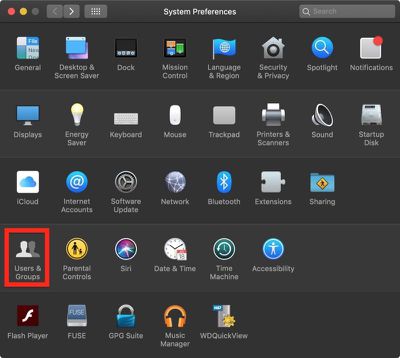
- Click the Apple () symbol in the top left corner of your Mac's screen and select System Preferences....

- Click Users & Groups.
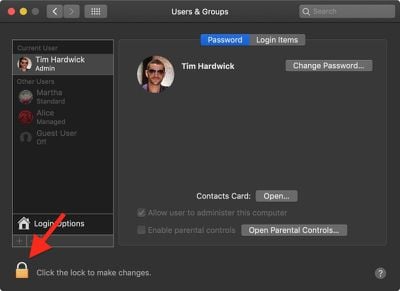
- Click the lock in the lower left corner of the window.
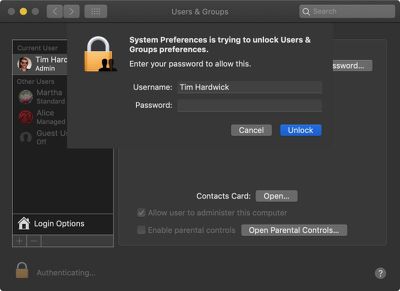
- Type in your admin password if prompted.
- Click Unlock.
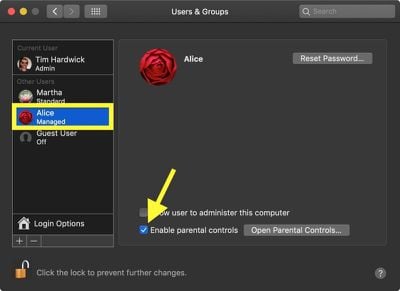
- Select an account in the column on the left.
- Click the box next to Enable parental controls to uncheck it.
- Click the lock in the lower left corner of the window to secure your changes and finish.
If you want to enable parental controls, or turn them back on, make sure to check out our how to that walks you through enabling them.