

 If you're sick of waiting for the progress bar to complete every time you reboot after a macOS software update, then you'll be pleased to learn there's another way to update your Mac that could potentially reduce your downtime.
The process involves a simple Terminal command, and allows you to continue using your Mac as the update downloads and the initial software installation takes place in the background. In our tests, we found that this method was capable of shaving off several minutes of idle time during installation restarts, but that the time-saving depends on the machine and the update in question.
Users with older Macs in particular will likely appreciate this tip, as it saves having to fire up the Mac App Store altogether, which can be slow-going and sometimes even downright unresponsive. Read on to find out how it's done.
How to Update macOS From the Command Line
Before following these steps, ensure you have a full backup of your system, which should be par for the course when performing any update. Note that the following procedure only lists stock Apple system updates (iTunes, Photos, printer drivers the like), but not updates for other Apple apps that aren't installed with macOS (Xcode, for instance), and not third-party updates from the Mac App Store.
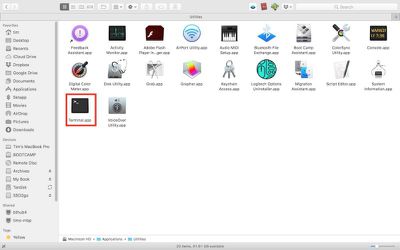
- To update macOS from the command line, first launch Terminal, which can be found in the Applications/Utilities folder. This will open a Terminal window and a command prompt for you to begin typing.

- Input the following command and press Enter: softwareupdate -l
- Wait as your Mac searches Apple's servers for any macOS software updates currently available for your system. If no updates are available, you'll be returned to the command prompt.
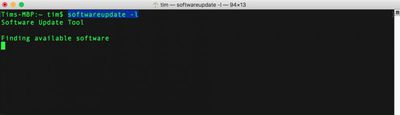
Now let's take a look at the command's output. Available updates always appear as items in a list. In our example, only one update is available at this time, but every item follows the same format, as shown:
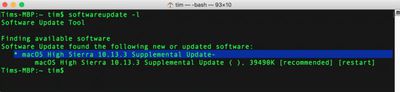
The asterisked line denotes the individual software update package that's available for your Mac to download. This line is also known as the identifier.
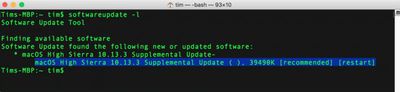
The second line offers a more detailed description of the update, including the version number (usually in brackets) and the download file size in kilobytes. [Recommended] means the update is recommended for all users, and [restart] indicates that your Mac needs to reboot for installation to complete.
To download and install a specific update in the list, use the following format, but replacing NAME with the update's identifier:
softwareupdate -i NAME
Or:
softwareupdate --install NAME
Note that if the package name you’re trying to install has spaces in it, you'll need to enclose the whole thing in single quotes. So for example:
softwareupdate --install 'macOS High Sierra 10.13.3 Supplemental Update-'
Also, be alert for spaces at the end of the package names. If present, they also need to be included within the quotes.
Moving on, to download a specific update for your system without also installing it then and there, you can use:
softwareupdate -d NAME
Updates downloaded in this way can be subsequently installed with the same -i or --install command above, or even through the Mac App Store. These updates are downloaded to a folder located in /Library/Updates, but they aren't designed to be installed by double-clicking the packages in that directory. You'll need to use the --install command or visit the Mac App Store to actually initiate the install.
Lastly, to download and install all available updates for your system, type the command:
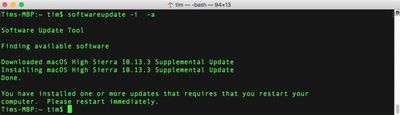
softwareupdate -i -a
Using these commands, you'll be able to leave the update to download and continue to install in the background while you get on with other things. All being well, Terminal will eventually prompt you to restart your machine manually so that the full installation procedure can complete. (Note that the softwareupdate utility requires admin authentication for all commands except the -l or -list command. If you run softwareupdate as a normal admin user, you will be prompted for a password where required.)
As some users will no doubt be aware, there are several additional options that can be used in conjunction with the softwareupdate utility. For example, -schedule on/off enables/disables your Mac's scheduled background check for updates. More adventurous readers can use man softwareupdate and softwareupdate -h for a summary list of commands.






















Top Rated Comments
The difference is the CLI typically provides more options and is more concise in how you do things.
Given the time and resources to create a GUI there are often compromises made to get the basic functionality without providing all of the options.
macOS is a Unix based OS at it's core, just like Solaris, Linux or FreeBSD. Lots of money allowed Apple to create better than average GUI apps and interfaces. There is little magic in the Darwin OS itself.
Praising the CLI over the GUI is a matter of preference and what you need to get done.
But the App Store app UI is usually out of sync with what is actually happening. If you are like me, when its time to install updates, I want them installed now, not sometime in the future when the App Store app feels like. Usually, I have made extra backups and cleaned everything up, before installing. After the update I check a number of things to make sure they are not hosed.
5 years ago I installed Apple update without any additional work, the day they were released. Not any more. Apple has, by its actions, lost my trust. Today I won't install any update until after its been out for weeks, if not longer. IMO Apple's main thrust these days is publicity, not performance and reliability and I am not willing to let their lack of ability effect my income.
I found this one useful several years ago when the Mac App Store just wasn’t working for me.
The App Store "Updates" tab OTOH is slooooooooow, convoluted, takes up four times the space yet tells me less, buries individual updates under macOS updates, and won't tell me how large a file is before I decide to download it. It sucks.
Edit: I half wonder if Apple is being intentionally obtuse about updates. I get the impression they'd be super happy if the choice of updating anything was taken out of the hands of users entirely and they were able to foist every update instantaneously, damn the consequences.
Back to the good ol' geek UNIX fun of macOS!!