With the introduction of iOS 15, Apple rebadged its paid iCloud plans to "‌iCloud‌+" to reflect the fact that subscribers now get access to additional privacy features like Private Relay and Hide My Email. This article explains what Hide My Email is and how to use it.
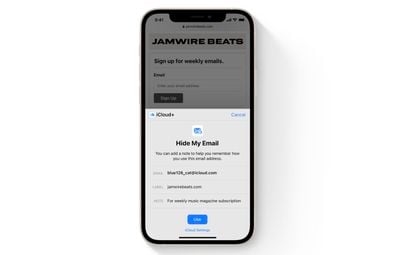
hide my email safari demo
Hide My Email builds on the idea of Sign in With Apple by providing you with unique, random email addresses that forward to your personal inbox whenever you want to keep your personal email address private.

It's especially useful if you suspect that a business you're transacting with is likely to share your email address with ad agencies or other third-parties for marketing purposes. Using a random email address means you can delete the address at any time, ensuring unsolicited emails don't reach your inbox.

How to Create an Email Address Using Hide My Email

The following steps show you how to create a new dummy email address with Hide My Email, for use in Safari and Mail. Make sure your iOS device is running iOS 15 or later.

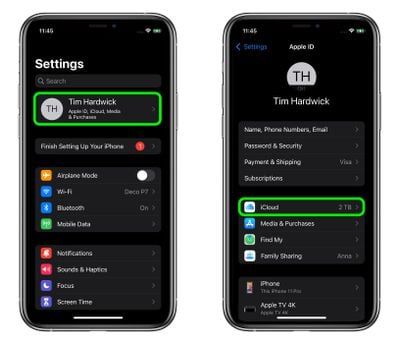
  1. Launch the Settings app on your iPhone or iPad
  2. Tap your Apple ID name at the top of the main settings menu.
  3. Tap iCloud.
    settings

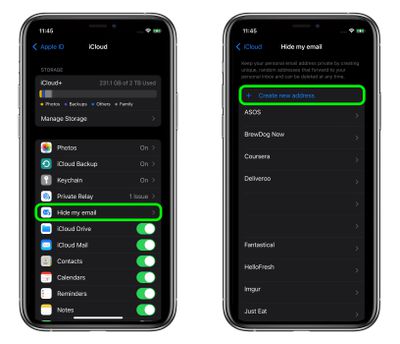
  4. Tap Hide My Email.
  5. Tap Create new address.
    settings

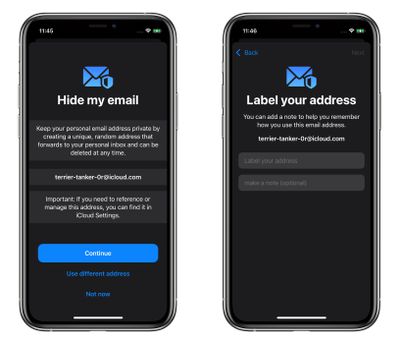
  6. Tap Continue, then give your address an identifying label. You can also optionally make a note about it.

  7. Tap Next, then tap Done.
    settings

You can now use the random email address when you send emails in Mail, or when you're asked to enter your email address on a website in Safari.

How to Deactivate an Address Using Hide My Email

If you aren't currently using a random address generated by Hide My Email, you can temporarily deactivate it so that you don't receive any forwarded email from it.

  1. Launch the Settings app on your ‌iPhone‌ or ‌iPad‌
  2. Tap your ‌Apple ID‌ name at the top of the main settings menu.
  3. Tap iCloud.
    settings

  4. Tap Hide My Email.
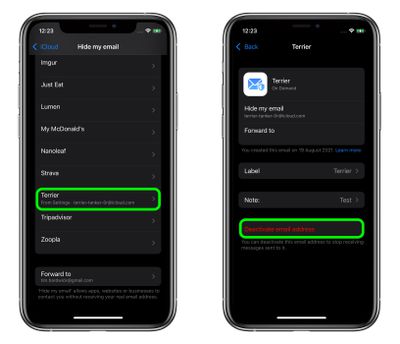
  5. Tap the email address in the list that you want to deactivate.
  6. Tap Deactivate email address.
  7. Tap Deactivate to confirm.
    settings

From now on, you won't receive emails sent to that address anymore. If you want to re-activate the address at any time, you'll find it in an "Inactive addresses" section at the bottom of your active addresses list. Tap the address in question, then tap Reactivate Address. Alternately, you can delete it by selecting Delete Address.

How to Change Your Hide My Email Forwarding Address

You can change the forwarding address for the dummy accounts that Hide My Email randomly generates. Here's how.

  1. Launch the Settings app on your ‌iPhone‌ or ‌iPad‌.
  2. Tap your ‌Apple ID‌ name at the top of the main settings menu.
  3. Tap iCloud.
    settings

  4. Tap Hide My Email.
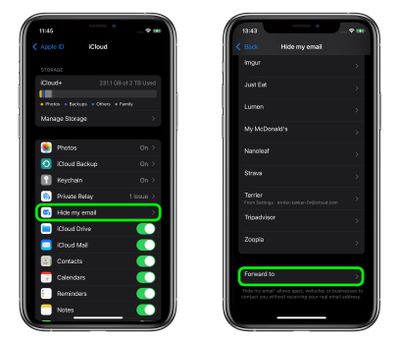
  5. Scroll to the bottom of the address list and tap Forward to.
  6. Select one of your email addresses, then tap Done.
    settings

Paid ‌iCloud‌+ plans also include another premium feature called Private Relay, which ensures that all traffic leaving your device is fully encrypted, so that no third party between the website and your device can see the website being viewed. Check out our dedicated how-to for all the details.


Top Rated Comments

meady100 Avatar
57 months ago
Did that just say ‘iCloud’ and ‘additional privacy features’ in the same sentence?
Score: 10 Votes (Like | Disagree)
Jeaz Avatar
57 months ago

Are people really going to willfully install iOS 15 on their iPhone?
Why wouldn't they?
Score: 6 Votes (Like | Disagree)
CarpalMac Avatar
57 months ago

Or you can simply have a secondary email address for all the spam and registrations on websites.
I own a domain and then use a bespoke address for each and all sites which get piped to a single master (catch-all) account. e.g. macrumors@mydomainnamehere.com. That way I can:
1) See who sold my email / has slack security, allowing my address out into the wild (Yes I mean you, ProtectYourBubble, GolfOnline, LinkedIn, Tumblr etc..)
2) Blackhole that address.

Alternatively, with Gmail, you can add a plus and then anything you like, and you will still get it.
E.g. mygmailaccountname+macrumors@gmail.com

Having a bespoke email address is good as well as if bad people get a hold of it, they can't automatically be sure they can login to your account elsewhere, should you make the mistake of reusing a password which lets face, we all have done at some point.


edit: corrected my gmail mistake.
Score: 6 Votes (Like | Disagree)
hagar Avatar
57 months ago

I really love this, but however the limit of just 100 aliases does make it, well, limited and in the end not very useful. Hopefully they increase the limit after beta.
Why is 100 not enough? I don’t see the need to use a different one for every single website I subscribe too.

I would use them mainly for websites I don’t really trust. And even then I could still cluster.
Score: 6 Votes (Like | Disagree)
JonnyBlaze Avatar
57 months ago
Using a different alias for each account login helps identify where the problem has come from if you do start getting spam, or in case the service you have an account with gets hacked. You only have to change that one account email or alias, rather than changing lots of account that use the same one. There might be other reasons too, but this is what I like the idea of this service for.
Score: 6 Votes (Like | Disagree)
Jeaz Avatar
57 months ago

Will this come to macOS?
Yeah, it's already in the current macOS beta.
Score: 5 Votes (Like | Disagree)

Popular Stories

Apple Wallet ID Illinois

Apple Plans to Expand iPhone Driver's Licenses to These 7 U.S. States

Wednesday December 24, 2025 8:40 am PST by
In select U.S. states, residents can add their driver's license or state ID to the Apple Wallet app on the iPhone and Apple Watch, and then use it to display proof of identity or age at select airports and businesses, and in select apps. The feature is currently available in 13 U.S. states and Puerto Rico, and it is expected to launch in at least seven more in the future. To set up the...
iPhone Top Left Hole Punch Face ID Feature Purple

iPhone 18 Pro Launching Next Year With These 12 New Features

Tuesday December 23, 2025 8:36 am PST by
While the iPhone 18 Pro and iPhone 18 Pro Max are not expected to launch for another nine months, there are already plenty of rumors about the devices. Below, we have recapped 12 features rumored for the iPhone 18 Pro models. The same overall design is expected, with 6.3-inch and 6.9-inch display sizes, and a "plateau" housing three rear cameras Under-screen Face ID Front camera in...
maxresdefault

Where's the New Apple TV?

Monday December 22, 2025 11:30 am PST by
Apple hasn't updated the Apple TV 4K since 2022, and 2025 was supposed to be the year that we got a refresh. There were rumors suggesting Apple would release the new Apple TV before the end of 2025, but it looks like that's not going to happen now. Subscribe to the MacRumors YouTube channel for more videos. Bloomberg's Mark Gurman said several times across 2024 and 2025 that Apple would...
maxresdefault

10 Mac Apps Worth Trying in 2026

Wednesday December 24, 2025 9:27 am PST by
2026 is almost upon us, and a new year is a good time to try out some new apps. We've rounded up 10 excellent Mac apps that are worth checking out. Subscribe to the MacRumors YouTube channel for more videos. Alt-Tab (Free) - Alt-Tab brings a Windows-style alt + tab thumbnail preview option to the Mac. You can see a full window preview of open apps and app windows. One Thing (Free) -...
iOS 26

iOS 26.2 Adds These 8 New Features to Your iPhone

Monday December 22, 2025 8:47 am PST by
Earlier this month, Apple released iOS 26.2, following more than a month of beta testing. It is a big update, with many new features and changes for iPhones. iOS 26.2 adds a Liquid Glass slider for the Lock Screen's clock, offline lyrics in Apple Music, and more. Below, we have highlighted a total of eight new features. Liquid Glass Slider on Lock Screen A new slider in the Lock...
airpods color prototypes

Apple Tested AirPods in Bright Colors

Saturday December 27, 2025 6:06 am PST by
Apple reportedly tested a version of the first-generation AirPods with bright, iPhone 5c-like colored charging cases. The images, shared by the Apple leaker and prototype collector known as "Kosutami," claim to show first-generation AirPods prototypes with pink and yellow exterior casings. The interior of the charging case and the earbuds themselves remain white. They seem close to some...
iPhone Fold Vertical Feature

Why Apple's Foldable iPhone May Be Smaller Than Expected

Tuesday December 23, 2025 5:21 am PST by
Apple's first foldable iPhone, rumored for release next year, may turn out to be smaller than most people imagine, if a recent report is anything to go by. According to The Information, the outer display on the book-style device will measure just 5.3 inches – that's smaller than the 5.4-inch screen on the ‌iPhone‌ mini, a line Apple discontinued in 2022 due to poor sales. The report has led ...
Foldable iPhone 2023 Feature Iridescent Search

Samsung Developing 'Wide Fold' With iPhone Fold-Like Design Ahead of Apple's 2026 Launch

Tuesday December 23, 2025 11:55 am PST by
Samsung is working on a new foldable smartphone that's wider and shorter than the models that it's released before, according to Korean news site ETNews. The "Wide Fold" will compete with Apple's iPhone Fold that's set to launch in September 2026. Samsung's existing Galaxy Z Fold7 display is 6.5 inches when closed, and 8 inches when open, with a 21:9 aspect ratio when folded and a 20:18...
iPhone SE Cosmopolitan Clean

Apple Discontinued These 25 Products This Year

Wednesday December 24, 2025 7:24 am PST by
With the end of 2025 near, the time has come to look back at the devices and accessories that Apple discontinued throughout the year. Most of the products that were discontinued this year were simply replaced by a new model with an updated chip. However, the iPhone SE line was entirely discontinued when the iPhone 16e launched, and the iPhone Plus line is being phased out. Below, we have...