Since 2014, Apple has included a feature in iOS called Live Listen that allows an iPhone or iPad to serve as a remote microphone for an MFI-compatible hearing aid.

When Apple released iOS 12, it added Live Listen support for AirPods and AirPods 2, making it possible to use your iOS device as a directional mic and have the audio relayed to Apple's wireless earphones.
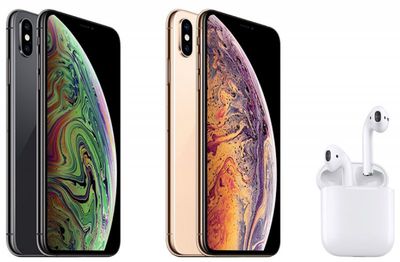
iphone xs and airpods
As an accessibility feature, the idea behind Live Listen is for it to be used by people who are hard of hearing or need extra help separating voices in a loud environment, but it can be useful in other ways, too.

If you're on a family vacation, for instance, you could use your ‌iPhone‌ or ‌iPad‌ as a makeshift baby monitor for when the baby's napping and you're in another room with the TV on. All you'd need to do is put the iOS device near the baby's crib and wear a single AirPod, which should have a strong enough Bluetooth range to allow you to listen in from afar.

Live Listen will work even when other audio is being played on your ‌iPhone‌ or ‌iPad‌ – so you could listen to a podcast, say, and still be keeping tabs on the baby. Just note that whatever it is that you're listening to will switch to mono output to match the Live Listen stream, and the AirPods' tap gestures will be disabled for as long as the feature is active.

Live Listen is easy to set up and use once you know how. The following steps show you how it's done on an ‌iPhone‌ or ‌iPad‌ running iOS 12 or later.

How to Set Up Live Listen on iPhone and iPad

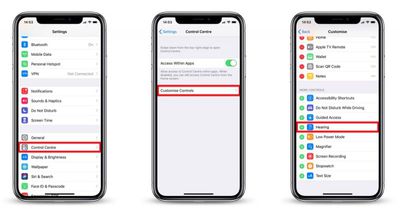
  1. Launch the Settings app on your ‌iPhone‌ or ‌iPad‌.
  2. Tap Control Center.
    how to set up live listen with airpods

  3. Tap Customize Controls.
  4. Scroll down and tap the green plus (+) button next to Hearing.
How to Use Live Listen on iPhone and iPad

  1. Put your AirPods in and connect them to your ‌iPhone‌ or ‌iPad‌ in the usual way.
  2. Launch Control Center on your iOS device: On an ‌iPad‌ with a Home button, double-tap the Home button; on ‌iPhone‌ 8 or earlier, swipe up from the bottom of the screen; and on a 2018 iPad Pro or ‌iPhone‌ R/X/XS/XS Max, swipe down from the upper right of the screen.
    how to use live listen with airpods

  3. Tap the Hearing icon.
  4. Tap Live Listen.
  5. Place your ‌iPhone‌ or ‌iPad‌ close to the person you want to hear, preferably in front of them.
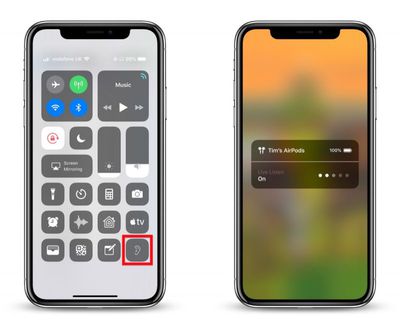
If the output to your AirPods is too quiet or too loud, use the volume buttons on your ‌iPhone‌ or ‌iPad‌ to adjust the volume level.

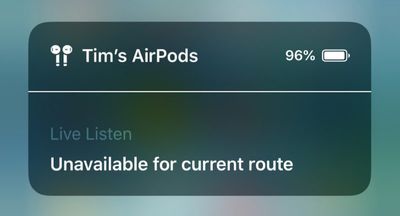
live listen not working airpods
If you see the message "Unavailable for current route" when you try to turn on Live Listen, restarting your iOS device and then forgetting and re-connecting your AirPods in the Settings app's Bluetooth menu should fix the issue.


Related Roundup: AirPods 4
Buyer's Guide: AirPods (Neutral)
Related Forum: AirPods

Top Rated Comments

iLoveDeveloping Avatar
93 months ago
Wow I knew nothing of this. Is it just me or do apple do a terrible job these days of actually telling users about features? I remember when the iPhone / iPod came out, for years almost every feature was explained and used in marketing on the website, i have literally found features on my phone by accident since getting a new iPhone8 that I didn’t even knew it had or how they worked. And I used to be a developer for 3 years, I can’t image how older users like my parents would even know how to use some thing or if they were even there in the first place. Apple is really doing a lousy job especially in the last 2-3 years in this regard (yes sales are through the roof but I’m specifically talking about informing users about great little features, and that silly tips app is a joke). It’s now more of an ‘object’, who cares what it does just look how pretty it is. A far cry from the jobs days.
Score: 7 Votes (Like | Disagree)
Kagee1 Avatar
93 months ago
Wow I knew nothing of this. Is it just me or do apple do a terrible job these days of actually telling users about features? I remember when the iPhone / iPod came out, for years almost every feature was explained and used in marketing on the website, i have literally found features on my phone by accident since getting a new iPhone8 that I didn’t even knew it had or how they worked. And I used to be a developer for 3 years, I can’t image how older users like my parents would even know how to use some thing or if they were even there in the first place. Apple is really doing a lousy job especially in the last 2-3 years in this regard (yes sales are through the roof but I’m specifically talking about informing users about great little features, and that silly tips app is a joke). It’s now more of an ‘object’, who cares what it does just look how pretty it is. A far cry from the jobs days.
I couldn’t agree more. Perhaps Apple has gotten “too big for its britches.”
[doublepost=1541422111][/doublepost
Score: 1 Votes (Like | Disagree)
sunapple Avatar
93 months ago
Wow I knew nothing of this. Is it just me or do apple do a terrible job these days of actually telling users about features? I remember when the iPhone / iPod came out, for years almost every feature was explained and used in marketing on the website, i have literally found features on my phone by accident since getting a new iPhone8 that I didn’t even knew it had or how they worked. And I used to be a developer for 3 years, I can’t image how older users like my parents would even know how to use some thing or if they were even there in the first place. Apple is really doing a lousy job especially in the last 2-3 years in this regard (yes sales are through the roof but I’m specifically talking about informing users about great little features, and that silly tips app is a joke). It’s now more of an ‘object’, who cares what it does just look how pretty it is. A far cry from the jobs days.
I'm sorry, but nowadays there're just a lot more features than five years ago and finding those features, the important ones, is still very easy. This has zero to do with Jobs.

https://www.apple.com/accessibility/
Score: 1 Votes (Like | Disagree)
FloatingBones Avatar
93 months ago
Wow I knew nothing of this. Is it just me or do apple do a terrible job these days of actually telling users about features?
The Apple Store's Today at Apple ('https://www.apple.com/today/') sessions are an excellent way to find out about how to do things. I recently attended four of these sessions with a friend for learning iPad skills. This was an excellent way for my non-techie friend to get up to speed on iOS/iPad, but the bonus was how much I learned during the process.

I couldn’t agree more. Perhaps Apple has gotten “too big for its britches.”
Have either of you attended any TaA sessions? Apple's instructors will cover the material for a particular session, plus questions/issues that students have. It kept some of the best features of the old One to One ('https://en.wikipedia.org/wiki/One_to_One_(Apple)') product: anyone can ask anything in the sessions, and the instructors will work hard to address those questions with the student -- either during the session or in a few minutes afterwards.
Score: 1 Votes (Like | Disagree)

Popular Stories

Apple Wallet ID Illinois

Apple Plans to Expand iPhone Driver's Licenses to These 7 U.S. States

Wednesday December 24, 2025 8:40 am PST by
In select U.S. states, residents can add their driver's license or state ID to the Apple Wallet app on the iPhone and Apple Watch, and then use it to display proof of identity or age at select airports and businesses, and in select apps. The feature is currently available in 13 U.S. states and Puerto Rico, and it is expected to launch in at least seven more in the future. To set up the...
iPhone Top Left Hole Punch Face ID Feature Purple

iPhone 18 Pro Launching Next Year With These 12 New Features

Tuesday December 23, 2025 8:36 am PST by
While the iPhone 18 Pro and iPhone 18 Pro Max are not expected to launch for another nine months, there are already plenty of rumors about the devices. Below, we have recapped 12 features rumored for the iPhone 18 Pro models. The same overall design is expected, with 6.3-inch and 6.9-inch display sizes, and a "plateau" housing three rear cameras Under-screen Face ID Front camera in...
iOS 26

iOS 26.2 Adds These 8 New Features to Your iPhone

Monday December 22, 2025 8:47 am PST by
Earlier this month, Apple released iOS 26.2, following more than a month of beta testing. It is a big update, with many new features and changes for iPhones. iOS 26.2 adds a Liquid Glass slider for the Lock Screen's clock, offline lyrics in Apple Music, and more. Below, we have highlighted a total of eight new features. Liquid Glass Slider on Lock Screen A new slider in the Lock...
maxresdefault

Where's the New Apple TV?

Monday December 22, 2025 11:30 am PST by
Apple hasn't updated the Apple TV 4K since 2022, and 2025 was supposed to be the year that we got a refresh. There were rumors suggesting Apple would release the new Apple TV before the end of 2025, but it looks like that's not going to happen now. Subscribe to the MacRumors YouTube channel for more videos. Bloomberg's Mark Gurman said several times across 2024 and 2025 that Apple would...
maxresdefault

10 Mac Apps Worth Trying in 2026

Wednesday December 24, 2025 9:27 am PST by
2026 is almost upon us, and a new year is a good time to try out some new apps. We've rounded up 10 excellent Mac apps that are worth checking out. Subscribe to the MacRumors YouTube channel for more videos. Alt-Tab (Free) - Alt-Tab brings a Windows-style alt + tab thumbnail preview option to the Mac. You can see a full window preview of open apps and app windows. One Thing (Free) -...
Foldable iPhone 2023 Feature Iridescent Search

Samsung Developing 'Wide Fold' With iPhone Fold-Like Design Ahead of Apple's 2026 Launch

Tuesday December 23, 2025 11:55 am PST by
Samsung is working on a new foldable smartphone that's wider and shorter than the models that it's released before, according to Korean news site ETNews. The "Wide Fold" will compete with Apple's iPhone Fold that's set to launch in September 2026. Samsung's existing Galaxy Z Fold7 display is 6.5 inches when closed, and 8 inches when open, with a 21:9 aspect ratio when folded and a 20:18...
iOS 26

iOS 26.3 Brings AirPods-Like Pairing to Third-Party Devices in EU Under DMA

Monday December 22, 2025 3:20 pm PST by
The European Commission today praised the interoperability changes that Apple is introducing in iOS 26.3, once again crediting the Digital Markets Act (DMA) with bringing "new opportunities" to European users and developers. The Digital Markets Act requires Apple to provide third-party accessories with the same capabilities and access to device features that Apple's own products get. In iOS...
iphone fold 3d print

Have a 3D Printer? You Can Make Your Own iPhone Fold Dummy

Tuesday December 23, 2025 1:31 pm PST by
Apple is working on a foldable iPhone that's set to come out in September 2026, and rumors suggest that it will have a display that's around 5.4 inches when closed and 7.6 inches when open. Exact measurements vary based on rumors, but one 3D designer has created a mockup based on what we've heard so far. On MakerWorld, a user named Subsy has uploaded a 1:1 iPhone Fold replica (via Macworld), ...
iPhone Fold Vertical Feature

Why Apple's Foldable iPhone May Be Smaller Than Expected

Tuesday December 23, 2025 5:21 am PST by
Apple's first foldable iPhone, rumored for release next year, may turn out to be smaller than most people imagine, if a recent report is anything to go by. According to The Information, the outer display on the book-style device will measure just 5.3 inches – that's smaller than the 5.4-inch screen on the ‌iPhone‌ mini, a line Apple discontinued in 2022 due to poor sales. The report has led ...