

With the iOS 17 Photos app, Apple is making it easier to crop your photos to your specifications. Keep reading to learn how.
Previously in iOS 16, cropping images in the Photos app involved several steps: Tapping into the Edit interface, choosing the crop tool, and adjusting the crop from there with either pinch zoom gestures or by dragging the corners of the cropping tool.
In iOS 17, Apple has thankfully simplified the process, so that when you zoom into any selected photo in your photo library, a new Crop button automatically appears in the top-right corner of the screen.
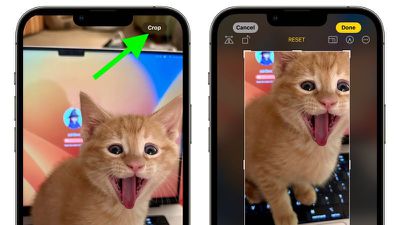
Tapping it brings up the full crop interface with the zoom level that you've selected, so you can crop into the part of the image that you prefer, rotate the image, invert it, or apply a screen ratio, or use Markup tools, all with just a couple of taps. When you're finished, simply tap Done and your photo will be cropped just the way you wanted.
There are several other improvements to the Photos app in iOS 17. For further details, check out our dedicated iOS 17 roundup.





















