Duet Display is an app made by former Apple engineers that allows you to use your iPad as a second screen for your Mac. In this article, we'll explain how it works and the steps you need to follow to get things up and running.
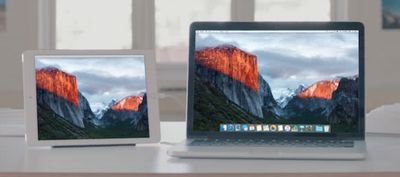
duet display 1
Duet Display is a great way to extend your Mac's desktop and can come in especially handy when you're working away from home and want to broaden your productivity space, but don't have the luxury of a dedicated external monitor.

In earlier versions of macOS, the app was hampered by changes to Apple's operating system that caused its developers no end of problems, but the latest Duet update (v2.0.3.8+) released on December 5 appears to have resolved those issues thanks to the introduction of full hardware acceleration support.


Duet Display is actually one of two apps best known for letting users leverage their iPad as a second screen for their Mac. The other is Luna Display ($79.99), but that app uses another implementation that requires two small dongles to ensure a consistent low-latency connection.

Duet Display on the other hand is a pure software solution and a lot more affordable at $9.99, which is why we've chosen to cover it here.

How to Use Your iPad as a Second Screen for Your Mac

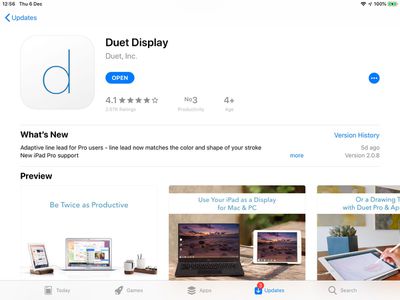
  1. Launch the App Store on your iPhone or iPad and download Duet Display ($9.99).
    duet display app store

  2. Open a browser on your Mac, navigate to www.duetdisplay.com and click the Download Mac button at the top of the webpage to download the free Mac client.
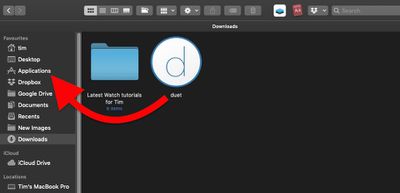
  3. Once the Duet client app is downloaded to your Mac, drag it from the Downloads folder to the Applications folder.
    drag Duet client to applications folder

  4. Double-click the Duet Mac client to launch it.
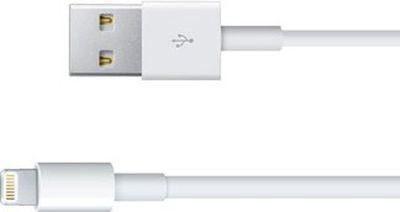
  5. Connect your iPhone or iPad to a free USB-A port on your Mac using a Lightning cable. (If you're using a Mac that has the newer USB-C ports, you'll need to use a Lightning to USB-C cable, which Apple sells in 1-meter and 2-meter lengths.)
    lightning cable e1347476331309

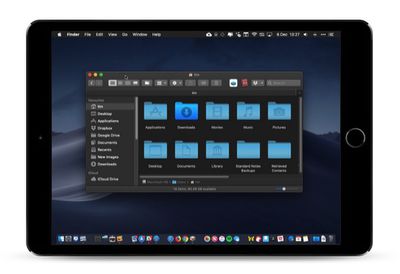
  6. Launch the Duet app on your iPhone or iPad and wait a moment while it communicates with the Duet Mac client. You should see your Mac's desktop mirrored or extended on your iPad screen once a successful connection is made.
    duet display ipad mini

Once you've got things working, it's worth checking out Duet's display options: click the Duet applet in your Mac's menu bar and if you have an iPad connected you'll see a button to enable a touch-sensitive MacBook Pro-style Touch Bar along the bottom of your iPad's screen.
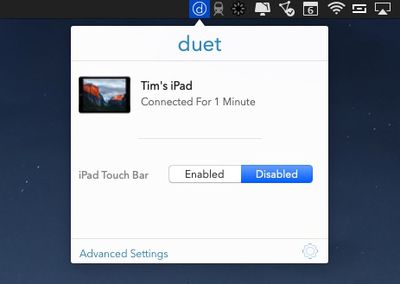
Duet display menu bar applet 1
If you click Advanced Settings, you can choose from a number of Display options to scale the output to your iOS device. The pre-defined resolutions allow you to see either larger text or more desktop space, and Duet helpfully recommends which scale to pick based on device model.
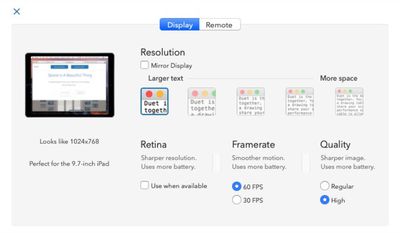
Duet Display advanced options
Check the box next to Mirror Display if you want to duplicate your Mac's desktop on your iPad rather than extend it. There are also options to enable Retina display mode, increase the framerate from 30 to 60fps, and switch the image quality from Regular to High, all of which require more device energy.

If you click the cog wheel in the Duet menu bar applet, you'll also find some additional settings worth attending to. If your Mac has a dedicated graphics card then you can set Duet to use it exclusively for faster performance, alternatively you can limit it to the integrated graphics for energy efficiency.

There are also menus to enable or reduce transparency on your iOS device display, an option to start Duet at login, and a link to change the Display Arrangement of your screens in System Preferences.
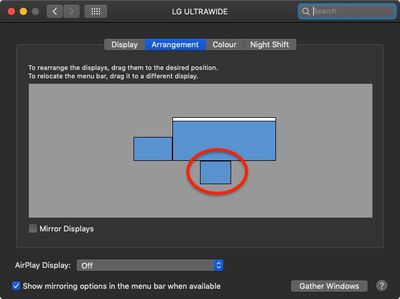
duet display arrangement

iPad showing as external display in System Preferences

If you get on with Duet Display, there are Air ($19.99 annually) and Pro ($24.99) versions that offer additional features like wireless connectivity and Apple Pencil support, respectively. For more information and support, check out the Duet Display website.


Top Rated Comments

arrowood Avatar
92 months ago
i have this app, but never use it.
does actually anyone really use it?
Every time I telecommute or work outside of my office. Used it yesterday, all day, in fact. For a dual-monitor addict like me, it's a godsend.
Score: 4 Votes (Like | Disagree)
dguisinger Avatar
92 months ago
I use an Asus USB-C 15" mobile screen.... it was like $250.

I wouldn't want to run a monitor on something that uses a remote software hack, i'd rather have the OS natively recognize it, use the USB C / DisplayPort protocol, and a screen that can natively display it.

I've said for a while, I wish the new iPad Pro's supported it natively, would have given me a reason to buy one. With all that custom silicon you would think they could have done it.
Score: 3 Votes (Like | Disagree)
brdeveloper Avatar
92 months ago
You're all blaming the app basing your judgement on previous versions, but does actually anyone tested the update from December, 5, that is, yesterday?
Score: 1 Votes (Like | Disagree)
ZMacintosh Avatar
92 months ago
honestly with the USB-C iPad Pros, this should be a built-in function. Plug in with USB-C and option to use an external display with touch or pencil support.

Still trying to find a good alternative to Wacom, which their drivers are hit or miss and most of their products are clunky in the Cintiq line-up.
Score: 1 Votes (Like | Disagree)
MacDonaldTrump Avatar
92 months ago
I use it as second display photo editing works well.
Score: 1 Votes (Like | Disagree)
RedGala Avatar
92 months ago
WARNING: Duet display is actually a terrible app. They give you sub-par resolution and latency, only to ask you for an annual fee for an actually acceptable mirroring/extension experience.

If the fact that they STILL haven’t updated their app for the new iPad Pro isn’t a sign that they suck, then I don’t know what is. I’m so mad that I wasted $10 and I hope their theft bites them in the future.
Score: 1 Votes (Like | Disagree)

Popular Stories

Apple Wallet ID Illinois

Apple Plans to Expand iPhone Driver's Licenses to These 7 U.S. States

Wednesday December 24, 2025 8:40 am PST by
In select U.S. states, residents can add their driver's license or state ID to the Apple Wallet app on the iPhone and Apple Watch, and then use it to display proof of identity or age at select airports and businesses, and in select apps. The feature is currently available in 13 U.S. states and Puerto Rico, and it is expected to launch in at least seven more in the future. To set up the...
iPhone Top Left Hole Punch Face ID Feature Purple

iPhone 18 Pro Launching Next Year With These 12 New Features

Tuesday December 23, 2025 8:36 am PST by
While the iPhone 18 Pro and iPhone 18 Pro Max are not expected to launch for another nine months, there are already plenty of rumors about the devices. Below, we have recapped 12 features rumored for the iPhone 18 Pro models. The same overall design is expected, with 6.3-inch and 6.9-inch display sizes, and a "plateau" housing three rear cameras Under-screen Face ID Front camera in...
iOS 26

iOS 26.2 Adds These 8 New Features to Your iPhone

Monday December 22, 2025 8:47 am PST by
Earlier this month, Apple released iOS 26.2, following more than a month of beta testing. It is a big update, with many new features and changes for iPhones. iOS 26.2 adds a Liquid Glass slider for the Lock Screen's clock, offline lyrics in Apple Music, and more. Below, we have highlighted a total of eight new features. Liquid Glass Slider on Lock Screen A new slider in the Lock...
maxresdefault

Where's the New Apple TV?

Monday December 22, 2025 11:30 am PST by
Apple hasn't updated the Apple TV 4K since 2022, and 2025 was supposed to be the year that we got a refresh. There were rumors suggesting Apple would release the new Apple TV before the end of 2025, but it looks like that's not going to happen now. Subscribe to the MacRumors YouTube channel for more videos. Bloomberg's Mark Gurman said several times across 2024 and 2025 that Apple would...
maxresdefault

10 Mac Apps Worth Trying in 2026

Wednesday December 24, 2025 9:27 am PST by
2026 is almost upon us, and a new year is a good time to try out some new apps. We've rounded up 10 excellent Mac apps that are worth checking out. Subscribe to the MacRumors YouTube channel for more videos. Alt-Tab (Free) - Alt-Tab brings a Windows-style alt + tab thumbnail preview option to the Mac. You can see a full window preview of open apps and app windows. One Thing (Free) -...
Foldable iPhone 2023 Feature Iridescent Search

Samsung Developing 'Wide Fold' With iPhone Fold-Like Design Ahead of Apple's 2026 Launch

Tuesday December 23, 2025 11:55 am PST by
Samsung is working on a new foldable smartphone that's wider and shorter than the models that it's released before, according to Korean news site ETNews. The "Wide Fold" will compete with Apple's iPhone Fold that's set to launch in September 2026. Samsung's existing Galaxy Z Fold7 display is 6.5 inches when closed, and 8 inches when open, with a 21:9 aspect ratio when folded and a 20:18...
iOS 26

iOS 26.3 Brings AirPods-Like Pairing to Third-Party Devices in EU Under DMA

Monday December 22, 2025 3:20 pm PST by
The European Commission today praised the interoperability changes that Apple is introducing in iOS 26.3, once again crediting the Digital Markets Act (DMA) with bringing "new opportunities" to European users and developers. The Digital Markets Act requires Apple to provide third-party accessories with the same capabilities and access to device features that Apple's own products get. In iOS...
iphone fold 3d print

Have a 3D Printer? You Can Make Your Own iPhone Fold Dummy

Tuesday December 23, 2025 1:31 pm PST by
Apple is working on a foldable iPhone that's set to come out in September 2026, and rumors suggest that it will have a display that's around 5.4 inches when closed and 7.6 inches when open. Exact measurements vary based on rumors, but one 3D designer has created a mockup based on what we've heard so far. On MakerWorld, a user named Subsy has uploaded a 1:1 iPhone Fold replica (via Macworld), ...
iPhone Fold Vertical Feature

Why Apple's Foldable iPhone May Be Smaller Than Expected

Tuesday December 23, 2025 5:21 am PST by
Apple's first foldable iPhone, rumored for release next year, may turn out to be smaller than most people imagine, if a recent report is anything to go by. According to The Information, the outer display on the book-style device will measure just 5.3 inches – that's smaller than the 5.4-inch screen on the ‌iPhone‌ mini, a line Apple discontinued in 2022 due to poor sales. The report has led ...