In iOS 15, Apple has updated the Photos app to include an expanded Info pane where you can view information about a photo in your library, including EXIF metadata such as the camera it was taken on, the lens type, and the shutter speed used.

You'll also find in the Info pane the file size of the image, and where the image came from if it was saved from within another app. Here's how to get to the new information pane in the Photos app on iPhones and iPads running iOS 15/iPadOS 15.
- Open the Photos app and tap an image in your Library.
- Tap the info button (the encircled "i" icon) below the image.
- Look for the EXIF data in the box below the date and time.
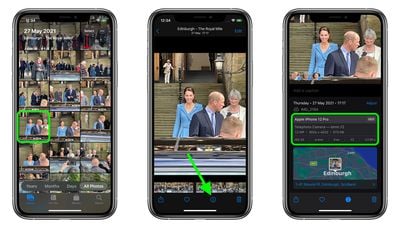
Note that you can also edit when the photos were recorded as taken by tapping Adjust (in blue) next to the date and time.
Tag: Photos Guide
Related Forum: iOS 15