When watchOS 3 launched alongside iOS 10, it brought a handful of feature additions and speed improvements to the Apple Watch. One of the new social features is a way for users to share their Activity Rings with friends and family through "Activity Sharing."

Mainly focused in iOS 10's Activity app, the ability to share workout data nevertheless requires an Apple Watch updated to watchOS 3, and for you to be comfortable with certain people receiving live updates on your fitness activity. When you're ready to start sharing your Activity Rings, and you've updated to both iOS 10 and watchOS 3, follow these steps:

Activity Sharing on iPhone
activity-how-to-3

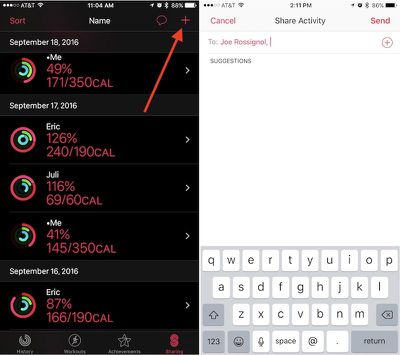
  1. Open "Activity" on your iPhone.
  2. Navigate to the "Sharing" tab on the bottom right.
  3. Tap the "+" icon in the top right corner to add a friend.
  4. The app will offer suggestions from your contacts of users who may own an Apple Watch, so you can tap one of those or type in someone specific in the text box.
  5. You can include multiple invitations at one time, and once you have everyone included in the "To" box, tap "Send."

From there, simply wait for your friend to accept the invitation. Afterwards, you'll begin to see one another's Calorie, Workout, and Standing rings in the same Sharing tab you sent the invite from. Once you amass a group of friends and family members, you can also sort the data in helpful partitions depending on what you'd like to see. Simply tap "Sort" in the top left corner of the Sharing tab and choose from Name, Move, Exercise, Steps, and Workouts as the primary focus.

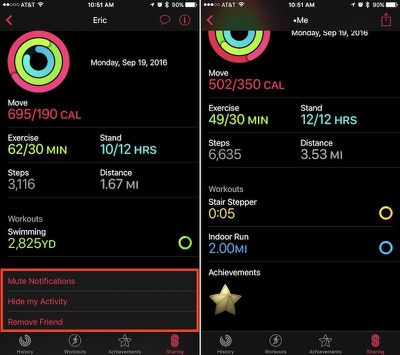
Tapping on anyone in the list will bring you into a deeper menu about that individual's Activity that day. The app will break down each ring, as well as showcase a step count, distance walked, and list any completed workouts or earned achievements. At the very bottom, there's a few options to mute a friend's notifications, hide your Activity from them, or delete them as a friend. Within your main friends list you will see your own Activity as well.
activity-how-to-2

An example of a friend's Sharing card (left), and your own (right)

Activity Sharing on Apple Watch

Although Activity Sharing is more in-depth within Activity on iOS, most of the interactivity of the new social feature takes place on the Apple Watch. Whenever friends begin closing their Activity Rings, completing workouts, and earning achievements, you'll get push notifications about each accomplishment. From these pop-ups, you can send friendly encouragements (or sly digs) about their hard work.
activity-how-to-5

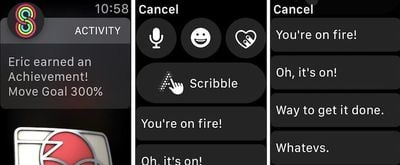
  1. When you receive an Activity notification from a friend on your Apple Watch, scroll down.
  2. Tap "Reply."
  3. You can choose from the traditional speech-to-text, emoji, Digital Touch, and Scribble options, or scroll more for some of Apple's stock Activity responses.
  4. Tap on any phrase to send it.

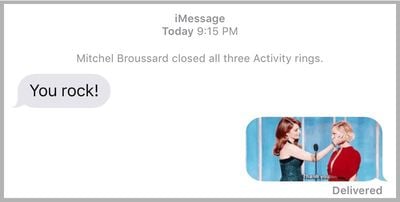
These responses are integrated directly into Messages in iOS 10, so if you sent "You're on fire!" for example, Messages would provide slight context above the message with "Mitchel completed a workout." Until they otherwise mute you for the day, or turn off your notifications completely within Activity on iPhone, each of your friends will receive a notification upon the completion of every workout and earning of every achievement.
activity-how-to-7
If you visit the Activity app on Apple Watch, you can scroll down to get more detailed readouts of each Activity Ring. Swiping right-to-left shows the new Sharing tab, similar to the one on iPhone. You can scroll to see each friend, tap on them for an individualized view, and send a message through a button at the bottom of their profile.

It should be noted that Apple's stock fitness-related phrases will only appear following a Sharing notification from a friend, and then only on Apple Watch. Any other Messages-related prompt outside of a notification from a friend will simply guide you over to Messages with all of the expected features introduced in the app in iOS 10.

There are plenty of other interesting and notable features to discover in watchOS 3, so be sure to check out the MacRumors roundups for both watchOS 3 and Apple Watch Series 2 to find out more information on each.


Related Roundup: Apple Watch 11
Buyer's Guide: Apple Watch (Buy Now)

Top Rated Comments

44267547 Avatar
121 months ago
How to use the most useless feature ever
You must not have any friends to share your activity with. I feel sorry for you.
Score: 2 Votes (Like | Disagree)
Phogro Avatar
121 months ago
How to use the most useless feature ever
^ how to be a shortsighted fool.
Score: 2 Votes (Like | Disagree)
Raineer Avatar
121 months ago
I'm curious to hear if this works for anyone. I've been trying to connect my activity account with my wife's for like 4 days now. We can get to the "accept" prompt to accept the invite, but after that it's just infinite spinning "thinking" icon. Have rescinded the invite and resent several times, trying both directions.
Score: 2 Votes (Like | Disagree)
Watabou Avatar
121 months ago
How to use the most useless feature ever
I think it's pretty fun, myself. I get to see how my friends and family are doing with their activity, and if they beat me on a day, it really motivates me to do better. But we do have a competitive side so that also helps.

Just because you think it's useless, doesn't make it so.
Score: 2 Votes (Like | Disagree)
tliede20 Avatar
121 months ago
I'm curious to hear if this works for anyone. I've been trying to connect my activity account with my wife's for like 4 days now. We can get to the "accept" prompt to accept the invite, but after that it's just infinite spinning "thinking" icon. Have rescinded the invite and resent several times, trying both directions.
You're not going to like my answer.... but I had to RESTORE my iPhone to make that work, I've seen this 3 times now. That seems to be the ONLY solution. Apple Support had me try the following which didn't work...

- Unpair / Repair watch
- Restore Watch

Checked diagnostics on both and they were clear.

Restoring the phone and THEN repairing the watch worked.

Good Luck!
Score: 2 Votes (Like | Disagree)
chitoac Avatar
121 months ago
I'm curious to hear if this works for anyone. I've been trying to connect my activity account with my wife's for like 4 days now. We can get to the "accept" prompt to accept the invite, but after that it's just infinite spinning "thinking" icon. Have rescinded the invite and resent several times, trying both directions.
its working for me. only problem i got was that my gf didnt update her watch, but after both have ios 10 and watch os 3 its working. sometimes it takes a little long to load.
but im loving it! specially the days i beat my her LOL
Score: 1 Votes (Like | Disagree)

Popular Stories

Apple Wallet ID Illinois

Apple Plans to Expand iPhone Driver's Licenses to These 7 U.S. States

Wednesday December 24, 2025 8:40 am PST by
In select U.S. states, residents can add their driver's license or state ID to the Apple Wallet app on the iPhone and Apple Watch, and then use it to display proof of identity or age at select airports and businesses, and in select apps. The feature is currently available in 13 U.S. states and Puerto Rico, and it is expected to launch in at least seven more in the future. To set up the...
iPhone Top Left Hole Punch Face ID Feature Purple

iPhone 18 Pro Launching Next Year With These 12 New Features

Tuesday December 23, 2025 8:36 am PST by
While the iPhone 18 Pro and iPhone 18 Pro Max are not expected to launch for another nine months, there are already plenty of rumors about the devices. Below, we have recapped 12 features rumored for the iPhone 18 Pro models. The same overall design is expected, with 6.3-inch and 6.9-inch display sizes, and a "plateau" housing three rear cameras Under-screen Face ID Front camera in...
iOS 26

iOS 26.2 Adds These 8 New Features to Your iPhone

Monday December 22, 2025 8:47 am PST by
Earlier this month, Apple released iOS 26.2, following more than a month of beta testing. It is a big update, with many new features and changes for iPhones. iOS 26.2 adds a Liquid Glass slider for the Lock Screen's clock, offline lyrics in Apple Music, and more. Below, we have highlighted a total of eight new features. Liquid Glass Slider on Lock Screen A new slider in the Lock...
maxresdefault

Where's the New Apple TV?

Monday December 22, 2025 11:30 am PST by
Apple hasn't updated the Apple TV 4K since 2022, and 2025 was supposed to be the year that we got a refresh. There were rumors suggesting Apple would release the new Apple TV before the end of 2025, but it looks like that's not going to happen now. Subscribe to the MacRumors YouTube channel for more videos. Bloomberg's Mark Gurman said several times across 2024 and 2025 that Apple would...
maxresdefault

10 Mac Apps Worth Trying in 2026

Wednesday December 24, 2025 9:27 am PST by
2026 is almost upon us, and a new year is a good time to try out some new apps. We've rounded up 10 excellent Mac apps that are worth checking out. Subscribe to the MacRumors YouTube channel for more videos. Alt-Tab (Free) - Alt-Tab brings a Windows-style alt + tab thumbnail preview option to the Mac. You can see a full window preview of open apps and app windows. One Thing (Free) -...
Foldable iPhone 2023 Feature Iridescent Search

Samsung Developing 'Wide Fold' With iPhone Fold-Like Design Ahead of Apple's 2026 Launch

Tuesday December 23, 2025 11:55 am PST by
Samsung is working on a new foldable smartphone that's wider and shorter than the models that it's released before, according to Korean news site ETNews. The "Wide Fold" will compete with Apple's iPhone Fold that's set to launch in September 2026. Samsung's existing Galaxy Z Fold7 display is 6.5 inches when closed, and 8 inches when open, with a 21:9 aspect ratio when folded and a 20:18...
iOS 26

iOS 26.3 Brings AirPods-Like Pairing to Third-Party Devices in EU Under DMA

Monday December 22, 2025 3:20 pm PST by
The European Commission today praised the interoperability changes that Apple is introducing in iOS 26.3, once again crediting the Digital Markets Act (DMA) with bringing "new opportunities" to European users and developers. The Digital Markets Act requires Apple to provide third-party accessories with the same capabilities and access to device features that Apple's own products get. In iOS...
iphone fold 3d print

Have a 3D Printer? You Can Make Your Own iPhone Fold Dummy

Tuesday December 23, 2025 1:31 pm PST by
Apple is working on a foldable iPhone that's set to come out in September 2026, and rumors suggest that it will have a display that's around 5.4 inches when closed and 7.6 inches when open. Exact measurements vary based on rumors, but one 3D designer has created a mockup based on what we've heard so far. On MakerWorld, a user named Subsy has uploaded a 1:1 iPhone Fold replica (via Macworld), ...
iPhone Fold Vertical Feature

Why Apple's Foldable iPhone May Be Smaller Than Expected

Tuesday December 23, 2025 5:21 am PST by
Apple's first foldable iPhone, rumored for release next year, may turn out to be smaller than most people imagine, if a recent report is anything to go by. According to The Information, the outer display on the book-style device will measure just 5.3 inches – that's smaller than the 5.4-inch screen on the ‌iPhone‌ mini, a line Apple discontinued in 2022 due to poor sales. The report has led ...