

Accessory company Alogic recently launched a few new input devices with Mac support as part of its Echelon series, and I've been spending some time testing out the USB-C Rechargeable Wireless Keyboard for macOS and the USB-C Rechargeable Wireless Mouse.
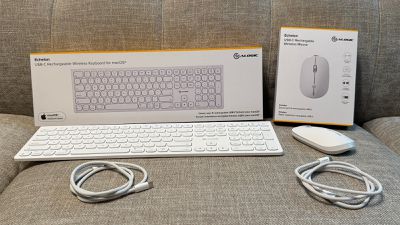
The Echelon series is a budget-friendly line of accessories, seeking to offer a mid-range feature set at value pricing, and the mouse and keyboard do just that. The keyboard is priced at $59.99 and the mouse at $24.99, with Alogic frequently running promotional discounts of around 20% to bring prices down even further.
Echelon USB-C Rechargeable Wireless Keyboard for macOS
Alogic's keyboard offers a full-size 109-key layout with function row and number pad. The membrane-style keyboard with chiclet keys has some similarities to Apple's Magic Keyboard for Mac, though you obviously don't have an option for an integrated Touch ID key with Alogic's offering. I've found the keys to be well spaced to allow for smooth typing, and have not experienced any problems with missing keystrokes, double letters, or other issues.
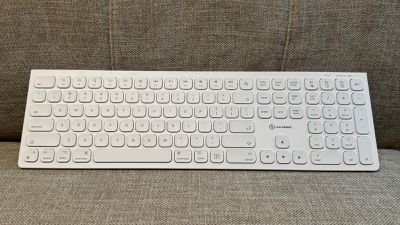
The Echelon keyboard offers a traditional extended keyboard layout, optimized for Mac with key arrangement and labels such as Command. The function keys in the top row include most of the usual Mac-specific functions such as display brightness controls, Spotlight, Mission Control, Launchpad, media playback controls, mute, volume controls, and even one to jump straight to your home folder when you're in Finder. There's also a dedicated system sleep key in that top row. In the bottom row, there's another dedicated key that will open up your Downloads folder when Finder is active.
At the far right of the keyboard is the number pad, which includes the usual layout of number and arithmetic keys, plus a top row that serves double duty for switching among paired devices and as dedicated keys for select all, cut, copy, and paste.
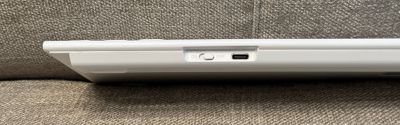
Unlike Apple's Magic Keyboard which inexplicably still uses Lightning to charge, Alogic's Echelon keyboard charges over USB-C, and a white braided USB-C to USB-C cable is included in the box. Alogic says the battery lasts "weeks" between charges, but the battery level on my unit has barely dropped at all after several days of heavy usage, so I'm expecting charge intervals to be on the order of a couple of months, similar to what I see with the Magic Keyboard.
It is worth noting that Alogic's keyboard goes to sleep within a few minutes of going idle, even if the computer it's connected to remains active, and you'll need to hit a key on it and wait a beat for the keyboard to wake up before you can begin typing. That took a little getting used to for me given my long-term experience with the Magic Keyboard that pretty much always seems to be ready to go.
The Alogic keyboard easily connects to Apple devices over Bluetooth using the standard pairing steps, with support for both Bluetooth 3.0 and Bluetooth 5.0 included. One distinct advantage compared to Apple's Magic Keyboard is that the Echelon supports connections to up to three devices, so you can pair it to your Mac, your iPad, and even another device and easily switch between those devices with a key combo.
Overall, I've found Alogic's Echelon USB-C Rechargeable Wireless Keyboard for macOS to be a solid budget keyboard, with a slim profile, a solid typing experience, and a nice set of key functions. The matte white plastic is a clean look that complements the Apple aesthetic, though I'll have to see how well it holds up to picking up dirt and stains over time. I do miss having Touch ID right on my external keyboard, but if that's not a deal-breaker for you, this keyboard might be worth a look. It's normally priced at $59.99, but an Independence Day sale going on now knocks the price down to $48.00 with promo code ID20.
Echelon USB-C Rechargeable Wireless Mouse
Alogic's new mouse is a well-matched complement to the Echelon keyboard, coming in the same matte white plastic. It's an ambidextrous mouse, so it's a simple matter of switching between left and right hands in macOS settings, though it's not as ergonomic as a handed mouse.
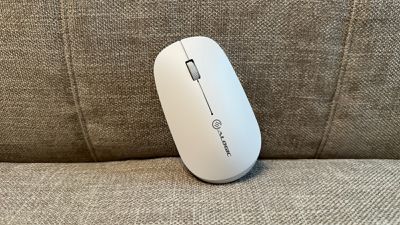
The Echelon mouse includes the standard left and right mouse buttons and a scroll wheel in between them. The scroll wheel can also be pressed to act as a middle mouse button, but that's it as far as input options on this mouse. There are no additional side or thumb buttons, so if those are something that's become part of your workflow, this mouse isn't for you, at least as an everyday mouse.
The left and right mouse buttons have relatively quiet clicks, which I tend to like, but the middle scroll wheel button is quite loud. Fortunately, that one isn't needed nearly as often so it's not a significant issue. The scroll wheel has well-defined clicks as you scroll to help you feel the movement, but there's no inertial free-spinning capability for quickly scrolling long pages or documents as I have come to appreciate on the Logitech MX Master 3 mouse that has been my daily driver for many years.
At just $24.99 for a wireless mouse, this is definitely a budget pick, and it does show in the overall experience, especially when you're used to a more powerful option. Alogic's Echelon mouse is extremely lightweight, and I find it glides best with some sort of desk pad or mat under it for a better feel, though it is certainly usable on a bare desk surface.
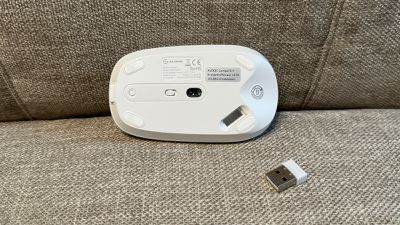
Alogic's Echelon mouse supports both Bluetooth 3.0 and Bluetooth 5.0, and it easily connects to a Mac or iPad using the system settings, but the mouse also supports 2.4GHz connections that can deliver improved performance such as lower latency. That 2.4GHz support comes via a small USB-A dongle that conveniently fits into the underside of the mouse when not in use so you don't lose it. Of course, most modern Macs don't include any USB-A ports, but I typically use my MacBook Pro in a desk setup with a Thunderbolt dock that does include some USB-A ports, and the mouse connects fine via the dongle that way. Regardless, most users will likely opt for a Bluetooth connection given the simplicity.
As with the Echelon keyboard, the mouse goes to sleep after just a few minutes of inactivity, which can be a bit disconcerting when returning to my Mac after a short break. I use a total of three displays in my desk setup, so when I sit down at my desk I usually give my mouse a quick shake to locate my pointer. With this Echelon mouse, the pointer doesn't move if the mouse has gone to sleep, so I have to first click once to wake it up before I shake it, which runs the risk of an inadvertent click if it the mouse hadn't been idle long enough to go to sleep. It's possible I'd get used to this over time, but so far I still find it a bit annoying.
As with most sensible wireless mice (sorry, Apple), the Echelon mouse charges via a USB-C port on the front, meaning it can still be used while it's charging. A white braided USB-C to USB-C cable is included in the box for charging purposes. Alogic says a charge should last two to three weeks with typical office usage, although I haven't been using it long enough to fully test those numbers. But given the small drop in charge I've seen in a few days of use, it seems reasonable, and perhaps even conservative, to me. Alogic indicates it takes about an hour to fully recharge the mouse.
The Echelon mouse can be paired with up to three devices simultaneously, two via Bluetooth and one via the 2.4GHz USB dongle. A small connection button on the bottom of the mouse is used for pairing and cycling through the connected devices. There's also an on/off switch on the bottom to conserve battery life and prevent unintended inputs.
Coming from a more powerful Logitech mouse, I can safely say that Alogic's Echelon mouse isn't going to become a full-time part of my setup. But at its budget price, it's potentially a solid option for tossing in a computer bag to use while on the go. While it doesn't include more advanced features, it does offer the basic mouse buttons and a scroll wheel and can pair to multiple devices, and that's all many users may be looking for. The Echelon USB-C Rechargeable Wireless Mouse is normally priced at $24.99, but the Independence Day sale with promo code ID20 brings the price down to just $20.00.
Note: Alogic provided MacRumors with the Echelon keyboard and mouse for the purposes of this review. No other compensation was received. MacRumors is an affiliate partner with Alogic. When you click a link and make a purchase, we may receive a small payment, which helps us keep the site running.






















Top Rated Comments
And if you are shopping for a ~$50 keyboard, there are many better options.
This is just an ad disguised as content.