

Popular accessory maker Anker recently came out with a new "Nano" line of products, and I've been testing them out for the last few weeks. All of the products are great, and Anker's ultra slim power bank in particular is appealing for those who are planning to pick up the iPhone Air.
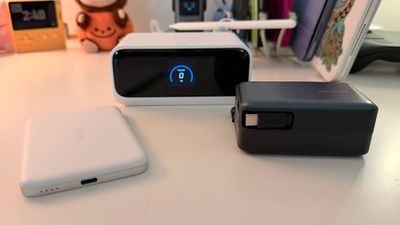
Nano Power Bank
Anker's MagGo Nano Power Bank is a 5,000mAh Qi2 power bank that attaches to the back of your iPhone, providing up to 15W charging while on the go. That's pretty typical for magnetic Qi-based chargers, but Anker's stands out because of how thin it is.
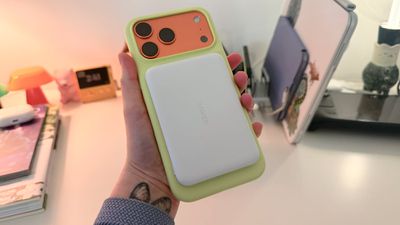
It's 8.6mm thick, or 0.34 inches, and it's the slimmest power bank I've seen. I've been using it constantly since Anker sent it to me for testing, and I'm a fan. It's the best power bank I've used because it doesn't add too much bulk to my iPhone.
I have an iPhone 17 Pro Max that's 8.75mm thick, so it does double the thickness, but it's still thinner than any other power bank that I've tried. Apple's dedicated charger for the iPhone Air is thinner, but that is limited to the iPhone Air and lacks the versatility of Anker's version.
Other magnetic power banks either add a lot of weight or make the iPhone super bulky to hold and use while it's charging, but the MagGo isn't big enough to bother me. I can use my phone as normal and I barely mind it, plus it's slim enough that my iPhone is still easily pocketable. The magnets in the MagGo are strong, so I don't have to worry about it coming off.
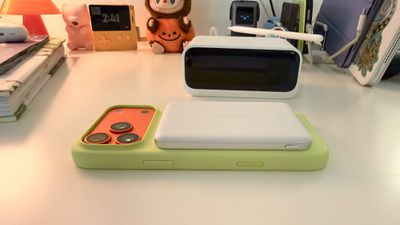
Since this is a 5,000mAh power bank, it's not enough for a full charge for the iPhone 17 Pro Max, but it's enough to get me through the day. All wireless chargers suffer from energy loss, so 5,000mAh is closer to 3,000mAh in terms of actual power transfer. This is not the most efficient or fast power bank option for wireless charging, and at 15W maximum, it's slower than MagSafe 2 chargers from Apple. It does, however, have a USB-C port, and it can be used with a USB-C cable when you need faster charging.
If you attach it to your iPhone magnetically, plug in a USB-C cable, and then hold the button for a few seconds, you can turn off the wireless charging and charge over USB-C while the MagGo is still attached to your iPhone. It also charges over USB-C, and supports passthrough charging.
There are times when the MagGo gets warm while charging my iPhone wirelessly, but I tend to get the same thing from any magnetic charger. The heat can impact charging efficiency and slow the wireless charging speeds, but in day to day use, I haven't felt like I'm not getting enough power out of it or that it's not charging quick enough. If I need a lot of power fast, there is no scenario where I am choosing any kind of wireless charging option.
If you're looking for a charger that works well while you're using your iPhone, the MagGo is a good option. I think this is a product that sets a new standard for on-device battery packs, because everything else feels bulky and outdated in comparison.
Nano Power Bank With Retractable Cable
For an option that offers more power and faster power delivery, Anker has the 10,000mAh 45W Nano Power Bank with an included retractable USB-C cable.
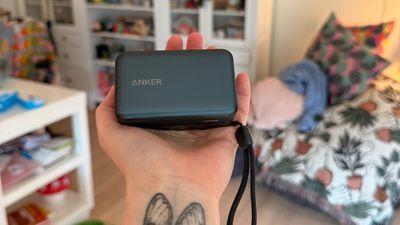
The Nano Power Bank is priced at $60, and it's basically a little palm-sized brick. It's about three inches long, two inches wide, and 1.5 inches thick, so it's not exactly pocketable, but it's slim enough to pop into a purse or backpack. It has an attached lanyard so you can loop it around a hand while your iPhone chargers if you want to use your iPhone.
It comes in black or white, and it has an attractive design. The top is a smooth, metallic-looking plastic, and there's ribbing on the sides to improve grip. A button at the side activates an LED that shows how much battery life is remaining, and it's a neat design because the LED is under the top plastic.
If you press the side button, you can cycle through other information too, including battery temperature, health of the power bank, how many devices are connected, and the power being delivered to each product.
The main feature of the Nano Power Bank is its retractable cable, which seems to be a hot new thing accessory makers are adding to products. The cable pulls out 2.3 feet, which is long enough to be able to use the iPhone while the power bank sits on a table.
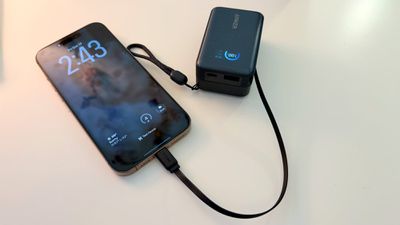
I have doubts about the durability of the retractable cable. I did try to pull it out further than it retracts, which did not break it. It feels well attached and has continued to retract despite my efforts to thwart it, but it is the kind of thing that would fail over time rather than immediately. Anker says that it was tested for over 20,000 retractions and is designed to last more than 10 years.
What's nice about the retractable cable is that you can pull out just a little or the entire thing. To get it to retract, you just give it a tug and let it go.
Along with the included cable, there's also a USB-C port and a USB-A port, so you can charge multiple devices at one time if you want. Anker says the power bank offers up to 45W, but if you're charging more than one device at a time, that drops significantly. With the USB-C cable and the USB-C port in use, the cable is limited to 15W, and the port is limited to 7.5W. With all three ports, each one only gets 7.5W.
Passthrough charging is supported, so you can charge the power bank while also charging up an iPhone.
Nano Charging Station
Anker's $90 Nano Charging Station is a desktop charger that combines plugs, USB-C and USB-A ports, and retractable charging cables into one small rectangular charger.
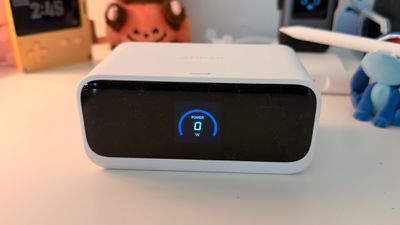
You can get the Nano Charging Station in black or white, and with the integrated LED at the front, it looks a lot like an alarm clock. The LED display shows charging information like current charge, amount of power going to devices that are plugged in, and temperature, but I kept wanting it to display the time when it wasn't in use. There's a button at the top that looks like a snooze button, but it is used to change the display's readout. From some angles (like viewing from the side), the display is hard to read, which is curious because it's such a major part of the design. Since it's a focal point, it should have been a little higher quality.
I like this as a desktop charger, but it's also useful for multi-device charging if you have an outlet where you frequently need more plugged in. It's not meant to be tucked away because of the built-in cables, so it's best for an area where you can get to all the ports, plugs, and cables easily.
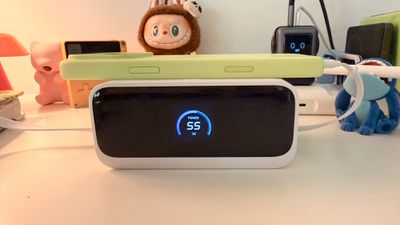
There are three AC outlets at the back of the charger, along with a USB-C port and a USB-A port on the right side of the device. On both sides, there's one built-in retractable cable, for a total of 7 charging spots. The retractable cable is the same as the cable in the Nano Power Bank, so you can pull out the length of cord you need and then give it a second tug to pop it back in place.
I wasn't sold on the retractable cables for a power bank, but I somehow find them much more useful for a desktop charger like this. I'd love a version of this with more retractable cables, just because it's an easy, simple solution for anyone in the house that needs a quick charge without having cables lying around. It's definitely nice to not have to hunt down a cable when someone is visiting and asks to charge up their phone.
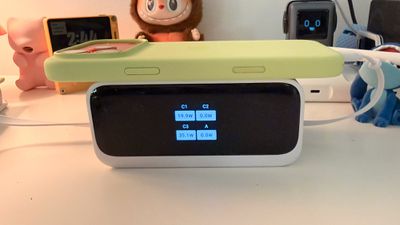
The best use case for the Nano Charging Station is locating it at the edge of a desk. You can plug three things into the back, tuck those cables under or behind the desk, and then have just the two retractable cables and the side ports available for on-desk use. Rearranging my desk cables and cords is no small feat, but I liked this little charging station so much that I went through the hassle to make it a permanent desk fixture.
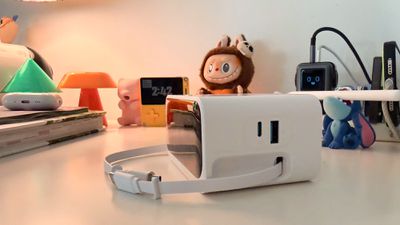
Each of the retractable cables are 2.33ft long, which is enough for use on my desk, but if you have the Charging Station further away, you'll need to use the USB-C port with a longer cable if you need more length. It's not a length that's going to work for placing it on a nightstand and using your phone in bed. If you're aiming to use your iPhone while it's plugged in, I think the Charging Station's cable length can be limiting depending on how your desk is arranged. There is one small design irritation that I've come across, and that's retracting the cable. It takes a small tug to engage the retraction mechanism, and that can sometimes cause the entire Charging Station to move just bit if I'm not gentle enough.
The four ports split 100W of power between them, and the AC outlets work as standard outlets. The Charging Station does offer surge protection for the three outlets, and Anker includes an active cooling feature that is meant to keep temperatures down. The Charging Station gets warm, but it doesn't get uncomfortably hot.
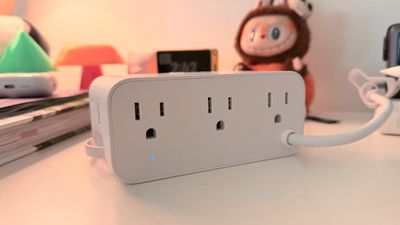
With one of the USB-C cables in use, you'll get the full 100W. If you're using both, there's a 67W/33W power split between the two cables or a 50W/50W split, depending on what's being charged. If you use the cables and the USB-C port together, it's split 34W/33W/33W, or 46W/27W/27W. There are different splits when using the USB-A port as one of the three, and it maxes out at 12W. With all four ports in use, the split is 30W for each of the two cables, 28W for the USB-C port, and 12W for the USB-A port. Basically, any configuration you use will give you enough power to fast charge an iPhone, with the exception of the USB-A port.
Bottom Line
Anker's Nano line is well-designed, and the three products that I tested are all useful and competitively priced. The Qi Nano Power Bank is my favorite of the bunch, and the only improvement I'd like to see in a next-generation version is Qi2.2.
I do want to point out that it comes in a 10,000mAh size, but that version is bulkier. The reason the 5,000mAh version is so good is because it adds so little weight and bulk to the iPhone. I think the rectangular Nano Power Bank with the cable that retracts is a little more niche because it's not quite pocketable, but it's a useful little accessory to have in your bag.
The Anker Nano Charging Station is one of the most useful desk charging accessories that I've used lately. I've been doing less wireless charging over the last few months, and I like that the retractable cables keep a lot of the mess tucked away. I do wish the screen had options for even more info, but it's nice to see the charging speed and power distribution. I am not convinced that the retractable cables are going to last long term, but Anker says they have been tested extensively so I'll give them the benefit of the doubt for now. As I keep using these, I'll update if anything breaks or goes wrong.
I have no issue recommending all three of these products, and if you catch them on sale, all the better. Anker has frequent sales that often cut prices even further, making its accessories an even better deal.
How to Buy
The Nano accessories can be purchased from the Anker website. The MagGo charger is $55, the Power Bank with built-in cable is $60, and the Charging Station is $90. MacRumors readers can get a 20 percent discount on all of Anker's Nano devices with the promo code Ankermacrumors2025.
Note: Anker provided MacRumors with Nano MagGo, Nano Charging Station, and Nano 45W Power Bank for the purpose of this review. No other compensation was received.






















Top Rated Comments
At least 9 models recalled below
https://www.anker.com/product-recalls
('https://www.anker.com/product-recalls')