

Connected home security cameras have been on the market for quite some time, but D-Link recently began selling the first HomeKit-compatible security camera.
Priced competitively at $199, the D-Link Omna 180 Cam HD camera has several perks over competing cameras that don't offer HomeKit integration -- it's guaranteed to have Apple's required level of encryption, it works with Siri, and it can be viewed right in the Apple-created Home app.
Design
The Omna is made from brushed aluminum and is palm-sized, so it can be placed just about anywhere, but it needs to go on a flat surface and can't be wall mounted like some other options. Size wise, it's a bit taller than a standard soda can, but skinnier.
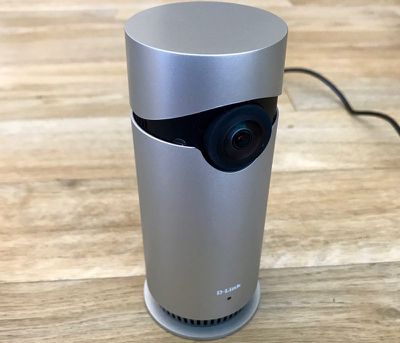
The camera portion is mounted on the front, a microSD card slot is at the bottom along with a reset button, and there's a small grated area at the bottom, presumably for heat dissipation, since the Omna does get somewhat warm. A green LED on the front lights up when it's powered on, and a power cord is attached to the back.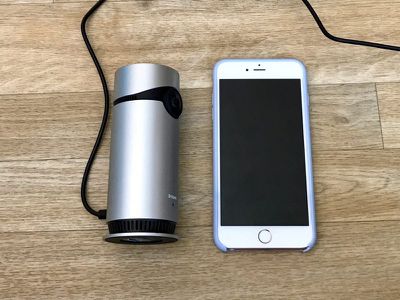
There is no included battery, so the Omna can't be used without a power source, but it connects to a home Wi-Fi network so only a single power cord is needed for operation.
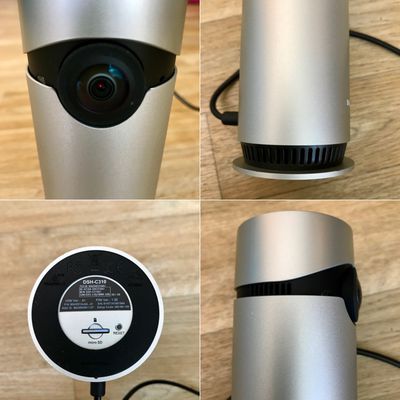
Along with the camera, it includes a microphone for two-way communication purposes. All in all, it's a compact, simple camera that fits in well wherever it's placed, but it's not going to go in as many places as the cameras that can also be wall mounted.
Camera Quality
One of the Omna's best features is its 180 degree wide-angle lens, which offers a wider view than many of the other home cameras on the market. The super wide angle captures almost the entirety of my office, and if I had it back further in the corner, it would be able to see the entire room from wall to wall.
The camera is 1080p for a clear picture in both bright and low light situations. Quality wise, it is on par with my Logi Circle and the Flir FX that I've tested in the past, and I was impressed with the resolution. Everything was clear with little blurring, but there is distortion due to the angle of the lens.
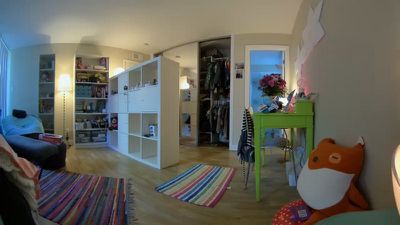
The Logi Circle has a zoom function that I use often, something that's missing here in the Omna. There's no zoom capability to get a closer look at what's going on in the room.
When the lights are out or in low light situations, the Omna has an infrared night vision setting for capturing clear video even when it's dark.
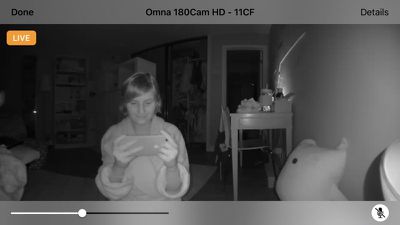
Because the lens is so wide, the Omna needs to be positioned carefully. If it's next to anything, the object may block a portion of the field of view, which somewhat limits where it can be placed. In my office, I needed to put it at the very corner edge of a side table for a decent view.
App
The Omna app is bare bones and offers surprisingly few options in comparison to other similar camera apps. It opens to a home screen with buttons to view the camera, change Home/Room settings, add accessories, and choose between a live view and SD playback for video saved to an SD card.
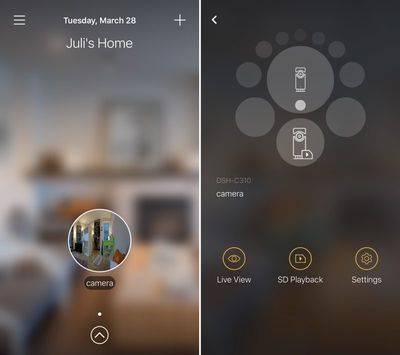
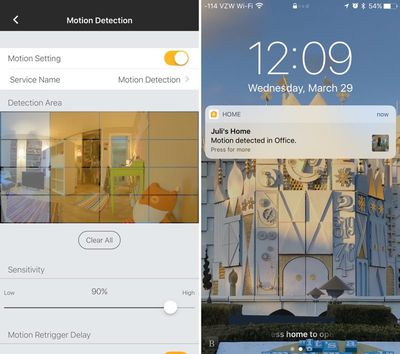
There are also options to turn on motion detection and set a motion detection area, which allows you to single out areas where motion detection should be focused, such as a door or window, while ignoring other areas. A re-trigger delay can also be set, as can a sensitivity feature.
Motion detection can be used with HomeKit and it can also be used to send you alerts whenever motion is detected. Unfortunately, there's no way to use a timer with motion detection to turn it on automatically when you leave the house -- it's on or it's off and it needs to be toggled on or off in the app. You can create a motion detection automation in the Home app, but it's limited to always on or on after sunset, and it can't be used in scenes. There are no deeper levels of customization.
There is no cloud storage option in the Omna app, so there's no way to store footage remotely. For some people who don't want their camera streams uploaded to the cloud, this is a plus, but for others concerned about home security, it's a negative.
If someone broke into a home and was captured on the Omna camera, the footage could be erased and made inaccessible simply by taking the camera or the SD card. It's not exactly inconspicuous with a green LED that doesn't turn off, and, at night, an additional two red LEDs for the night vision.
The SD card option seems to only save 20 seconds of footage at a time, with no option to extend it, which seems way too short. Recordings happen whenever motion is detected. Based on the motion delay you've set in the app, you'll get 20 second snippets every 30 seconds to 5 minutes. Mine's set at five minutes, so my camera is essentially recording 20 seconds of footage at five minute intervals whenever it sees movement (by the way, it's activated by movement only - not sound).
I would rather be able to have continuous recording that captured a longer length of time but overwrote footage as the SD card fills up because I don't think these 20 second snippets would be useful in a situation where I need camera footage. It's also not possible to set the SD card to record only at specific times -- it's all or nothing.
The 20 second limit is designed to allow users to check in and watch a short snippet whenever a motion detection notification is sent, which is useful, but I would have liked to have additional recording options. The Omna app's organization for SD recordings is also abysmal, with each snippet denoted by just a date and time, and there's no way to save footage to the camera roll.
HomeKit Integration
The Omna Camera can be used with either the dedicated D-Link Omna app or with the built-in Home app that's available on iOS devices. In the Home app, if added as a favorite accessory, the camera feed will be viewable directly on the home screen, which is useful for getting an overview of all HomeKit-enabled products at a glance.
That it's viewable in the Home app also means there's no need to download the Omna app on each device - you can just use the Home app when you need to access the camera. You will need to use the dedicated Omna app for viewing footage recorded on the SD card, though. Home can only show a live view.
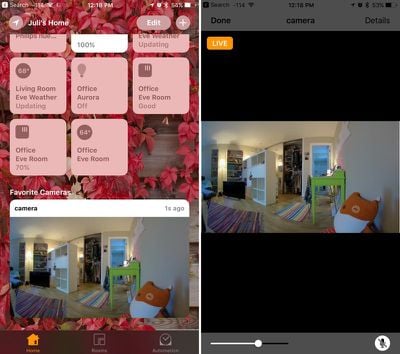
Because it uses HomeKit, the Omna was simple to set up. I downloaded the Omna app, chose "Add Accessory" and then scanned the HomeKit code on the device. It took just a few seconds to get it up and running from there, and I also could have set it up directly in the Home app to save even more time. I already have a HomeKit setup so I didn't need to go through that process, but if this is your first HomeKit product, there are a few other steps, such as creating a room.
In HomeKit, the Omna camera and its motion sensing capabilities are treated as two different accessories, which allows for motion sensing options when creating an Automation in the Home app. When motion is detected, HomeKit can do things like turn on your lights, but I'm not sure how useful this is because, as mentioned before, no real timers can be set.
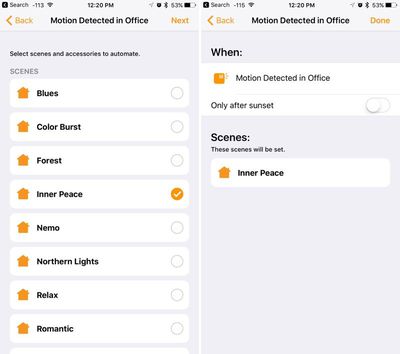
As I mentioned before, motion sensing can also be used for sending an alert to an iPhone whenever motion is detected, a great option when away from home, but again, this will need to be toggled on manually in the app unless you want constant alerts. When you get a motion detected alert, it comes with a quick snapshot of what's going on in the room.
As for Siri integration, you can ask about the camera to bring up the live view in the Home app, or you can ask whether or not the camera is detecting any motion, and that's about it. Siri isn't super useful with camera accessories.
The other HomeKit aspect worth mentioning is encryption. Apple has high encryption standards and requires all of its HomeKit-certified products to implement strong encryption, which brings peace of mind, especially with a product like a camera.
Bottom Line
If you have an extensive HomeKit setup or are interested in HomeKit products, the Omna is worth checking out. If you don't have a HomeKit setup, there's no real reason to get the Omna -- it's clearly been designed to work with HomeKit and the app is a little barebones compared to the apps of other camera products like the Logi Circle or the Flir FX.
HomeKit has some undeniable benefits like encryption, an ability to see the camera view in the Home app and motion detection triggers, but beyond that, this is just a standard camera that has some shortcomings compared to other home security cameras on the market. It's a solid camera, but if you don't need HomeKit compatibility, there are better options.
If you're looking for a security solution, the Omna is probably also not the greatest choice. It doesn't offer a lot of options when it comes to recording video, and without offsite storage, a thief can just walk away with your camera. If you just need something for checking in on pets and kids every now and then and aren't concerned with the drawbacks, the Omna is worth considering.
Pros:
- Simple setup
- HomeKit-level encryption
- 180 degree field of view
- Infrared for recording at night
- No subscription fees
Cons:
- No cloud storage
- Motion detection isn't customizable enough
- Need to buy separate microSD card
- No sound activation, movement only
- Can't easily save footage to iPhone
- Can't view recorded footage in Home app
- No zoom
- Can't turn off LEDs
How to Buy
The Omna 180 Cam HD Camera is available from Apple.com for $199.95.






















Top Rated Comments
Been searching for a decent priced IP camera some ok ones for 89$.
Netatmo Presence ('https://www.macrumors.com/2016/01/04/ces-2016-netatmo-presence-security-camera/')
If I remember correctly, the thing I liked about this camera was the subscription-less operation, and the ability to do long-term storage separately from the unit, such as a network drive or a cloud.