

Eve back in May came out with the Eve Outdoor Floodlight camera, one of the only floodlight-enabled HomeKit Secure Video cameras that are on the market. I have been testing the camera for several months now to get a feel for how it works and whether it's worth investing in.
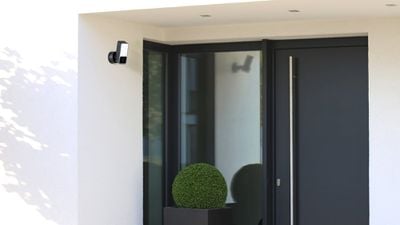
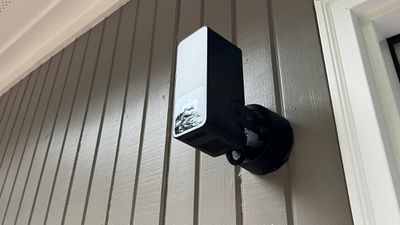
Part of the reason that this review has taken so long is because the Eve Camera has some installation caveats that potential buyers should be aware of. This is a wall-mounted floodlight camera, so it needs to replace either an outdoor light or an existing camera oriented in the same way, unless you're going to install a new electrical connection.
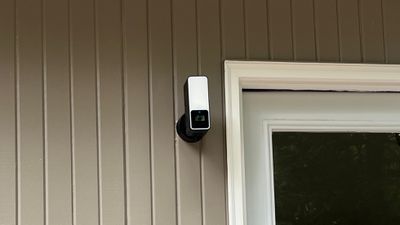
My house has a lot of wide-angle downward-facing lights/cameras mounted just below my gutters, with these positioned in a way to see much of the yard. The Eve Camera can't be angled downward, so it can't be installed in the downward orientation that's common for security cameras or floodlights. It needs to be a straight-on position, like where you might put a doorbell camera. There is some tilt so you can tweak the angle, but not enough that it can replace something like a downward-facing Ring floodlight camera.
I ended up removing a Ring camera that was mounted on the wall by my back door, but I found that the Eve Camera has a smaller base than the Ring, so it did not fit the space. The base is also too small to fit a typical junction box outside that you might have for another light or camera, which is is a hassle if this is the only setup you have. I ultimately needed to replace and repair some siding to get the camera set up, and I'm still not sure that it's watertight. If you're replacing an existing camera, be aware that there might be some extra work to get it to look right, and this is likely going to be an issue for a lot of people.
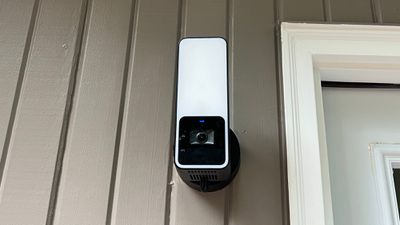
As for installation, this is a camera that needs to be wired directly to a junction box. You can do it yourself, but you need some electrical wiring experience. I hired an electrician to install the camera, and he said it was simple enough minus the base sizing. Note that the Eve Outdoor Camera is limited to a 2.4GHz WiFi connection, which feels outdated.
Once installed, powered on, and connected to HomeKit, the Eve Outdoor Cam works like any other HomeKit Secure Video camera. The video feed is viewed directly in the Home app, but it can also be accessed through the Eve app. You need an iCloud+ subscription to use HomeKit Secure Video. The cheapest $1 plan allows for one camera, the $2.99/month plan allows for five cameras, and the $9.99 per month plan allows for unlimited cameras, with all plans also including iCloud storage and other iCloud+ features.
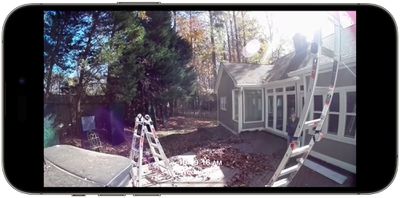
The Eve Outdoor Cam offers 1080p video and it can record at night with night mode. Quality is reasonable and I can clearly see what's going on in my yard, but 1080p resolution is not enough to see details clearly from more than 8 to 10 feet away (I have this complaint about all of my cameras). During the day, it's not quite as crisp as my Ring cameras in areas with a lot of variation in light and dark, but at night, the feed is sharper with less noise than my other cameras.
HomeKit Secure Video has the benefit of being encrypted, which gives peace of mind that your video feed isn't being viewed by someone else. It can only be viewed on your own devices and footage is stored in iCloud. Security comes with some sacrifice in usability, and I don't think the Eve Outdoor Cam is as seamless to use as my Ring cameras, nor does it offer the same features and reliability.
There are times when the Eve Outdoor Cam fails to record, and it's an issue that I haven't been able to pin down. It's gotten better with iOS 16, but it still happens. It records whenever motion is detected, and another thing - it's sensitive to motion. "Motion" includes falling leaves, so it goes off constantly if I don't use Activity Zones and limit notifications.
The Home app offers a lot of customization options. You can have the Camera record video only when you're away and stream at other times, or it can record both when you're away and when you're home. It can also be turned off entirely from the Home app, and there are options to disregard audio and delete all recordings.
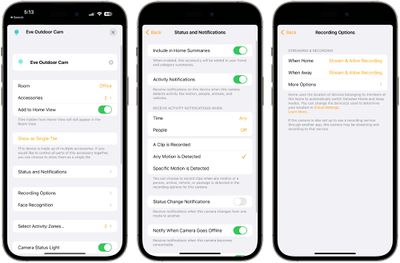
You can set select times to record and choose to record all motion or only when people are detected. It also uses facial recognition and can tell you when specific people show up on the camera. There is no option for continuous recording, and footage is stored when motion is detected.
Notifications are customizable, so you can opt to receive notifications during select times, when motion is detected, when people are detected, or when a clip is recorded. The Eve Cam can detect people, animals, vehicles, and package deliveries, providing tailored notifications. Rich notifications are supported, so you can see a preview of the feed, but a major annoyance I have is that tapping one of these brings me to the light toggle in the Home app rather than my camera feed.
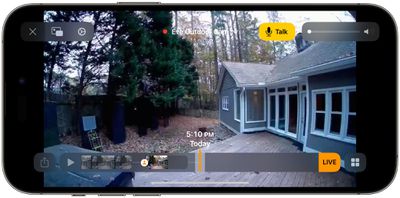
The Eve Cam's light will come on when motion is detected at night, and it has been reliable in my testing, but there is a slight delay before it activates. It stays on for a short period of time after motion detection and then turns off automatically. There is a microphone so you can speak to someone who is near the camera with two-way audio, but it doesn't offer the same siren feature available through other cameras like Ring.
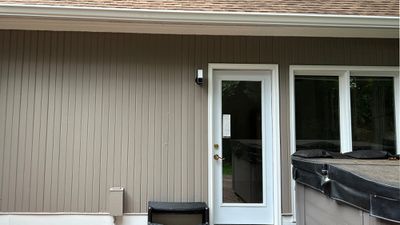
Recorded footage is stored in the app in a timeline and you can scrub through each motion event. The app stores 10 days of footage, and clips can be saved or deleted. Compared to the Ring app, I find the Home app to be buggy, slow, and hard to navigate to find what I'm looking for. It's just clunky in general, and it's one of the major downsides to HomeKit Secure Video. This is in no way Eve's fault since it's Apple that designs the Home experience.
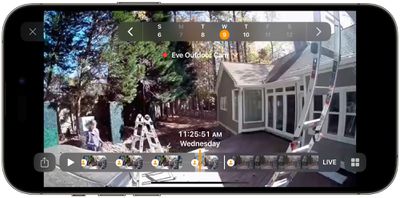
Eve does allow the camera footage to be viewed live in the Eve app, but all of the recordings are limited to the Home app, so I rarely open up the Eve app. It does have a push to talk button, a toggle for the light, and volume controls for the microphone and speaker, but there's nothing else that can be done in the Eve app.
I know the HomeKit Secure Video cameras don't come with the privacy concerns around other cameras like Amazon's Ring devices, but the Home app just isn't as straightforward or as simple to use as the Ring app. I live in a neighborhood where my cameras are mostly used to watch the local wildlife so I have the benefit of not being too concerned about Amazon's privacy practices, which is why I prefer the Ring experience.
I have more issues with HomeKit Secure Video both in terms of recording and accessing my recorded footage, but the service still works well enough. As for the Eve Camera, I've been largely satisfied with the performance, with the exception of the installation process. I haven't had issues with motion detection or connectivity, and the recording problem I have is likely a Home app problem rather than a problem with the camera itself.
Bottom Line
The Eve Outdoor Camera is one of the only HomeKit-enabled outdoor camera options that also has a light, so there isn't a lot to choose from if you've opted for the HomeKit Secure Video ecosystem. Luckily, the Eve Outdoor Camera is all around decent.
The camera looks sleek on the wall and it doesn't take up too much space for those who are looking for something subdued, but potential buyers should be aware of the installation issues and prepared for some headache getting the camera set up. It's also limited to 1080p and it can struggle a bit with high variation in light and dark, but it comes with unparalleled privacy.
How to Buy
The Eve Outdoor Camera can be purchased from Amazon.com for $250.
























Top Rated Comments
After 8 (!!!) years, HomeKit is still a mess. The new app is definitely an improvement but the platform is still buggy and unreliable. For years I have been careful to only purchase HomeKit devices and HSV cameras but I wonder why I even bother.
I still need to rely on HomeBridge, IFTTT, and device specific features to glue together a somewhat decent platform. That is impossible to maintain and debug.
I’ve learned to paint, mud drywall, repair things with bondo and wood filler, and this weekend I’m teaching myself how to caulk well. On the agenda is starting to learn how to do minor electrical work, and I will start out with swapping some bathroom vanity lights, which I’m hoping will be easy enough. It’s a process when you’re new to this!
Another Netatmo Presence user here - got 4 around my home and 2 on our house in the USA and the have worked flawlessly since install.
The ones at home have been up for nearing 3yrs now with the other 2 being up since the start of 2022 and zero issues at all and a nil subscription cost is the winner for me.
I do like how they integrate with both HomeKit and GoogleHome too as I am transitioning my homes away from Apple for home interface/smart equipment so it doesn't mean a re-purchase (better for the consumer/chooser)
we frequently get foxes take a route past the camera at night, it takes a video of them :)