

Some of the more interesting types of smart home devices are thermostats, which can help save energy by optimizing scheduling, automatically sensing when the home is occupied or vacant, and more. One of the early entrants into the field on the HomeKit side is Honeywell, which has introduced several different smart thermostats, starting with the second-generation Lyric Round, which debuted early last year.
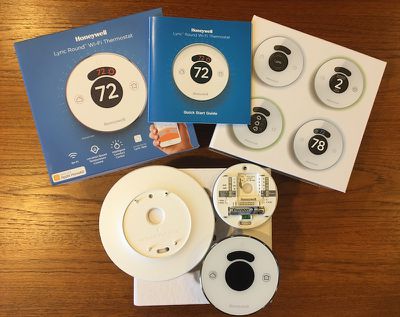
I've been using a Lyric Round for quite a while now, and I've come to appreciate its integration with HomeKit and its ease of use, while Honeywell has continued to improve its function and stability over time.
Installation
As with any hardwired electrical accessory, installation takes a little bit of work and patience, although thermostats are generally pretty straightforward. Depending on your type of heating and cooling system, you'll find a variety of wires that need to be attached to the back of thermostat.
If you're replacing an existing thermostat, it's pretty easy to get everything hooked the same way on the new thermostat, as long as you make sure to keep track of which wire is which. And of course, it's always good practice to turn off power to the thermostat at the circuit breaker when performing the installation.
The thermostat itself comes in two pieces, a wall plate and the thermostat body. The wall plate screws directly to the wall and contains the hookups for the wiring, as well as a handy built-in level to make sure everything is lined up as you mount the plate. The body of the thermostat then snaps onto the wall plate.
Depending on the form factor of your existing thermostat, you may also need to use the optional wall cover included with the Lyric Round in order to fully cover the hole in the wall, as I had to do in replacing a rectangular style thermostat. The wires feed through a small hole in the cover and the Lyric Round simply snaps onto the cover. The wall cover does detract from the sleek look of the Lyric Round itself, but there's only so much you can do in trying to cover a hole in the wall unless you want to take on a drywall patching job.
I actually had a fair bit of difficulty with my installation, as the wiring for my existing thermostat terminated in a junction box, whereas typical thermostat wiring simply exits through a relatively small hole in the wall as junction boxes are generally not required due to the low voltage of the systems.
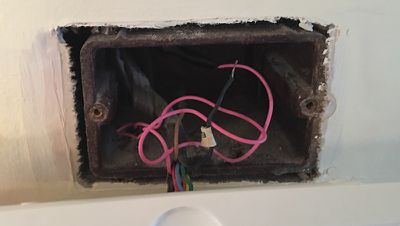
The presence of a junction box not only required the use of the wall cover to hide the large hole in my wall, but also interfered with the mounting of the new thermostat, as the large hole left no drywall where I needed to attach the Lyric Round to the wall. Some sort of standardized adapter plate for junction boxes would have been handy, but Honeywell was unable to assist me in that regard, so I fashioned my own box cover that I was then able to screw the Lyric Round wall cover to.
Setup
Once I had the Lyric Round mounted to my wall and the power turned back on, setup was simple. Thermostat functions are managed through the Lyric app on iOS, which walks you through step-by-step to get you registered for a Honeywell account and let you specify details of your heating and air conditioning system such as type of heating system, fuel source, compressor stages, backup heat, and more.
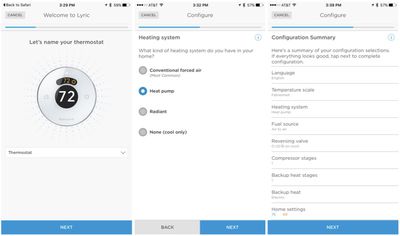
Finally, the Lyric app allows you add your thermostat to HomeKit, integrating with the rest of your smart home devices and performing tasks like charging the temperature using Siri and controlling simple settings from Apple's centralized Home app on iOS.
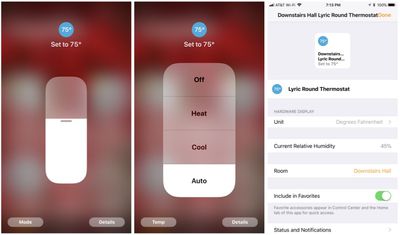
Interface
The Lyric Round itself has a simple and intuitive interface consisting of several components, with the simplest being a chrome ring around the edge of the thermostat that you turn left or right to adjust temperature, very similar to Nest's iconic thermostat design. Subtle backlighting behind the thermostat in blue or orange gives you visual feedback when you've adjusted the settings cooler or warmer, while there are optional audible bleeps as you rotate the ring for additional feedback.
The Lyric Round also includes some touch sensitive buttons on the front, including a small screen at the top that lets you switch among heating, cooling, and off, with animated icons for heating and cooling when the system is running.
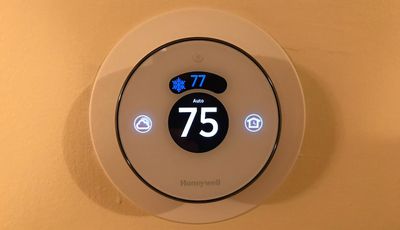
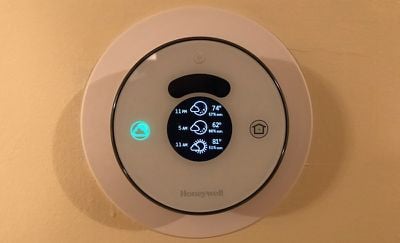
To the left of the main temperature display is a Weather button that brings up the current outdoor temperature and humidity, as well as forecasts for 6 and 12 hours into the future to help you make decisions about setting your thermostat.
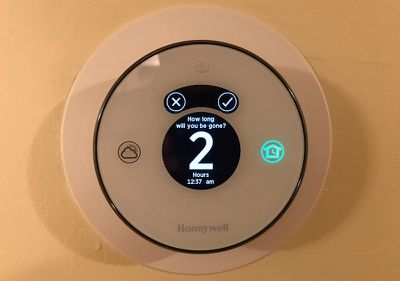
To the right is a Home/Away button that lets you manually tell the Lyric Round you're going to be away from the house for a period of time, and it will adjust the thermostat to your Away settings to reduce energy usage.
The Lyric Round also includes a basic motion sensor that allows the display to dim to a customizable level when not in use but then brighten and light up its buttons when it detects a person in the vicinity.
Lyric App
While basic controls are available at a touch on the Lyric Round, more advanced functions are managed in the Lyric app, which is a fairly slick-looking app with a simple main screen that displays the current temperature in a large font and a dial at the bottom of the screen to make it easy to adjust the temperature. Outdoor weather and indoor humidity are also displayed on the main screen, as are quick access icons for accessing fan mode, heating/cooling mode, and scheduling.
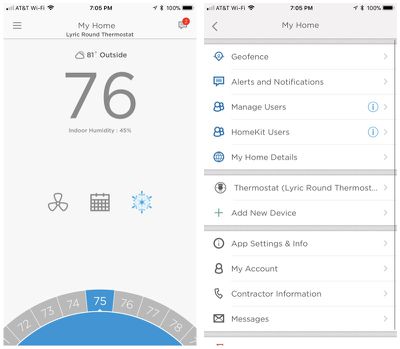
A menu button in the top left of the screen gives you access to a host of other features including home setup, multiple user management, HomeKit settings, and alerts and notifications.
Geofencing
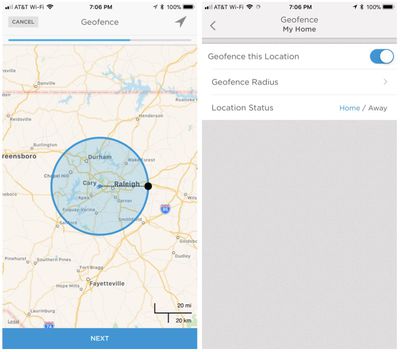
The Home/Away function also supports geofencing, allowing you to set a customizable radius around your home. Once you leave that radius, the Lyric Round will automatically switch to your Away settings, reducing energy usage. When you reenter the geofenced radius, it will return to normal settings.
Sleep Settings and Scheduling
In addition to separate Home and Away settings, the Lyric app also lets you turn on Sleep settings for a different comfort levels at night, simply setting the desired sleeping temperatures or heating and cooling and choosing the times you want them to be in effect.
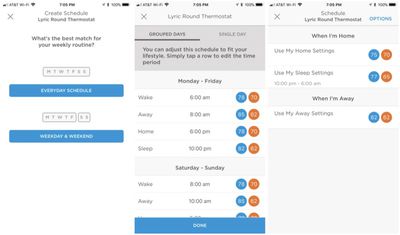
Those looking for more customization can use schedules, setting temperature and times for Wake, Away, Home, and Sleep. You can apply the settings on an everyday basis, separated into weekdays and weekends, or on a single-day basis.
Adaptive Recovery and Fine Tune
With adaptive recovery, Lyric learns how quickly your system is able to heat and cool, adjusting its timing to optimize comfort as your schedule changes. Fine tuning capabilities also allows Lyric to take into account the humidity and outdoor weather to adjust its settings for maintaining comfort.
Temperature Alerts and Filter Reminders
The Lyric app lets you set up several different types of alert notifications, including high and low indoor temperature and humidity limits that can alert you to problems with your heating and air conditioning system.
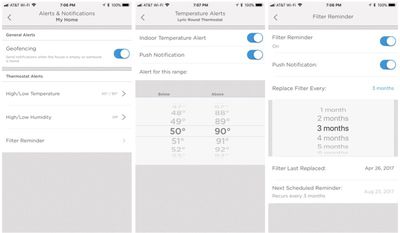
You can also set up push notifications to remind you to change your air filters, with customizable time frames ranging from one to eleven months.
Wrap-up
Thermostats are proving to be one of the more popular HomeKit accessories with third-party manufacturers, due in large part to the usefulness of including smart home technology in these products. Scheduling, geofencing, intelligent monitoring and comfort adjustments, and other features make for nice upgrades over more traditional thermostats, even those that have for many years supported basic scheduling functions.
The Lyric Round is a quality entrant into this market, with its attractive design meshing nicely with many home decors and offering some of the same benefits of a Nest thermostat but with HomeKit support. The classic round design originally made famous by Honeywell decades ago has been updated with the smooth ring to make manual temperature adjustments simple. Scheduling and geofencing functions make it easy to "set it and forget it" and let the thermostat maintain your comfort level and save energy.
The Lyric Round was originally priced at $249 last year, but Honeywell has since reduced the price to $199 and it is available from a variety of retailers including Amazon. Be aware that some retailer including Apple are still selling the Lyric Round for $249, so be sure to check pricing before you buy.
Note: Honeywell provided the Lyric Round to MacRumors free of charge for the purposes of this review, and it was returned to Honeywell after publication. No other compensation was received. MacRumors is an affiliate partner with Amazon and may earn commissions on purchases made through links in this article.






















Top Rated Comments
Beware that there are Lyric Rounds out there that are not Homekit compatible. They look exactly the same and have exactly the same name but are old stock. The only difference is the part number. I have an old one. They cannot be upgraded for Homekit compatibility. Buy from any major retailer and you are fine. If you buy from some random seller on Ebay or Amazon, you might be getting old stock.
[doublepost=1503600091][/doublepost]How do you cool specific areas without a multi-zone HVAC system. No thermostat can regulate vents in a zone individually. It's all or nothing for every vent on that zone. All the sensors do is average out the temp.
It's been great since then, and we LOVE the Siri/HomeKit functionality.