

Meross makes a range of HomeKit-compatible smart home devices for multiple regions around the world. The Meross Smart Power Strip and Smart Plug are some of the company's most popular products and both work with Apple HomeKit.
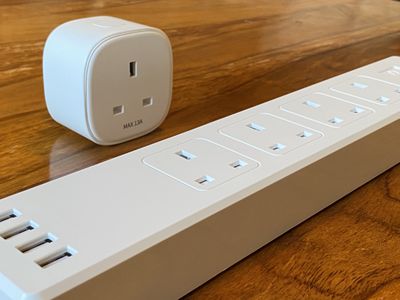
Meross's smart plugs are among the more affordable HomeKit-compatible devices on the market, and the company offers the option to buy them in cheaper multi-packs for your smart home setup. Meross also offers a smart power strip with four USB ports and HomeKit control for each individual plug on the strip.
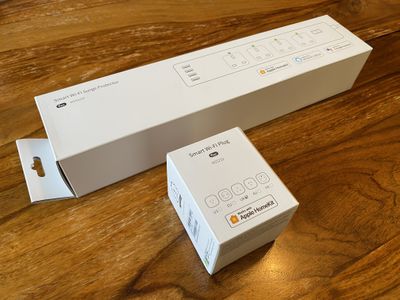
Although my Meross devices were for UK power outlets, the company also sells its smart plug and smart power strip with the correct pins for the U.S., EU, Australia, and France.
Unboxing
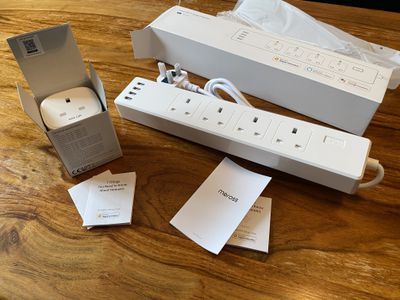
Both devices were boxed and presented as well as you'd expect for a smart home device. Meross seems to have taken some packaging cues from Apple and used a very similar matte white cardboard to many Apple products.
Design and Build
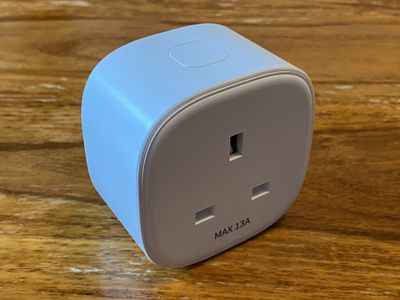
The Meross smart plug is housed in a matte white plastic shell, with a large, flush button on the top. In spite of its lower price point, the Meross smart plug is actually smaller and slightly slimmer than other leading smart plugs such as those offered by Elgato Eve.
However, the plug feels hollow and much lighter than other smart plugs that I have used. While weight and feel in the hand is hardly important for a stationary smart home device, it is worth noting that this does make it feel somewhat cheap.
The smart power strip has a matte finish on the top, a beveled edge, and glossy plastic around the sides. Each plug is surrounded by a recess to highlight it. Although any power strip can scarcely be described as good-looking, the Meross power strip looks like a slightly more thoughtfully-designed item.
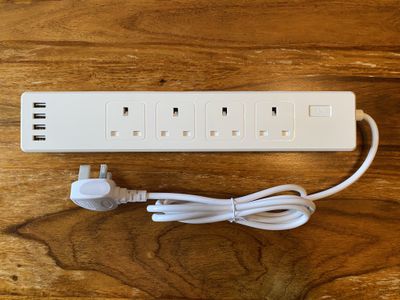
Rubberized feet on the bottom keep the strip in place when it is flat on the floor, but there are also four screw-holes if you want to wall-mount it, as is common for surge protectors and power strips.
The smart power strip feels markedly higher quality than the smart plug, even if it does also feel too hollow, but this is perhaps to be expected in light of its higher price tag. Neither is particularly impressive when it comes to design or build quality, but as items that users will generally want to keep out of sight, this is hardly very important.
Features
Both devices work over Wi-Fi, but unlike many other smart home devices, such as Philips Hue smart lighting, there is no need to use a central hub connected to the router.
Both devices make use of LEDs to indicate their status. The smart plug has a bright LED under the power button, which shows a green or orange Meross logo when illuminated, depending on whether it is powered on or connecting. However, the plastic is so thin on the smart plug that it leaks out much of the light elsewhere, which diminishes the look.
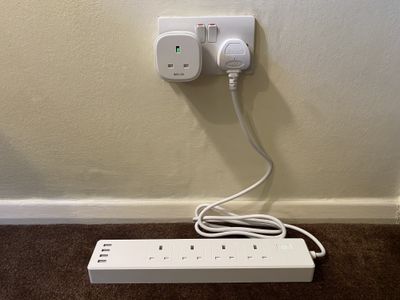
The smart power strip has many more LEDs than the smart plug: one for each of the power outlets, including the USB ports, and one on the power button. The light leak issue is virtually negligible on this device, and the small, bright LEDs are an excellent indicator of status. I can see exactly which outlets are switched on from across the room.
The power strip also has four 4.0A standard USB ports on its left-hand side, as well as the four main power outlets, for charging devices. I personally would have preferred USB-C ports and the ability to charge at faster speeds, but in addition to the other four power outlets, the USB ports are a good addition to the product and have already come in handy. The power strip seems ideal for adding an entire desk's worth of devices and chargers to HomeKit.
The devices can be manually controlled by clicking their power button, just in case you do not have a controller device nearby or your Wi-Fi is down. The single button on the power strip activates or deactivates all of the outlets at once, and there is no manual option to control each outlet individually. Considering users will likely seldom use the manual controls, turning on and off all of the outlets at once seems fair in this instance.
When powered up, the plugs offer a loud click noise. While I appreciated the click to confirm that it was now powered, I can also see that this may be a nuisance to users who might want things to power on or off quietly, such as during the night.
Setup
Although Meross does have its own app, it is not necessary to use it at all if you pair the devices using HomeKit. In theory, you need only open the Home app on your iPhone, tap Add Accessory, and scan the code on the device.
However, I had some major issues setting up both Meross devices. For reasons still unbeknownst to me, the devices repeatedly failed to connect with the Home app. After a lengthy back-and-forth with Meross support to troubleshoot the problem, I finally managed to get the devices working correctly with the Home app.
I was advised to set about a long list of complex and largely unintelligible troubleshooting operations, including toggling MAC address filtering on my router, using a different iPhone, and logging out of iCloud, among other steps. The only way I could successfully pair the devices, in the end, was by completely disabling my router's firewall and the 5GHz portion of the network. Although the devices are now working seamlessly, I must say that this was the most irksome, difficult, and invasive HomeKit pairing process that I have ever experienced. Someone with less technical know-how would have found this troubleshooting process, simply to get the devices paired, almost impossible.
HomeKit Support
Once the devices were finally paired, they provided a consistent and reliable connection to the Home app. Unlike some of the other HomeKit devices I use, the Meross offerings were unfailingly connected to my network. I have yet to experience a "no response" alert and they are seamlessly quick to react to commands.
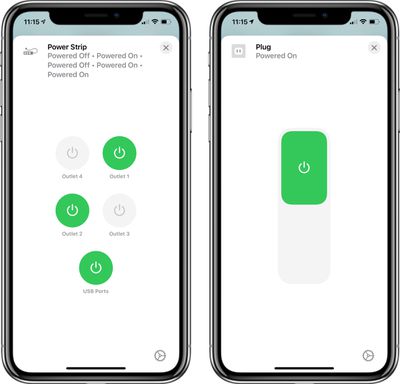
Better still, I was pleased to see that the smart power strip offered individual control over each of its power outlets, including the USB ports. This allows for precise control over each of the outlets, and it is possible to rename and change the icon for each one in the Home app. Integration with this lesser-known Home app functionality is exactly what one would want from a smart home strip.
The Bottom Line
The fact that Meross's devices work without an individual app or a central hub makes the experience more seamless than many other HomeKit devices, and I cannot fault the consistency of the connection.
However, there is no doubt that the unorthodox, insecure, and demanding pairing process made it a frustrating and time-consuming experience. I do not believe it is a reasonable expectation of consumers to toggle dozens of setting on their phone, or worse still, their router, simply to pair a basic smart home device. Had I not been reviewing the devices, I likely would have given up before getting them to work. Sadly, I do not seem to be alone in experiencing these issues, according to a plethora of Amazon reviews.
That said, not everyone will have this bad experience, and the majority of reviewers on Amazon seem to be contented with their pairing process. Furthermore, Meross support was nothing if not inventive in presenting solutions to my issue. It's only a shame it took hours to troubleshoot the problems, which on balance, really does not seem worth it for these devices.
The Meross smart plug works as well as one would expect for what it is. For users setting about larger HomeKit setups, the ability to batch-purchase these outlets at a cost-effective price point may present an attractive option. The Meross smart power strip is a more impressive piece of kit. The individual control of the outlets through the Home app offers extraordinary versatility. Overall, providing you can get them working in the first place, the Meross smart plug and smart power strip make a valuable addition to any HomeKit setup.
How to Buy
In the U.S., the Meross smart plug can be purchased from Amazon in packs of two for $25, packs of three for $32.59, and packs of four for $39.99.
The Meross smart power strip is available on Amazon for $35.99 with three outlets or $40.99 with four outlets.
Note: Meross provided MacRumors with a smart power strip and smart plug for the purpose of this review. No other compensation was received.






















Top Rated Comments
"Hey Siri, turn on the treadmill" and it will turn it on as well as the fan next to it
"Hey Siri, turn on the bike" and it will turn on the bike, both fans, the Apple TV I use for Zwift and its screen
"Hey Siri, turn off the gym equipment" when I've finished
Essential? No. Convenient? Yes.