

Nanoleaf started out in 2013 as small company offering a Kickstarter project for an energy efficient light bulb, which led to the launch of the HomeKit-enabled Nanoleaf Smarter Kit, a set of three standard-style bulbs connected by a hub.
Nanoleaf's first HomeKit accessory worked well but was rather ordinary, something that can't be said about its newest product, the Aurora Smarter Kit. Inspired by the aurora borealis phenomena, the Aurora is like no other HomeKit product -- or lighting product -- on the market.
Priced at $199, the Aurora Smarter Kit is a set of modular mood lights that can be arranged in hundreds of ways. Each triangle-shaped light can be set to a different color using the Aurora app, and movement patterns are used to create a dynamic lighting setup that's essentially interactive art.
Design and Setup
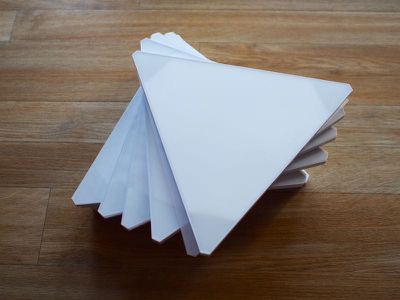
The Aurora Smarter Kit includes nine plastic triangles with LEDs in each corner, a main connector that plugs into one of the triangles and into a standard wall socket, adhesive strips, and connectors to connect and power each triangle.
While one triangle needs to be attached to the power source (which can power up to 30 triangles), the others triangles draw power through the main triangle using small plastic connector tabs that can be placed on any side of each individual triangle. That means the triangles can be arranged in an endless number of patterns, and triangles beyond the additional nine can be added to the design.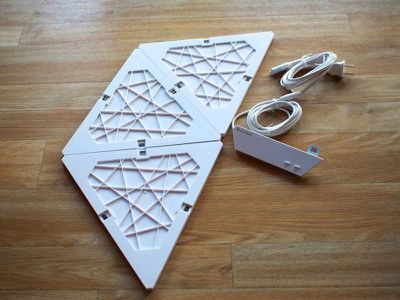
Triangles need to be connected to one another for power, so there's no way to split the triangles up unless you have two kits with two power panels. Some of Nanoleaf's imagery shows the Aurora split across two walls or connected at a 90 degree angle -- this is not possible at the current time. Nanoleaf tells me that flexible connectors that will allow the triangles to be placed around corners are in the works and will be released in the summertime.
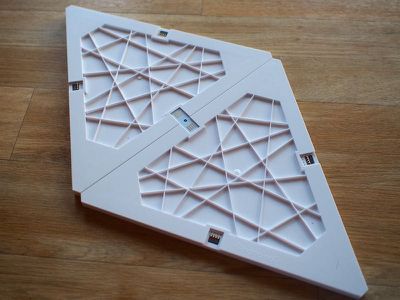
Each triangle measures in at about 9.5 inches long and 8 inches on the sides, so a set of nine takes up a good amount of space on the wall depending on the arrangement. A single wire will need to snake up the wall, connecting the power panel to an outlet.
Nanoleaf recommends setting up all of the panels and testing them before attaching them to the wall, so mine went on the floor first while I picked a layout. With the Aurora, you're going to want to invest some time in arranging the triangles into a suitable shape, because these go up on the wall using 3M adhesive strips. Once up, they're not moving without some serious effort.
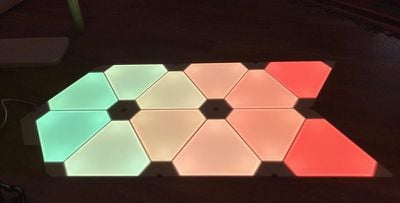
I made a design on the floor and used paper guide triangles, included in the packaging, to mock it up on the wall so I could get the proper alignment. Again, with that adhesive, this is a measure twice stick once operation.
Each panel attaches to the wall using three 3M adhesive strips, one in each corner of the triangle. Hanging them on the wall took about a half hour from arranging the paper triangles to the finished product. The panels snap together as described above with the connectors, so it's just a matter of lining everything up and pressing down to make sure it's adequately adhered to the wall.
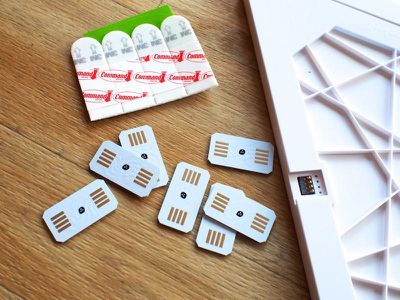
The triangles are made of a lightweight opaque plastic, so with three adhesive strips, they are well and truly stuck. The triangles aren't going to slip off the wall or come down in an earthquake, and while mine have only been up for two weeks, I suspect if one strip begins to fail, the other two strips will keep it attached.
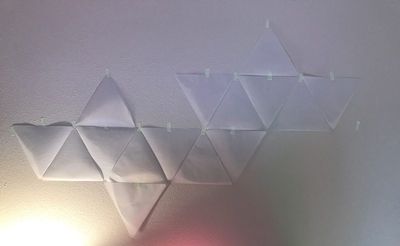
All of this adhesive makes it a hassle to rearrange the panels, which is a shame. I would love to be able to change my design on a regular basis to keep it from getting stale, but unsticking the panels from the wall is a huge pain (not to mention the 3M strips can damage some paint).
On the plus side, using adhesive for attachment makes for a clean, futuristic look with just a single wire connecting the entire setup to a power source.
I started out with 12 triangles (the main kit and an extra kit Nanoleaf sent) but once I set them up on the floor, I loved the look enough that I went to Best Buy and bought another expansion kit. A week later, I bought another, so now I have 18 triangles.
Expansion kits are priced at $60 for three panels, and while that's far from cheap, it's on par with other lighting kits like Philips Hue. I think most people will want to buy at least one expansion kit for the Nanoleaf Aurora -- nine panels feels like too few.
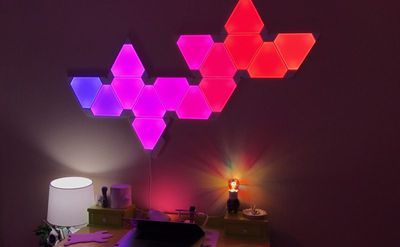
On the main power piece that connects to one of the triangles, there's a power button and an additional button that allows you to manually swap through different pre-set scenes that have been established in the app. This allows the Aurora to be controlled sans iPhone, but it's the only manual control available.
Light Output
The base Aurora module doesn't quite put out enough light to be used as a main light source in a room (unless the room is fairly small), but it works well as a nightlight, and it does get bright enough that it can be paired with a standard lamp or two for sufficient room lighting. It's also the perfect amount of light for watching movies or playing video games.
Because I was only expecting the Aurora to provide mood lighting, I was surprised at how bright it can get. The colors are super rich and vibrant with the brightness cranked up, or more muted and soft with the brightness turned down. I keep the brightness at about 25 percent, which is comfortable enough to provide a little light without being obtrusive.
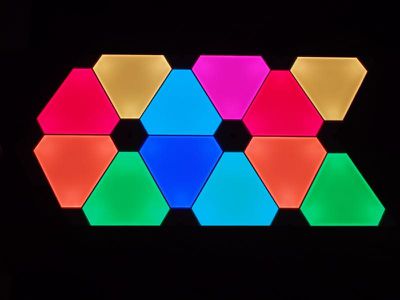
Light output will change with the number of panels. Nine isn't enough to light a room, but 18 goes a lot further at maximum brightness depending on the color it's set to. I have a fairly large office and I'd compare the 18-panel Aurora setup to a standard lamp based on the amount of light output. It won't light my office on its own, but paired with one or two lamps, it's a good amount of light.
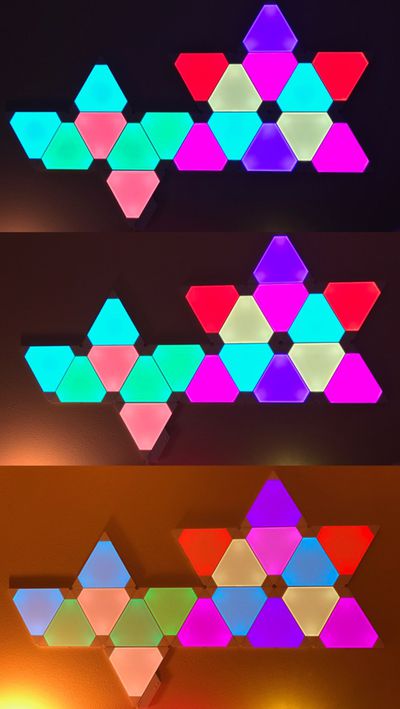
You can see the three LEDs in each corner of the Aurora panels, with the light very clearly radiating from those areas. At dimmer settings and with some color rotation patterns there's also a noticeable flickering as the lights shift colors, most apparent when the Aurora is dimmed. It's a little distracting, but not a deal breaker. It doesn't appear to flicker the same way at maximum brightness, or if it does, it can't be seen because it's so vibrant.
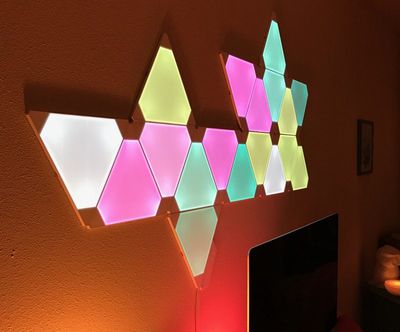
Several times, I've noticed bright flashes of light coming from the Aurora, almost like one of the LEDs is flaring. This is definitely a bug and an irritating one -- it happens at least once a day, but it doesn't seem to impact the functionality of the light.
I leave my Aurora panels turned on all the time except for at night. They're LED so they don't use a lot of energy and they don't get warm. When off, it just looks like a bunch of white plastic triangles on the wall, which isn't as appealing as the bright colors. That's something to keep in mind if you don't plan to have the Aurora turned on permanently.
App and HomeKit Features
Over the last two years, Apple's HomeKit has improved quite a bit. Adding new devices to HomeKit is almost always simple and error free, and the Aurora Smarter Kit was no exception. Setting it up consisted of powering it on, connecting to it directly via WiFi, inputting the password for my WiFi network, and scanning the HomeKit hardware code using the Nanoleaf Aurora app (the Home app - or any other HomeKit app - can also be used for this process).
It should be noted that the Aurora only works with a 2.4GHz WiFi network, so you will need to make sure you have that option set up on your router. Though the Aurora needs to connect to the 2.4GHz network, I can still control it with my iPhone connected to the 5GHz network. It works when away from home too, thanks to the HomeKit integration and an Apple TV hub.
In the early days of HomeKit, I used to have a lot of issues with new accessories causing problems with my setup, resulting in a lot of resets or inexplicable connection issues, but I haven't had that happen in the last year. HomeKit isn't perfect, especially when it comes to getting Siri to recognize voice commands, but it's better than it used to be.
Siri's interaction with the Aurora is similar to any other HomeKit-enabled light. You can use Siri to change the lights on, off, to a specific color, or to a pre-defined scene created in the Nanoleaf Aurora app.
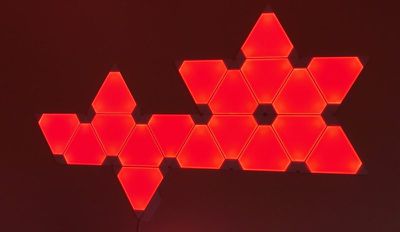
Unfortunately, there's no way to create light shows or multi-colored light setups with the Aurora outside of scenes, so you will need to use the dedicated app a lot of the time rather than Siri or Apple's Home app.
Third-party app makers don't always do a great job with their apps, and while Nanoleaf's app isn't terrible, it could use some improvement. A lot of the time when I open the Nanoleaf app I get a connection error that says the Aurora can't be reached. This seems to be an app problem rather than an internet problem because five seconds later, the connection is fine.
The Nanoleaf app's interface is neat. It displays a real-time view of the Aurora lights in the arrangement you've created and with the colors you've set.
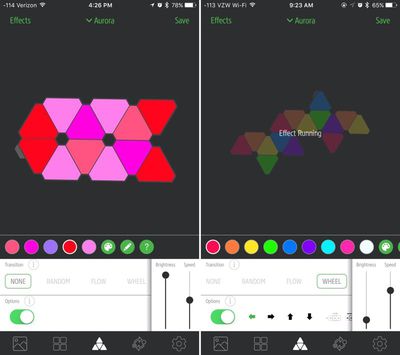
Controlling the Aurora revolves around choosing a pre-existing color palette or creating a new one. Any color can be picked and added to a palette, and then that palette is used to assign a color to each triangle.
Tap a color, tap a triangle, and it shows up right on the wall. When a color palette is set, there's an option to add several light effects to switch between the colors of your palette in various patterns.
Options include Random (randomly changes the colors of the triangles), Flow (slowly transitions between colors), Wheel (a continuous shifting gradient of colors), Highlight (like random, but with a focus on the left side of the palette), Fade (all the triangles shift between each color), and Burst (triangles shift colors from the middle out).
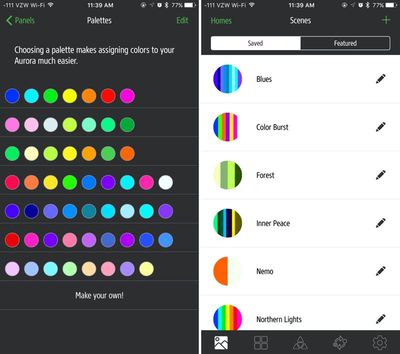
Brightness, movement speed, transition smoothing, and direction are also options that can be set.
All palettes can be saved as scenes that can be activated via Siri or through the Scenes section of the app. Like other HomeKit apps, the Nanoleaf app can control other HomeKit-enabled accessories, but it is limited to lights. To have the lights turn to specific scenes at pre-set times, a Schedules feature can be used.
Siri and Apple's Home app can be used to turn the Aurora off and on, dim it, set a single solid color, or activate a scene. Individual triangles can't be controlled via Siri or in the Home app.
Bottom Line
At $200, the Aurora Smarter Kit isn't cheap, but its uniqueness, vibrant colors, HomeKit support, and customizable design make it worth the price. It's almost more art than light, and while it won't light up an entire room, it's a perfect accent light or night light. It can be the centerpiece of a room or a subtle background accent depending on the colors and the brightness.
Not everyone is going to feel like a $200 light is a worthwhile purchase, but if you're the kind of person who doesn't mind shelling out a couple hundred dollars for a futuristic tech toy or a neat lighting solution, I can guarantee you're not going to be disappointed with the Aurora.
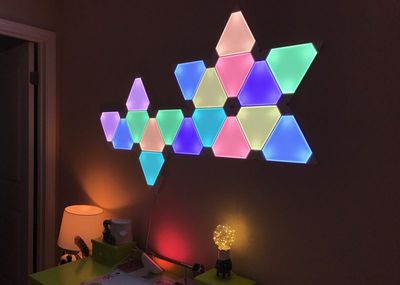
I do wish adhesive wasn't the solution for mounting the Aurora because it makes it difficult to rearrange panels at will (and this kind of adhesive always has the potential to damage walls), but there doesn't seem to be an alternative option so it's a shortcoming that has to be lived with. And it's a downside I don't mind tolerating for the benefits of the Aurora.
There are also some bugs and connection issues with the Nanoleaf Aurora that potential buyers should be aware of, but none of the bugs I ran into severely impacted functionality.
The Aurora is pricy, but Nanoleaf has some additions in the works like sound integration and new panel shapes, so this seems to be a system that's going to last for long time and provide years worth of value. I'd happily use the Aurora without HomeKit integration, so that it works with Siri and the rest of my smart home products is a bonus.
Pros:
- Modular
- Expandable
- Super bright
- Can control each triangle
- HomeKit compatible
Cons:
- Requires 2.4GHz network
- Connectivity problems
- Odd LED flashes
- Flickering color transitions at low brightness
How to Buy
The Aurora Smarter Kit can be purchased from the Nanoleaf website for $199. It's also available from Best Buy's website and retail stores for the same price.
Nanoleaf provided MacRumors with a Nanoleaf Starter Kit and one expansion set for the purposes of this review. The author also purchased additional expansion sets.






















Top Rated Comments
What I didn't like is that it looks cheap during the day when powered off (large white hunk of plastic on the wall). Also the colors tend to change and wash out when the lights are dimmed (red turns light pink). At medium intensity the colors are very inconsistent across the panels. It really needs to be 100% brightness to look decent.
This is the sort of thing that would work great in a bar, restaurant, or a college dorm, but looks cheap and out of place in a home.