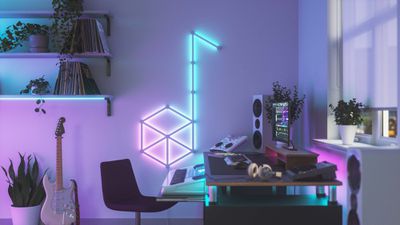
Nanoleaf, known for its HomeKit-enabled accent lights, recently launched its most futuristic and modern looking lighting product yet - Lines. Lines are modular LED light bars that are illuminated at the back and can be arranged into different patterns and shapes for a unique design.
nanoleaf lines music
Prior Nanoleaf products have all been panels in various shapes with LED lights in the corners, but the Lines are something entirely different and may appeal to those who don't care for the panel look. Lines are priced starting at $200, so this is a high-end accent lighting product.
nanoleaf lines colors rainbow
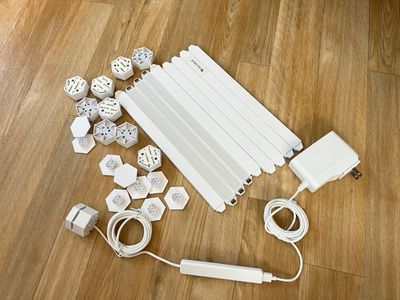
Lines are white plastic light bars that are 11 inches long and .78 inches thick, and the idea is to connect lines together with hexagon-shaped connectors, creating different patterns and designs. The Nanoleaf app can be used for designing a Lines setup, and once a favorite shape has been decided on, the Lines can be mounted to the wall.
nanoleaf lines components
Mounting Nanoleaf's Lines is hassle free. Just make your design, test out the lights, and then transfer the shape to the wall using the adhesive tape. There are detachable plastic plates that hold the adhesive and pull tabs so you can remove the Lines from the wall without damage. It's probably Nanoleaf's best setup in terms of relocating/removing the hardware. I took the Lines off of the wall a couple of times to move them and had no issues.
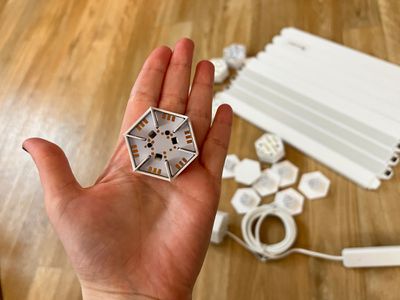
nanoleaf lines connector
Nanoleaf's products are HomeKit-enabled, so setup is as simple as opening up the Nanoleaf app and then scanning a HomeKit code. You might run into a snag if you don't have a 2.4GHz WiFi network available, but for the most part, it should be a seamless experience.
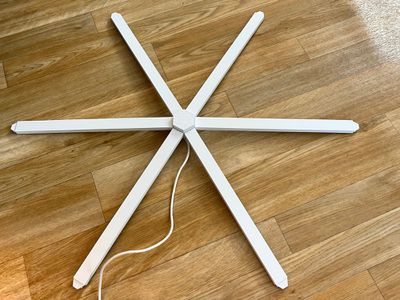
nanoleaf lines connected
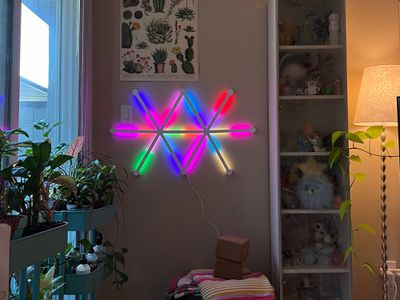
Once set up, turned on, and connected, the Lines magic happens. Nanoleaf is using backlighting for the Lines, and it's a neat effect with millions of color options. Lines offer a unique look that's different from the other Nanoleaf products, and I can't get over how cool it is. Each Line can be set to two separate colors, and there's little blending, so you get these distinct shade mixes that are visually striking.
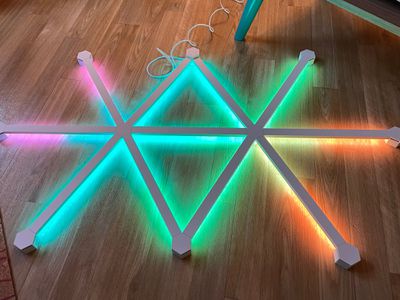
nanoleaf lines on floor
With Nanoleaf's Hexagons and Triangles, the lighting panels are bright enough to replace a traditional light, but that's not the case with Lines. Lines, like Nanoleaf's wood-colored Elements, are accent lighting and are not bright enough to work as a standard light. That said, at 100 percent brightness, they're still able to put out a decent amount of light and are bright enough that I prefer to run them at about 50 percent brightness since they're in my line of sight.
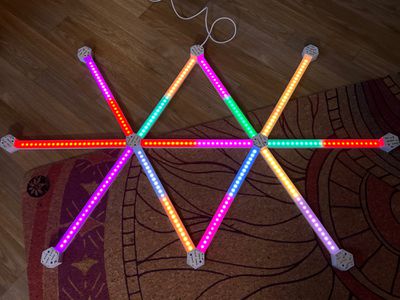
nanoleaf lines back leds
When not lit up, Nanoleaf's Lines suffer from a problem that plagues most of the other Nanoleaf products - they're not that attractive on the wall. I am not a fan of the look of the Lines when they're turned off. The Lines are made from a stark white plastic and when off, they really stand out. Nanoleaf is making covers for the Lines that turn them black or pink, and that might improve the look when they're deactivated. The skins are shipping sometime in the future, and Nanoleaf says more designs are coming.
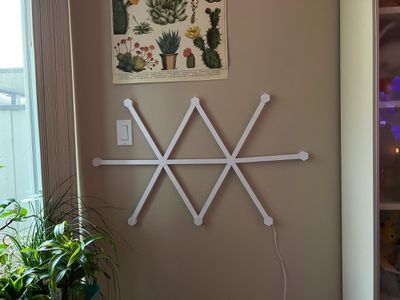
nanoleaf lines turned off
I can forgive how the lines look when not lit just because of how vibrant and eye-catching they are when activated. You can choose from tons of different colors and pick a static look, or set up scenes with rotating colors in different patterns. Nanoleaf has some preset designs and an entire Nanoleaf gallery where you can download designs other people have created.
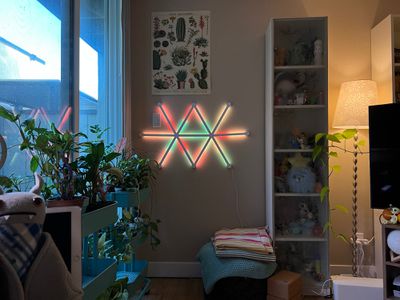
nanoleaf lines colors pastels
Nanoleaf's robust selection of lighting scenes is so convenient and one of my favorite parts of the Nanoleaf ecosystem. You can always find something fresh and interesting when browsing through the different looks that have been uploaded if you don't feel like putting the effort in to create your own designs. You can preview scenes or save them to your library and use them regularly.

The Lines are designed to be controlled through the Nanoleaf app, but you can also swap through your saved scenes using the hardware-based controller. Nanoleaf Lines support rhythm functionality as well, and you can use Rhythm scenes to set them to light up with music.
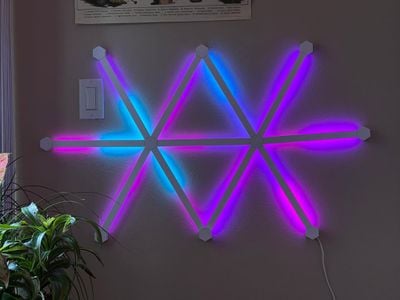
nanoleaf lines blues
Lines are ‌HomeKit‌ compatible and can be assigned to Rooms and controlled alongside other ‌HomeKit‌ devices with Siri voice commands. The Home app offers little control functionality beyond activating/deactivating the Lines or setting them to a static color, so the Nanoleaf app is the primary control method. The Nanoleaf app incorporates all of your ‌HomeKit‌ products and the interface can be confusing, but the Nanoleaf section is straightforward and has the controls for the Lines.

I didn't have connectivity issues with the Lines during my time testing them, and I did spend about a month with them before writing my review, so they feel fairly reliable. I've also been using other Nanoleaf products for years with few connectivity problems beyond needing to reset the WiFi connection every so often.
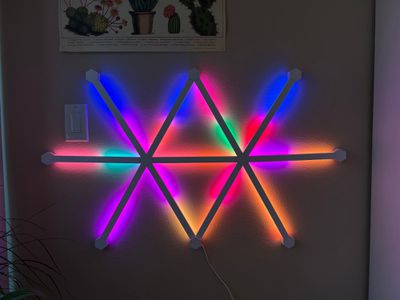
nanoleaf lines rainbow colors
Pricing is the major negative with the Lines. It's $200 for nine LED light bars, and another three costs $70, and that's not money that everyone is going to want to spend on accent lighting.

Bottom Line

If Nanoleaf's Lines fit your personal aesthetic and your budget, I don't think you're going to be disappointed picking them up. Lines are not the most attractive wall decor when not turned on, but when lit, they're colorful, futuristic, and fun.

I find the Lines to be a great addition to my home office, and I think they complement any kind of gaming room, PC setup, theater setup, or TV room, and I suspect kids would enjoy them too. I wish Nanoleaf could sell these at a more affordable price point, and I love everything about them but their high price tag.

How to Buy

Lines can be pre-ordered from the Nanoleaf website for $199. Each set includes nine Lines, with add-ons of three Lines available in expansion packs priced at $70. Nanoleaf says that pre-orders are expected to ship in late November.

Note: Nanoleaf provided MacRumors with set of Lines and a Lines expansion pack for the purpose of this review. No other compensation was received.


Top Rated Comments

1rottenapple Avatar
54 months ago
I wish they have an internal battery. The power cord is really unsightly.
Score: 6 Votes (Like | Disagree)
hipnetic Avatar
54 months ago
This website is always good for a Nanoleaf review every few months.
Score: 6 Votes (Like | Disagree)
nutmac Avatar
54 months ago
I realize taste is subjective, but does anyone actually like these things?

The light strips hidden under the fixture (e.g., cabinet, desk) and Nanoleaf's faux wood hexagons can look pretty good. But aside from bringing holiday cheers, I don't really see the point of paying $200 to put Lines against the wall. It looks like something one would put in a kid's room.
Score: 3 Votes (Like | Disagree)
Unity451 Avatar
54 months ago
Nanoleaf is about the coolest thing I'd never spend money on.
Score: 2 Votes (Like | Disagree)
biggest father1 Avatar
54 months ago
Even though this isn’t for me, I’m always glad to see more HomeKit products.
Score: 2 Votes (Like | Disagree)
SurferPup Avatar
54 months ago

You say that like it's a bad thing! What's wrong with kids having fun, or teens having fun, or even adults having fun?

No-one is claiming you should install these in The Parlor where the Important Guests can see them.
They're for use cases like a basement entertainment room, or a dorm room alongside posters of hot chix and Lamborghinis. Think of them as, eg, 2020's lava lamps -- in both the negative and positive aspects.
Or in the dungeon attached vertically next to the leather whips and a hexagon around the masks, illuminating in deep red. Adds to the allure of the dark recesses while your mistress hides in the shadows across the room as she awaits for you to settle in for your tier two obedience class.
Score: 1 Votes (Like | Disagree)

Popular Stories

Apple Wallet ID Illinois

Apple Plans to Expand iPhone Driver's Licenses to These 7 U.S. States

Wednesday December 24, 2025 8:40 am PST by
In select U.S. states, residents can add their driver's license or state ID to the Apple Wallet app on the iPhone and Apple Watch, and then use it to display proof of identity or age at select airports and businesses, and in select apps. The feature is currently available in 13 U.S. states and Puerto Rico, and it is expected to launch in at least seven more in the future. To set up the...
iPhone Top Left Hole Punch Face ID Feature Purple

iPhone 18 Pro Launching Next Year With These 12 New Features

Tuesday December 23, 2025 8:36 am PST by
While the iPhone 18 Pro and iPhone 18 Pro Max are not expected to launch for another nine months, there are already plenty of rumors about the devices. Below, we have recapped 12 features rumored for the iPhone 18 Pro models. The same overall design is expected, with 6.3-inch and 6.9-inch display sizes, and a "plateau" housing three rear cameras Under-screen Face ID Front camera in...
maxresdefault

Where's the New Apple TV?

Monday December 22, 2025 11:30 am PST by
Apple hasn't updated the Apple TV 4K since 2022, and 2025 was supposed to be the year that we got a refresh. There were rumors suggesting Apple would release the new Apple TV before the end of 2025, but it looks like that's not going to happen now. Subscribe to the MacRumors YouTube channel for more videos. Bloomberg's Mark Gurman said several times across 2024 and 2025 that Apple would...
iOS 26

iOS 26.2 Adds These 8 New Features to Your iPhone

Monday December 22, 2025 8:47 am PST by
Earlier this month, Apple released iOS 26.2, following more than a month of beta testing. It is a big update, with many new features and changes for iPhones. iOS 26.2 adds a Liquid Glass slider for the Lock Screen's clock, offline lyrics in Apple Music, and more. Below, we have highlighted a total of eight new features. Liquid Glass Slider on Lock Screen A new slider in the Lock...
maxresdefault

10 Mac Apps Worth Trying in 2026

Wednesday December 24, 2025 9:27 am PST by
2026 is almost upon us, and a new year is a good time to try out some new apps. We've rounded up 10 excellent Mac apps that are worth checking out. Subscribe to the MacRumors YouTube channel for more videos. Alt-Tab (Free) - Alt-Tab brings a Windows-style alt + tab thumbnail preview option to the Mac. You can see a full window preview of open apps and app windows. One Thing (Free) -...
Foldable iPhone 2023 Feature Iridescent Search

Samsung Developing 'Wide Fold' With iPhone Fold-Like Design Ahead of Apple's 2026 Launch

Tuesday December 23, 2025 11:55 am PST by
Samsung is working on a new foldable smartphone that's wider and shorter than the models that it's released before, according to Korean news site ETNews. The "Wide Fold" will compete with Apple's iPhone Fold that's set to launch in September 2026. Samsung's existing Galaxy Z Fold7 display is 6.5 inches when closed, and 8 inches when open, with a 21:9 aspect ratio when folded and a 20:18...
iOS 26

iOS 26.3 Brings AirPods-Like Pairing to Third-Party Devices in EU Under DMA

Monday December 22, 2025 3:20 pm PST by
The European Commission today praised the interoperability changes that Apple is introducing in iOS 26.3, once again crediting the Digital Markets Act (DMA) with bringing "new opportunities" to European users and developers. The Digital Markets Act requires Apple to provide third-party accessories with the same capabilities and access to device features that Apple's own products get. In iOS...
iphone fold 3d print

Have a 3D Printer? You Can Make Your Own iPhone Fold Dummy

Tuesday December 23, 2025 1:31 pm PST by
Apple is working on a foldable iPhone that's set to come out in September 2026, and rumors suggest that it will have a display that's around 5.4 inches when closed and 7.6 inches when open. Exact measurements vary based on rumors, but one 3D designer has created a mockup based on what we've heard so far. On MakerWorld, a user named Subsy has uploaded a 1:1 iPhone Fold replica (via Macworld), ...
iPhone Fold Vertical Feature

Why Apple's Foldable iPhone May Be Smaller Than Expected

Tuesday December 23, 2025 5:21 am PST by
Apple's first foldable iPhone, rumored for release next year, may turn out to be smaller than most people imagine, if a recent report is anything to go by. According to The Information, the outer display on the book-style device will measure just 5.3 inches – that's smaller than the 5.4-inch screen on the ‌iPhone‌ mini, a line Apple discontinued in 2022 due to poor sales. The report has led ...