

Nearly a year and half ago, OWC was one of the first companies to launch a Thunderbolt 3 dock, offering over a dozen ports of various types to support a variety of accessories. While I loved the sheer number of the ports offered on the original version of the dock, there were some shortcomings, including a lack of any 10 Gbps USB 3.1 Gen 2 ports and only 60 watts of charging power, which may not be enough for 15-inch MacBook Pro users.

Users for whom those two concerns are dealbreakers will be glad to hear that OWC is launching an updated version of its Thunderbolt 3 dock in just a few weeks, addressing these issues.
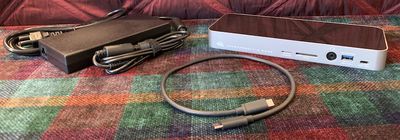
owc tb3 dock 2018 parts
The new OWC Thunderbolt 3 Dock is exactly the same size and shape as the original, with a horizontal design constructed of an aluminum band (in silver or space gray) wrapping all the way around the sides and glossy black plastic on the top and bottom.

All ports are clearly labeled in white, and there is an OWC logo and "Thunderbolt 3 Dock" branding printed on the front of the dock. The dock measures in at a hair over 9 inches wide by 3.5 inches deep and an inch tall. It weighs about 1.2 pounds, although as a desktop dock you're not likely to be moving it around very often so weight shouldn't be much of a factor.

Because OWC's new dock is so similar to the original version, I'm not going to walk through all of the features, and I'll instead focus on the differences. But rest assured, the new version continues to have five USB-A ports running at 5 Gbps, a pair of Thunderbolt ports, a Gigabit Ethernet port, a Mini DisplayPort port, and S/PDIF output and combo 3.5 mm audio ports. Two of the USB-A ports (one front and one rear) offer 1.5A of power for faster charging of connected devices.
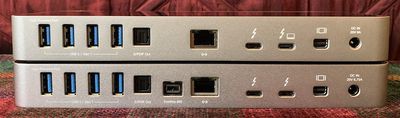
owc tb3 dock 2018 rear compare

New version on top, original model on bottom

As for new additions, OWC has added two additional ports on the front of the dock: a microSD card slot that complements the SD card slot from the original version, and a new 10 Gbps Type-C USB 3.1 Gen 2 port. Both of these are great additions that many users will find handy.
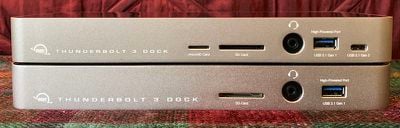
owc tb3 dock 2018 front compare

New version on top, original model on bottom

I tested out the new 10 Gbps USB-C port on the front of the dock using a fast CalDigit Tuff external SSD, and I saw solid speeds coming in at over 500 MB/s read and 480 MB/s write. Speeds when connected to one of the 5 Gbps USB-A ports came in at around 350 MB/s read and 325 MB/s write, which typical for this drive over that type of connection.

owc tb3 dock 2018 speed

Speed test using 10 Gbps USB-C port and external SSD

One connectivity option you'll find missing compared to the original version of the dock is a FireWire 800 port, which was formerly located near the center of the dock on the rear. It's not a particularly surprising omission given the continuing decline in use for the standard and the fact that OWC had previously dropped the port from its main Thunderbolt 3 dock lineup. The loss of the port won't be an issue for the vast majority of users, but if you happen to still need FireWire connectivity you'll need to look at other dock options.

If you're a 15-inch MacBook Pro user, you'll be glad to hear that OWC has bumped up the charging capabilities in the new dock to 85 watts from the original 60 watts. That'll be enough to charge up your MacBook Pro at the same speed as from Apple's power adapter, and it'll keep your machine powered up even under heavy loads.
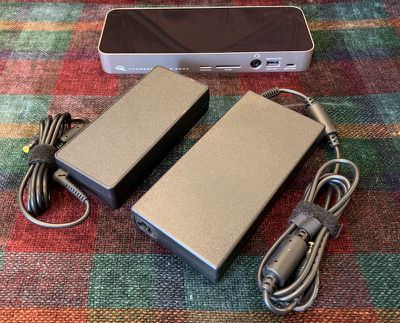
owc tb3 dock 2018 bricks compare

135-watt power brick from original version (left) vs. 180-watt power brick for updated model (right)

It's a very welcome improvement, but it does come at the cost of a larger external brick needed to support the increased power. The power brick included with the new dock is 180 watts, up from 135 watts in the original version. That increases the brick's size fairly significantly, but in most cases you'll be able to tuck it away somewhere and not have to worry about it.

Overall, the new Thunderbolt 3 Dock from OWC is one of my top picks among all of the docks I've tested. CalDigit's TS3 Plus has been my go-to dock since its release, but OWC's dock now gives it a run for its money with the array of ports and full 85-watt charging power that put it just about on par. OWC's dock will be priced at $299, which is competitive with other high-end Thunderbolt 3 docks, some of which can run up to $350 or more. OWC says the new dock will be available from its online store at macsales.com and at other retailers starting in early November.

Note: OWC provided the Thunderbolt 3 Dock to MacRumors free of charge for the purposes of this review. No other compensation was received. MacRumors is an affiliate partner with macsales.com and may earn commissions on purchases made through links in this article.


Top Rated Comments

Kobayagi Avatar
94 months ago
Damn. Spend so much on a new laptop and then spend even more to get (some) ports that previous models had.
Business wise, it's perfect. But it's far from customer friendly.
Score: 9 Votes (Like | Disagree)
OldSchoolMacGuy Avatar
94 months ago
We still see a lot of complaints about the lack of multiple connection types on the new MBP. Those people have never had one and a dock.

It's sooooooo nice to be able to sit down at my desk, plug in just 1 cable and have power, multiple monitors, numerous peripheral, hard drives, network, and more, all from just one cable. Previously that required a couple minutes of plugging in cables then a couple more minutes every time you wanted to take your laptop and leave. Just 1 cable for everything is a game changer and well worth the price of a hub. Those that complain about needing dongles are doing it wrong.
Score: 7 Votes (Like | Disagree)
alphaod Avatar
94 months ago
Darn, no more FireWire...

(Yes I use FireWire on some older hard drives)
Score: 5 Votes (Like | Disagree)
awer25 Avatar
94 months ago
We still see a lot of complaints about the lack of multiple connection types on the new MBP. Those people have never had one and a dock.

It's sooooooo nice to be able to sit down at my desk, plug in just 1 cable and have power, multiple monitors, numerous peripheral, hard drives, network, and more, all from just one cable. Previously that required a couple minutes of plugging in cables then a couple more minutes every time you wanted to take your laptop and leave. Just 1 cable for everything is a game changer and well worth the price of a hub. Those that complain about needing dongles are doing it wrong.
This is really missing the point of the complaint. There were plenty of USB hubs prior to Thunderbolt 3, and in the situation you described you always could have sat down to your docking station and plugged one cable into the computer to connect multiple devices (ok, maybe two if you need power as well).

The complaint is that when you're on the go, you now have to buy and carry a ton of dongles to connect peripherals which previously connected directly to the laptop.
Score: 3 Votes (Like | Disagree)
longofest Avatar
94 months ago
We still see a lot of complaints about the lack of multiple connection types on the new MBP. Those people have never had one and a dock.

It's sooooooo nice to be able to sit down at my desk, plug in just 1 cable and have power, multiple monitors, numerous peripheral, hard drives, network, and more, all from just one cable. Previously that required a couple minutes of plugging in cables then a couple more minutes every time you wanted to take your laptop and leave. Just 1 cable for everything is a game changer and well worth the price of a hub. Those that complain about needing dongles are doing it wrong.
It's possible to get that kind of docking ability without sacrificing ports. My work Dell XPS 15 accomplishes that offering one Thunderbolt 3 port, and then offering 2 USB 3.1 ports, a HDMI port, a headphone jack, and an SD card port. No dongles needed.
Score: 2 Votes (Like | Disagree)
ignatius345 Avatar
94 months ago
We still see a lot of complaints about the lack of multiple connection types on the new MBP. Those people have never had one and a dock.

It's sooooooo nice to be able to sit down at my desk, plug in just 1 cable and have power, multiple monitors, numerous peripheral, hard drives, network, and more, all from just one cable. Previously that required a couple minutes of plugging in cables then a couple more minutes every time you wanted to take your laptop and leave. Just 1 cable for everything is a game changer and well worth the price of a hub. Those that complain about needing dongles are doing it wrong.
You mean... people who are using their laptops anywhere but at a desk next to an AC outlet are "doing it wrong"? OK, sure.
Score: 2 Votes (Like | Disagree)

Popular Stories

Apple Wallet ID Illinois

Apple Plans to Expand iPhone Driver's Licenses to These 7 U.S. States

Wednesday December 24, 2025 8:40 am PST by
In select U.S. states, residents can add their driver's license or state ID to the Apple Wallet app on the iPhone and Apple Watch, and then use it to display proof of identity or age at select airports and businesses, and in select apps. The feature is currently available in 13 U.S. states and Puerto Rico, and it is expected to launch in at least seven more in the future. To set up the...
iPhone Top Left Hole Punch Face ID Feature Purple

iPhone 18 Pro Launching Next Year With These 12 New Features

Tuesday December 23, 2025 8:36 am PST by
While the iPhone 18 Pro and iPhone 18 Pro Max are not expected to launch for another nine months, there are already plenty of rumors about the devices. Below, we have recapped 12 features rumored for the iPhone 18 Pro models. The same overall design is expected, with 6.3-inch and 6.9-inch display sizes, and a "plateau" housing three rear cameras Under-screen Face ID Front camera in...
maxresdefault

Where's the New Apple TV?

Monday December 22, 2025 11:30 am PST by
Apple hasn't updated the Apple TV 4K since 2022, and 2025 was supposed to be the year that we got a refresh. There were rumors suggesting Apple would release the new Apple TV before the end of 2025, but it looks like that's not going to happen now. Subscribe to the MacRumors YouTube channel for more videos. Bloomberg's Mark Gurman said several times across 2024 and 2025 that Apple would...
maxresdefault

10 Mac Apps Worth Trying in 2026

Wednesday December 24, 2025 9:27 am PST by
2026 is almost upon us, and a new year is a good time to try out some new apps. We've rounded up 10 excellent Mac apps that are worth checking out. Subscribe to the MacRumors YouTube channel for more videos. Alt-Tab (Free) - Alt-Tab brings a Windows-style alt + tab thumbnail preview option to the Mac. You can see a full window preview of open apps and app windows. One Thing (Free) -...
iOS 26

iOS 26.2 Adds These 8 New Features to Your iPhone

Monday December 22, 2025 8:47 am PST by
Earlier this month, Apple released iOS 26.2, following more than a month of beta testing. It is a big update, with many new features and changes for iPhones. iOS 26.2 adds a Liquid Glass slider for the Lock Screen's clock, offline lyrics in Apple Music, and more. Below, we have highlighted a total of eight new features. Liquid Glass Slider on Lock Screen A new slider in the Lock...
airpods color prototypes

Apple Tested AirPods in Bright Colors

Saturday December 27, 2025 6:06 am PST by
Apple reportedly tested a version of the first-generation AirPods with bright, iPhone 5c-like colored charging cases. The images, shared by the Apple leaker and prototype collector known as "Kosutami," claim to show first-generation AirPods prototypes with pink and yellow exterior casings. The interior of the charging case and the earbuds themselves remain white. They seem close to some...
iPhone Fold Vertical Feature

Why Apple's Foldable iPhone May Be Smaller Than Expected

Tuesday December 23, 2025 5:21 am PST by
Apple's first foldable iPhone, rumored for release next year, may turn out to be smaller than most people imagine, if a recent report is anything to go by. According to The Information, the outer display on the book-style device will measure just 5.3 inches – that's smaller than the 5.4-inch screen on the ‌iPhone‌ mini, a line Apple discontinued in 2022 due to poor sales. The report has led ...
Foldable iPhone 2023 Feature Iridescent Search

Samsung Developing 'Wide Fold' With iPhone Fold-Like Design Ahead of Apple's 2026 Launch

Tuesday December 23, 2025 11:55 am PST by
Samsung is working on a new foldable smartphone that's wider and shorter than the models that it's released before, according to Korean news site ETNews. The "Wide Fold" will compete with Apple's iPhone Fold that's set to launch in September 2026. Samsung's existing Galaxy Z Fold7 display is 6.5 inches when closed, and 8 inches when open, with a 21:9 aspect ratio when folded and a 20:18...
iPhone SE Cosmopolitan Clean

Apple Discontinued These 25 Products This Year

Wednesday December 24, 2025 7:24 am PST by
With the end of 2025 near, the time has come to look back at the devices and accessories that Apple discontinued throughout the year. Most of the products that were discontinued this year were simply replaced by a new model with an updated chip. However, the iPhone SE line was entirely discontinued when the iPhone 16e launched, and the iPhone Plus line is being phased out. Below, we have...

















