

Western Digital recently introduced its newest SanDisk-branded backup product for iOS devices, the SanDisk iXpand Base, which combines nightly charging with backing up to make for an easy and intuitive way to protect your data.
The idea is to put the iXpand Base on your nightstand, plug it into the wall, and then plug your iPhone into the Lightning port at night. This charges the iPhone and allows it to transfer your photos, videos, and contacts to the Base for the purpose of backing up.
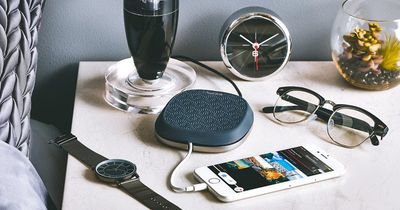
Design
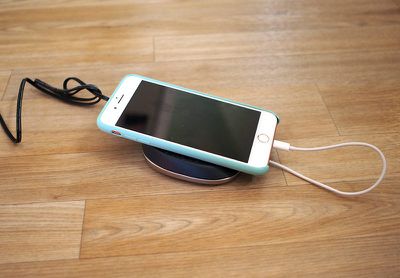
The iXpand Base is a palm-sized tapered surface that's designed to serve as a sort of platform on which to rest your iPhone while it charges at night. The bottom of the base is made from aluminum, while the top is covered in a soft, textured rubber material that keeps the iPhone securely on its surface.
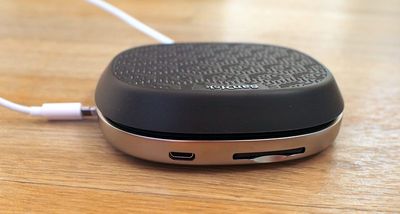
At the back, there's an SD card slot that houses an SD card where your backups are stored and there's a microUSB cable that is attached to a plug that provides power to the Base.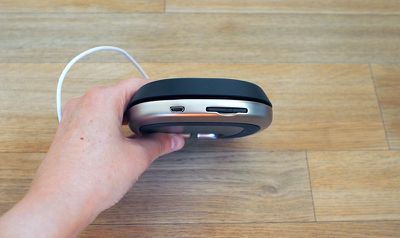
Underneath, there's a spot for the USB-A side of a Lightning cable to plug in, and you will need to supply your own Lightning cable with this product. Once set up, the Lightning cable plugs into your iPhone and a backup automatically starts upon connection if the accompanying SanDisk iXpand Base app is installed.
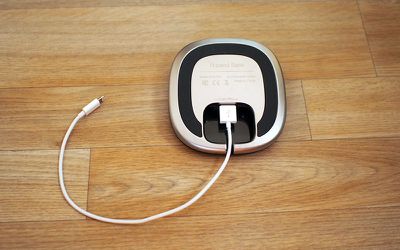
Design wise, I'm not sure what to say about the iXpand Base. It's just a flat, slightly tapered surface where your iPhone sits. It's not much to look at and adds no utility to the iPhone -- I would have preferred to see a dock-style design for a cleaner look and better nightstand functionality.
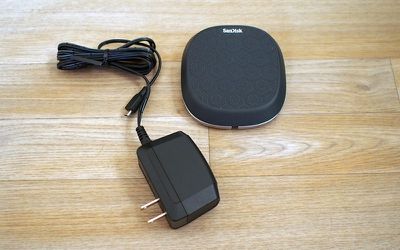
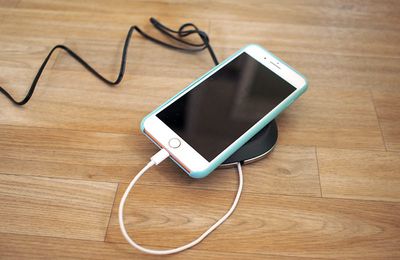
It doesn't take up much more space than my iPhone 7 Plus on the table next to my bed (though it is wider), but it looks messy with the white Lightning cable paired with the black cord coming out of the back of the device.
Backing Up
When you have the SanDisk app installed, as soon as you plug the iXpand Base into your iPhone, it will start a backup and begin charging the phone at the same time.
The backup feature scans your last backup, adds new photos and videos, and makes sure you consistently have a full resolution copy of your photos, videos, and contacts.

Unfortunately, the iXpand Base can't be used when it isn't plugged into a power source. So if you wanted to take it on the go to use it as a portable storage solution without the charging component, that's not possible because it can't draw power from the iPhone.
An iPhone will only connect to the Base and start backing up when the Base is plugged into the wall, making it useless without power.
If you attach a microUSB to USB-A cable to the microUSB port on the Base, you can connect it to your computer to view the files stored on it and add additional files, but SanDisk does not provide one of these cables. The Base also doesn't connect to the iPhone when plugged into the computer. Files transfer over to a computer at USB 2.0 speeds.
Alternatively, you can also remove the SD card from the iXpand Base and stick it in the SD card slot of your computer if your computer has an SD card. The SD card is hard to remove from the base, though, and many modern Macs don't have an SD card slot anyway.
App
The iXpand Base app can work in the background to back up your iPhone as soon as it's plugged into the Base at night, which is a useful feature. Once it's been installed and an initial backup has been completed, subsequent backups will happen with no interaction on your part.
Just plug it in at night and the app starts the backup process. You'll see a banner on your iPhone letting you know it's in progress.
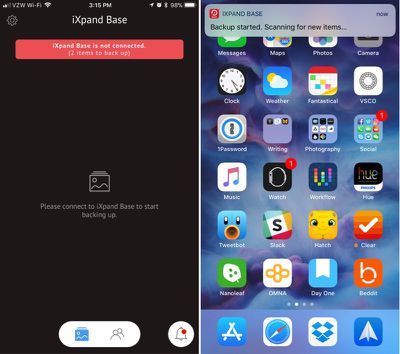
The app itself is bare bones. You can sync photos, videos, and contacts to your phone using the backup feature, but there's no option to sync individual files or photos to the Base from an iPhone.
The first time I synced my photo library, it took about 20 minutes, but each nightly backup has been much quicker. Restoring my backed up photo library to another phone was simple to do in the Settings section of the app, but it took awhile to transfer the files.
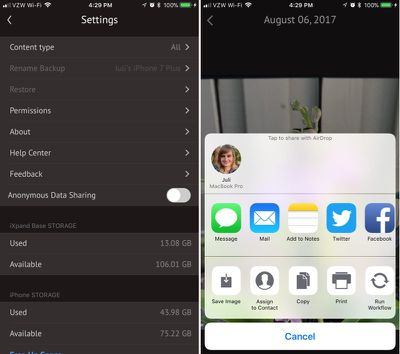
In addition to storing your photos, videos, and contacts, the iXpand Base app can be used to view, share, and manage them, but only when your iPhone is plugged in to the Base and the Base is plugged into power.
At some point during the testing process, the iXpand app duplicated several of my photos. I'm not sure what went wrong, but having duplicates in my backup is a huge hassle because they all need to be manually deleted and they take up twice the storage space.
I have a 128GB iPhone and the 128GB iXpand Base, and because it makes a full photo/video backup you'll need to buy a capacity that matches up with how much data is on your phone. SanDisk sells these in 32, 64, 128, and 256GB capacities. There is multi-user support, so with the larger capacities, multiple iPhones can be backed up.
Bottom Line
The SanDisk Base is a clever idea, but I was left feeling like it could have been implemented in a better way, especially at its $50-$200 price point. Not being able to connect my iPhone to the Base to view my files while it isn't plugged in is inconvenient.
When it comes to design, the flat puck of the Base feels like a lazy choice. The Base offers no benefit over putting the iPhone on a nightstand, and because I have to supply my own Lightning cable, it's no more convenient or stylish. I think this concept would have worked better with a dock style stand that allowed the iPhone to sit in an upright position, and given the size of the base, it seems like the components could have been built into that form factor.
While I liked the idea of being able to back my iPhone up automatically without thinking about it, I don't think this is a better solution than the small iXpand Lightning/USB Flash Drives SanDisk offers, or similar products from other companies. Those are more affordable, portable, and offer more functionality because they have both Lightning and USB-A connectors, making it easier to transfer files between devices.
If all you want is an effortless table top backup solution that does little else, the iXpand Base will provide that, but you can get more for your money with other backup and file transfer products.
If you do like the look and function of the iXpand Base, it's worth noting that it supports swappable SD cards. I'm not sure why someone would buy anything other than the lowest capacity version. It's cheaper to buy a standalone SD card and swap it in than it is to buy one of the higher capacity models.
How to Buy
The iXpand Base can be purchased from the SanDisk website. The 32GB model costs $49.99, the 64GB model costs $99.99, the 128GB model costs $129.99, and the 256GB model costs $199.99.
Note: SanDisk provided MacRumors with a 128GB iXpand Base for the purpose of this review. No other compensation was received.
























Top Rated Comments
Still, it has utility for certain purposes. To those who want multiple backups of their photos (not at all uncommon among serious photographers), this is a reasonably useful method for when a computer is not convenient/available. Then there are those who would rather avoid cloud-based photo storage/backup (whether iCloud, Google, Drop Box, or photo-sharing site). However, at the price, it's not likely to save money over paying for cloud storage. It also may be attractive for those who want an alternate method of transferring images from iPhone to other devices.
It's possible to do a hybrid backup - photos on this device, remainder of backup to iCloud (turn off photos backup in iCloud settings). However, that only complicates matters when a restore is required.
Overall, it's not at all attractive for my needs, but that doesn't mean others can't love it.
I guess it is better than nothing however. I see so many people at The Genious Bar getting their phones replaced or renewed having a conversation like this:
- but what's going to happen to my data?
- Do you have a backup of your phone?
- uh no I guess not.
- then sorry, there is not much we can do.
- oh no but they were really important for me.
- sorry.....