

Following my review of the Yale Assure Lock SL deadbolt with HomeKit support last month, a number of readers highlighted the Schlage Sense as another satisfactory HomeKit option worth considering. As it turns out, I've been using the Schlage Sense on my front door for quite some time, so it's worth taking a look at how Schlage's offering has held up over time.
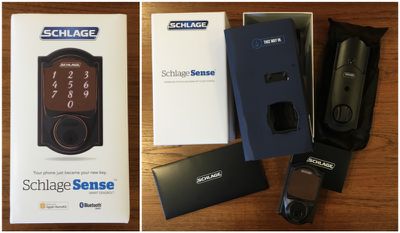
The Schlage Sense deadbolt was one of the first HomeKit-enabled smart locks, launching over two years ago, yet it remains one of the most popular smart locks on the market among Apple users. In fact, Apple continues to feature the Schlage Sense in its online and retail stores, although it is currently listed as unavailable for both online orders and in-store pickup even though it remains on the shelves at some Apple retail stores.
Unlike the Assure Lock SL that comes in only a single design (albeit with a few color options), the Schlage Sense comes in two different styles that fit in with many of Schlage's other hardware products: a classic Camelot style and a more modern Century style, with Matte Black, Satin Nickel, and Aged Bronze finishes available depending on style.
I've been using a Camelot-style Schlage Sense on my front door, paired with a matching non-locking Camelot doorknob to ensure I can't be accidentally locked out of my house due to a locked doorknob. The pairing looks good together, with the Camelot style offering a hint of elegance even with a prominent keypad.
Installation
Installation of the Schlage Sense is straightforward, and Schlage includes step-by-step directions to walk you through the process. As long as you're replacing an existing deadbolt and everything is lined up properly, installation takes just a few minutes and only requires a screwdriver. Just slide the deadbolt assembly into the edge of the door and sandwich it with the interior and exterior portions while connecting the two sides with a cable. A few screws pull everything together, and once you insert the batteries you should be ready to configure the lock.
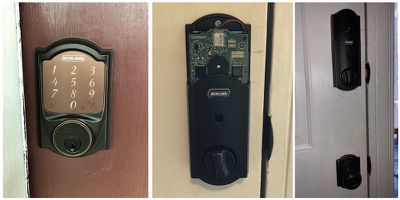
As is common with smart deadbolts, the interior portion of the Schlage Sense is quite large, which is a rather unfortunate visual look. But with space required for the lock cylinder, electronics, and four AA batteries, there's only so much that can be done to reduce the size.
Setup and App
Programming and setup are handled through the Schlage Sense app [App Store], which walks you through the process of pairing the lock with your phone over Bluetooth and configuring your lock options such whether the lock beeps as you press the keypad, automatic relocking, and one-touch locking where you don't have to enter a code. The lock also has an optional alarm mode which can beep when the door is opened or closed or sound an alarm when forced entry is detected.
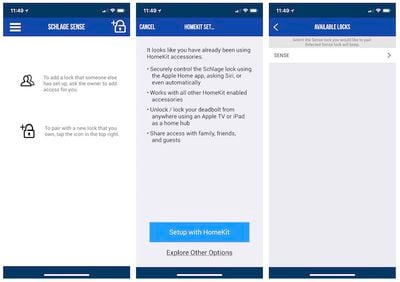
You can register for a Schlage account and add the Sense or just go straight to HomeKit, allowing the deadbolt to integrate with other HomeKit accessories. The HomeKit setup process is dead simple, requiring just a few steps. With an Apple TV, iPad, or HomePod around the house, you can use HomeKit to view the lock status and lock or unlock from anywhere, but if you don't want to use HomeKit, Schlage offers a $70 Wi-Fi adapter to provide remote access.
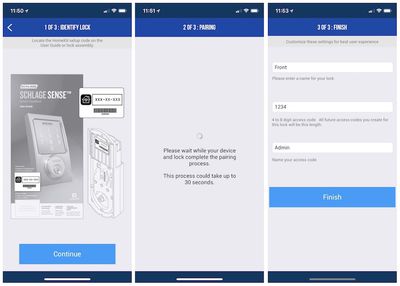
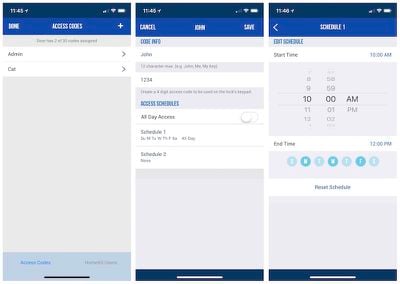
The app also lets you set up multiple user codes to limit access to your home. When adding a code, you'll have the option of specifying certain days and times when the code will work, which is handy for pet-sitters and others who need only temporary access to your home.
The main screen of the app gives you quick access to lock status, and a simple tap anywhere on the large lock graphic locks or unlocks the deadbolt. Of course, with HomeKit integration, you can use the Home app or Siri to perform the same functions.
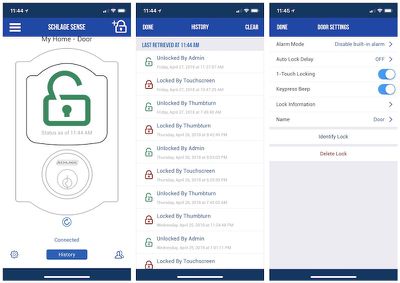
The app also lets you see a history of lock events, showing what days and times the deadbolt was locked and unlocked, with details such as whether it was locked or unlocked via the exterior touchscreen or interior thumb turn, as well as which user code was used for an exterior unlock.
The app won't win any design awards and there's a little layout issue on iPhone X, but it doesn't interfere with any of the app's functions.
General Operation
The Schlage Sense operates smoothly, with a satisfying heft to the thumb turn on the interior and simple keypad operation on the outside. Entering a user code on the keypad requires pressing the "Schlage" button at the top of the pad, which lights up the keypad, and then entering the four-digit code that unlocks the door. The same process locks the door from the outside unless you've turned on one-touch locking, which immediately locks the door when you press the Schlage button without the need to enter a user code.
While unlocking and locking, the Schlage Sense can utilize two different power levels to assist with moving the motorized deadbolt. The lock will first attempt to extend or retract the deadbolt at a lower power level, but if it is unsuccessful due to alignment being off or pressure being placed on the door that provides more resistance, the lock will increase power and try again. The motor is fairly noisy at both power levels.
The higher power undoubtedly burns through batteries more quickly (how much I'm not sure), but if your installation has everything lined up properly the higher power should rarely be needed. About the only time I've had the high-power mode activate is when trying to lock and I didn't quite get the door closed all the way. I've also triggered it a few times when I failed to wait for unlocking to complete before trying to push the door open and the pressure of pushing the deadbolt against the door jamb prevented the bolt from retracting under the low-power mode.
HomeKit
Adding the Schlage Sense to your HomeKit home is a simple process of scanning the HomeKit code during the setup process. Once it's part of your home, you can view and control the lock via the Home app on iOS or through Siri. You can also add it to automation routines with rooms, scenes, and triggers such as a "Good Night" scene to secure your house at bedtime.
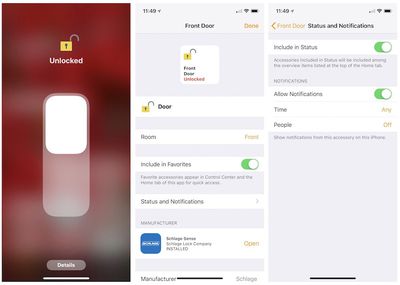
Schlage Sense also works with Amazon Alexa and should be receiving an update soon to offer support for Google Assistant.
Bugs
I did have an issue related to the release of iOS 10.2 where I became unable to apply firmware updates to my Schlage Sense. At the time, Schlage customer service told me it was a known issue with some users and that I would be notified when an app update was released to address the issue. Over time, I also began getting less and less life out of each set of batteries, and I was never able to get firmware updates working again on the lock. After a couple months of waiting for a fix that never came and my battery life running down to just a week per set rather than the 6–12 months I should have been seeing, I contacted support again and they quickly sent out a free replacement.
Since that time, the only issue I've run into is an occasional bug where the deadbolt has been unlocked but still thinks it's locked. It's a very rare issue that I only notice when I try to one-touch lock the door from the keypad and nothing happens because it's waiting for me to enter an unlock code.
Other than these two issues, the Schlage Sense has been reliable throughout the time I've owned it, and I've never found myself unable to gain access to my house. I do have smart locks and keypads on all of the entrances of my house to help provide peace of mind should any of them fail, and as a result I haven't carried house keys on me when leaving the house in years.
Wrap-up
Over two years after its launch, the Schlage Sense remains one of the most popular HomeKit-enabled smart locks, and it's easy to see why. It comes from a trusted brand that has helped it gain visibility in Home Depot, Lowe's and other retailers where homeowners shop for their door hardware, and the exterior keypad has a nice look that's not too bulky while still able to accept a traditional key. The two different styles give you options to fit in with different looks, and when I had an issue with the lock Schlage was quick to send out a replacement.
The Schlage Sense is available in Camelot and Century styles, with the Camelot available in Satin Nickel or Aged Bronze and the Century available in Satin Nickel or Matte Black. The list price is $229, but some retailers such as Amazon typically have prices closer to $200, with third-party retailers through Amazon sometimes going even lower.
Note: Schlage/Allegion provided the Schlage Sense to MacRumors free of charge for the purposes of this review. No other compensation was received. MacRumors is an affiliate partner with Amazon and may earn commissions on purchases made through links in this article.





















Top Rated Comments
[doublepost=1525097194][/doublepost]