iOS 26: What's Changed With the iPhone's Home Screen

Apple's new Liquid Glass design is noticeable on the Home Screen right when you unlock your iPhone, though the degree of change is customizable. We've rounded up everything that's changed with the ‌iPhone‌'s main interface.

iOS 26 Home Screen Features

Liquid Glass Design

By default, app icons have a layered look with subtle depth, essentially appearing as multiple sheets of glass stacked on one another to create a glass-like translucent look.
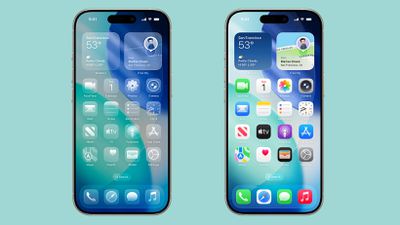
ios 26 home screen
Apple created Liquid Glass app icons for apps like Safari, Maps, Photos, the App Store, Mail and more. Third-party app icons are adopting the same aesthetic, and for apps with a simple design on a solid background, no update is needed. Icons like this already have a Liquid Glass look.

The dock is transparent and blends into the background behind it, and the same goes for the search button. App folders have a frosted glass design that also changes tint based on your wallpaper. When you edit your ‌Home Screen‌, the buttons that you interact with are also transparent.

Interface elements like the dock, folders, and the search button have a lighting effect that changes when you move your ‌iPhone‌, making them look like real glass.

Light, Dark and Tinted Modes

The Liquid Glass effect is apparent in both Light Mode and Dark Mode, with icons continuing to feature the same stacked glass look, just with a lighter or darker background.
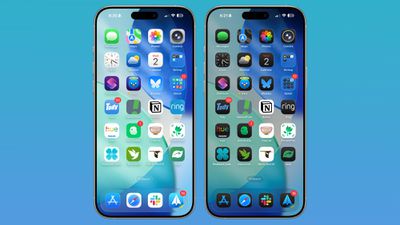
ios 26 home screen standard
Apple technically changed Light Mode to "Default Mode" in the customization settings where you can adjust color (long press on the display and tap on customize).

There are new "Always" and "Auto" toggles for enabling permanent Light or Dark styles or adjusting them based on time, and the Small and Large buttons for changing icon size have been relocated to the upper right of the customization interface.

Tinted mode looks different in iOS 26 than it did in iOS 18. Rather than icons featuring a black background with colored graphics, icons adopt the full color that you select with white graphics in Light Mode. In ‌Dark Mode‌, backgrounds are a much darker shade of the color you choose, but aren't entirely black.
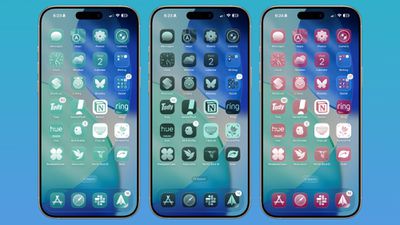
ios 26 home screen icon tint
With Tinted icons, the layered glass look isn't as obvious, but it's still present.

Clear Icons

Apple added a "Clear" icon option in ‌iOS 26‌ that's available alongside Default, Dark, and Tinted. As the name suggests, Clear has a dramatic Liquid Glass look with icons that are entirely transparent. The icons adopt the color of your wallpaper, with white text and designs.
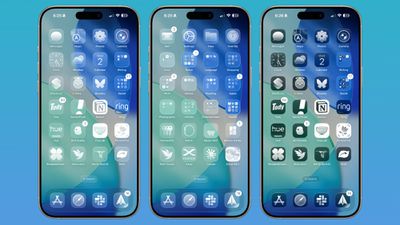
ios 26 home screen clear icons
There are Light and Dark options for the Clear setting. Light looks like frosted glass, while Dark looks like tinted glass. If you want to go all-in on Liquid Glass and have your ‌iPhone‌ look notably different, Clear is the option to choose.

Widgets

Widgets have some of the same aesthetic as icons, but on the whole, they don't look too much different from how they looked in iOS 18 in the Default mode.
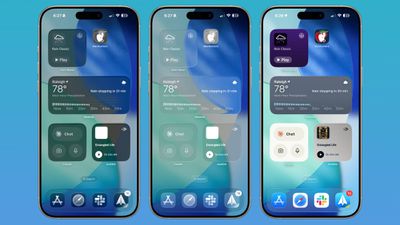
ios 26 widgets
With the Clear option turned on, widgets are transparent and have a more cohesive design that matches with your wallpaper.

Wallpaper

You can edit your wallpaper directly from the ‌Home Screen‌ in ‌iOS 26‌. Long press on the display and then tap on the new "Edit Wallpaper" option.
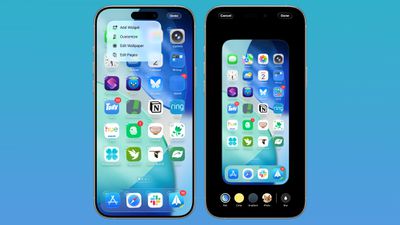
ios 26 wallpaper home screen
The wallpaper interface lets you change the image that you're using on the ‌Home Screen‌, but it doesn't affect the Lock Screen. If you have a photo set as a wallpaper, for example, you can change the color, select a gradient, or choose a photo, plus you can turn blurring for images off or on.

Wallpaper takes a starring role in ‌iOS 26‌ because it affects the color of the dock, folders, and icons, depending on your settings.

Control Center

Control Center adopts Liquid Glass, so while the functionality is the same, the general look is different. Compared to the iOS 18 Control Center, the ‌iOS 26‌ version has depth for the icons with the Liquid Glass shifting light effect.
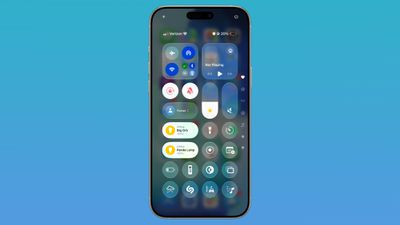
ios 26 control center
The icons are tinted to look like frosted glass, and some of the underlying buttons for adjusting Control Center have been tweaked with the updated look. Icons are a little larger, and some of the bar-shaped icons for volume, brightness, and other settings are rounder.

Other Home Screen Elements

The Dynamic Island, Notification Center, long press gestures, and App Library have not changed beyond aesthetics. App Library folders are translucent and the search bar is rounded, and for widgets, there is a glass look of varying intensity depending on your icon color choice.
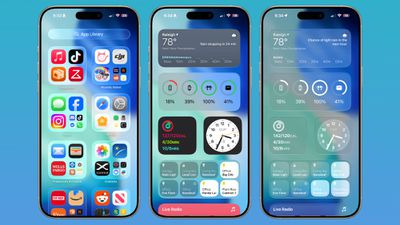
ios 26 home screen features
App Library icons are also slightly larger, with less padding between them.

Web Apps

When you add a website to your ‌Home Screen‌ in ‌iOS 26‌, it always opens as a web app. Web apps were available on the ‌Home Screen‌ in iOS 18, but web developers needed to configure them to operate as web apps.
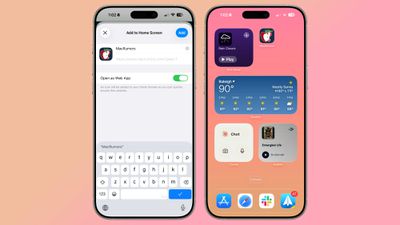
ios 26 web apps
If websites weren't configured properly, they would open in Safari when added to the ‌Home Screen‌. Now a website will open as a dedicated web app, even if it hasn't been explicitly set up to work that way.

There is an Open as Web App option that can be toggled off when adding a website to a ‌Home Screen‌ if you prefer that websites open up in Safari.

Read More

We have a dedicated iOS 26 roundup that goes into detail on all of the new features that are available in the update.


Related Roundups: iOS 26, iPadOS 26
Related Forum: iOS 26

Popular Stories

Apple Wallet ID Illinois

Apple Plans to Expand iPhone Driver's Licenses to These 7 U.S. States

Wednesday December 24, 2025 8:40 am PST by
In select U.S. states, residents can add their driver's license or state ID to the Apple Wallet app on the iPhone and Apple Watch, and then use it to display proof of identity or age at select airports and businesses, and in select apps. The feature is currently available in 13 U.S. states and Puerto Rico, and it is expected to launch in at least seven more in the future. To set up the...
iPhone Top Left Hole Punch Face ID Feature Purple

iPhone 18 Pro Launching Next Year With These 12 New Features

Tuesday December 23, 2025 8:36 am PST by
While the iPhone 18 Pro and iPhone 18 Pro Max are not expected to launch for another nine months, there are already plenty of rumors about the devices. Below, we have recapped 12 features rumored for the iPhone 18 Pro models. The same overall design is expected, with 6.3-inch and 6.9-inch display sizes, and a "plateau" housing three rear cameras Under-screen Face ID Front camera in...
maxresdefault

Where's the New Apple TV?

Monday December 22, 2025 11:30 am PST by
Apple hasn't updated the Apple TV 4K since 2022, and 2025 was supposed to be the year that we got a refresh. There were rumors suggesting Apple would release the new Apple TV before the end of 2025, but it looks like that's not going to happen now. Subscribe to the MacRumors YouTube channel for more videos. Bloomberg's Mark Gurman said several times across 2024 and 2025 that Apple would...
maxresdefault

10 Mac Apps Worth Trying in 2026

Wednesday December 24, 2025 9:27 am PST by
2026 is almost upon us, and a new year is a good time to try out some new apps. We've rounded up 10 excellent Mac apps that are worth checking out. Subscribe to the MacRumors YouTube channel for more videos. Alt-Tab (Free) - Alt-Tab brings a Windows-style alt + tab thumbnail preview option to the Mac. You can see a full window preview of open apps and app windows. One Thing (Free) -...
iOS 26

iOS 26.2 Adds These 8 New Features to Your iPhone

Monday December 22, 2025 8:47 am PST by
Earlier this month, Apple released iOS 26.2, following more than a month of beta testing. It is a big update, with many new features and changes for iPhones. iOS 26.2 adds a Liquid Glass slider for the Lock Screen's clock, offline lyrics in Apple Music, and more. Below, we have highlighted a total of eight new features. Liquid Glass Slider on Lock Screen A new slider in the Lock...
airpods color prototypes

Apple Tested AirPods in Bright Colors

Saturday December 27, 2025 6:06 am PST by
Apple reportedly tested a version of the first-generation AirPods with bright, iPhone 5c-like colored charging cases. The images, shared by the Apple leaker and prototype collector known as "Kosutami," claim to show first-generation AirPods prototypes with pink and yellow exterior casings. The interior of the charging case and the earbuds themselves remain white. They seem close to some...
iPhone Fold Vertical Feature

Why Apple's Foldable iPhone May Be Smaller Than Expected

Tuesday December 23, 2025 5:21 am PST by
Apple's first foldable iPhone, rumored for release next year, may turn out to be smaller than most people imagine, if a recent report is anything to go by. According to The Information, the outer display on the book-style device will measure just 5.3 inches – that's smaller than the 5.4-inch screen on the ‌iPhone‌ mini, a line Apple discontinued in 2022 due to poor sales. The report has led ...
Foldable iPhone 2023 Feature Iridescent Search

Samsung Developing 'Wide Fold' With iPhone Fold-Like Design Ahead of Apple's 2026 Launch

Tuesday December 23, 2025 11:55 am PST by
Samsung is working on a new foldable smartphone that's wider and shorter than the models that it's released before, according to Korean news site ETNews. The "Wide Fold" will compete with Apple's iPhone Fold that's set to launch in September 2026. Samsung's existing Galaxy Z Fold7 display is 6.5 inches when closed, and 8 inches when open, with a 21:9 aspect ratio when folded and a 20:18...
iPhone SE Cosmopolitan Clean

Apple Discontinued These 25 Products This Year

Wednesday December 24, 2025 7:24 am PST by
With the end of 2025 near, the time has come to look back at the devices and accessories that Apple discontinued throughout the year. Most of the products that were discontinued this year were simply replaced by a new model with an updated chip. However, the iPhone SE line was entirely discontinued when the iPhone 16e launched, and the iPhone Plus line is being phased out. Below, we have...

Top Rated Comments

antonrg Avatar
25 weeks ago
It's absolutely mind-blowing to me that there are people who think that the Clear option is useable. It's an absolute insanity to me. And I don't have any issues with my eyesight, thank God.
Score: 40 Votes (Like | Disagree)
pdaholic Avatar
25 weeks ago
I used clear icons for a few hours, then questioned why I wanted to make life harder for myself.
Score: 27 Votes (Like | Disagree)
Sputman99 Avatar
25 weeks ago
Please have an option to turn off the Windows Aero Liquid Glass please
Score: 21 Votes (Like | Disagree)
macjaffa Avatar
25 weeks ago
Surely Im not the only one who primarily identifies icons by their colour?
Score: 21 Votes (Like | Disagree)
Donkey Man Avatar
25 weeks ago
Apple is completely lost in the woods - they have basically dumped their hitherto pioneering UI guidelines into the trash. Tim Spindler has to go.
Score: 20 Votes (Like | Disagree)
CharlesShaw Avatar
25 weeks ago
To me, Liquid Glass does for the Home Screen what LED does for Christmas lights.

To paraphrase what my favorite YT host (TechnologyConnections) said of LED Christmas lights, "this is not what Christmas looks like, it's what a vape shop looks like."
Score: 16 Votes (Like | Disagree)