As an Apple Music user, you can share songs and albums with friends who also subscribe to the streaming service.

You can share Apple Music songs and albums over Messages, Mail, AirDrop, and more. This is also the method to use if you want to create a link to share on social networks like Twitter and Facebook. Keep reading to learn how it's done.
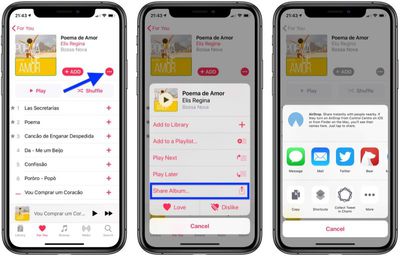
Sharing Songs and Albums on Your iOS Device
- Launch the Music app on your iPhone or iPad.
- Find the song or album that you want to share.

- Tap the ellipsis (three dots) button to bring up the action menu.
- Tap Share Song.../Album... to bring up the Share Sheet and see your sharing options.
Sharing Songs and Albums on Your Computer
- Open iTunes on your Mac or PC.
- Find the song or album that you want to share.
- Click the ellipsis (three dots) button to bring up the contextual menu.
- Hover your mouse pointer over Share Song/Album to see your sharing options.
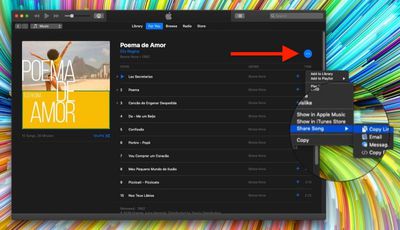
That's all there is to it. On Mac or iPhone, after following these steps, just go on to tap or click the sharing option that you prefer and follow the prompts that Apple provides to select a friend you want to share your music with.
Tag: Apple Music Guide