In iOS 17, Apple Music has got some new features that should make using the Music app and the Apple Music streaming service in general a more enjoyable experience.

One new new feature in particular is an option to view song credits for any song that is playing, searched for, or in a playlist. Credits show all of the performing artists, composition artists, and people involved in production and engineering.
To view song credits for any track, simply do the following:
- In the Music app on iPhone or iPad, tap the three-dot icon next to the song in question.
- Select View Credits from the pop-up menu.
- Scroll down to view the credits section.
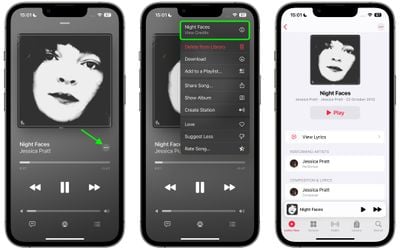
You'll note that this screen is also home to the option to see the full lyrics, which has been removed from the standard dropdown menu. It also offers information on the audio quality available for the song, such as Lossless or Dolby Atmos.
Tag: Apple Music Guide