FaceTime is great for when you want to stay in touch with friends and family, but it's also good at dealing with people you don't want to hear from, too.
Apple provides features on Mac and iOS that allow you to block nuisance calls from the same number coming through to your FaceTime account. The steps below show you how it works.
How to Block Unwanted FaceTime Calls on Your iPhone or iPad
- Launch the FaceTime app on your iPhone or iPad.
- Tap the Info (the encircled "i" icon) button next to the name of the contact that you want to block.

- Tap Block this Caller at the bottom of the screen.
- Tap Block Contact to confirm.
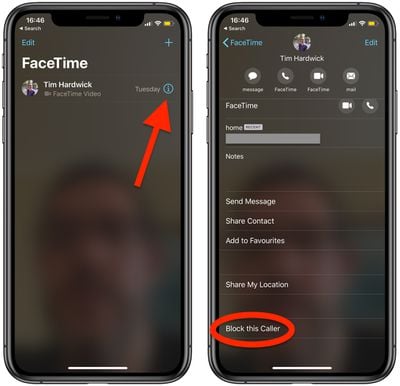
The name, number, and email addresses associated with the contact are now added to your block list.
How to Block Unwanted FaceTime Calls on Mac
- Launch the FaceTime app from your Mac's Applications folder.
- Find the caller you want to block in the sidebar menu.
- Right-click (or Ctrl-click) on the contact and select Block this caller from the contextual menu.
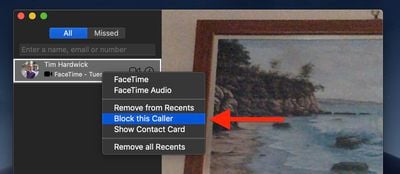
The name, number, and email addresses associated with the contact are now added to your block list.
Tag: FaceTime Guide