On iPhone, if you're on a regular voice call to someone and they're also using an iPhone, you can switch in mid-call to a FaceTime video chat, without even hanging up. It's a handy feature to make use of if you're chatting to someone over the phone and they want to show you something.
The following steps show you how it's done. Remember, FaceTime is an iPhone-only feature, so placing a FaceTime call to another person requires both users to have an iPhone. If the person you're calling has an Android or other type of phone, you won't be able to switch to a FaceTime video call.
- Call someone on your iPhone in the usual way, using the Phone app.
- When you're on the call, take your iPhone away from your ear and look at the call menu that appears on the screen.
- Tap the FaceTime button to initial a FaceTime video call (if you're in a polite frame of mind, first ask the person you're chatting with if they want to FaceTime).
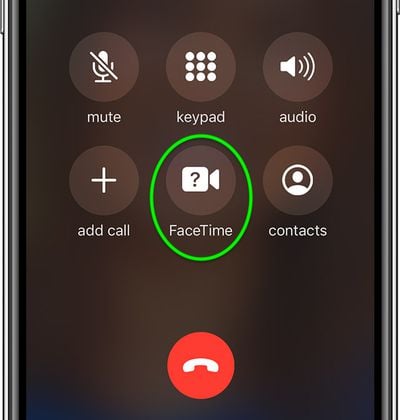
If the FaceTime button is greyed out in the call menu, you may need to enable FaceTime on your device.
Tag: FaceTime Guide